A shopper lands on your store at 11pm with a question about sizing. Nobody is awake to answer.
They do not wait until morning. They close the tab and buy from someone whose store answered instantly.
That lost sale is exactly the gap an AI chatbot for eCommerce fills. It answers questions, recommends products, and recovers carts around the clock, without you hiring a night shift.
This guide covers what an eCommerce chatbot does, how AI chatbot development actually works, what it costs, and how to build one that sells instead of annoying people.

What Is an AI Chatbot for eCommerce?
An AI chatbot for eCommerce is a conversational tool that talks to your shoppers in natural language, answers their questions, and guides them toward a purchase.
Unlike the clunky bots of a few years ago, a modern one understands what people mean, not just the exact words they type.
It connects to your product catalog, your order data, and your help content, so it can answer real questions about real products.
Done well, it feels less like a form and more like a helpful shop assistant who never sleeps.
Key Takeaways
- An AI chatbot for eCommerce answers instantly, recommends products, and recovers carts around the clock.
- AI chatbots understand intent, while rule-based bots only follow scripts.
- The build is mostly about your data, your flows, and a clean human handoff.
- Always give customers an easy route to a real person.
- Measure deflection, conversion lift, and recovered revenue to prove the ROI.
What an eCommerce Chatbot Actually Does
The best chatbots earn their place by doing several jobs at once.
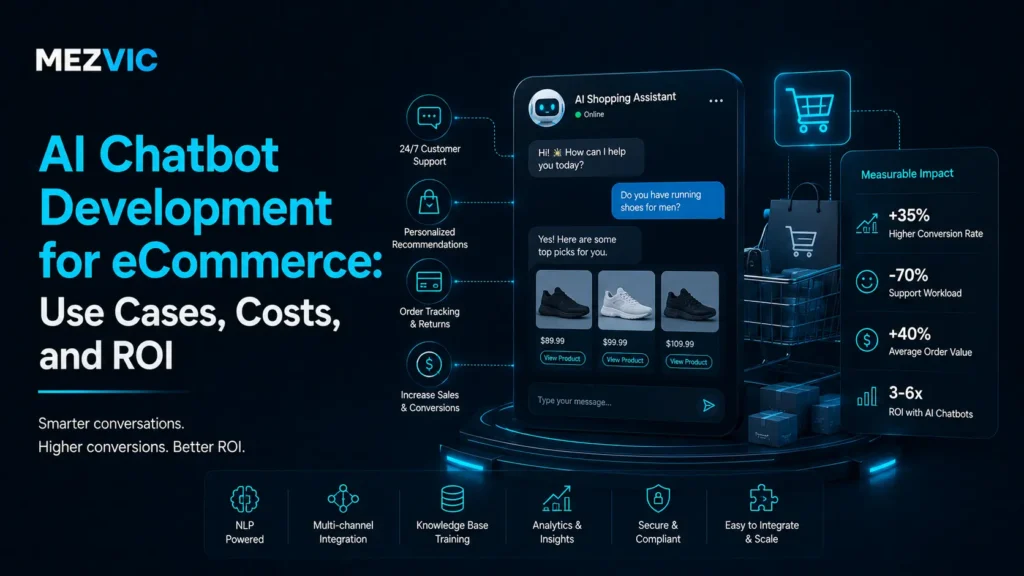
- Answers product, shipping, and returns questions instantly.
- Recommends products based on what the shopper is looking for.
- Recovers abandoned carts with a timely nudge.
- Tracks orders so customers stop emailing “where is my order”.
- Captures leads and emails for later follow up.
- Hands off to a human when the question needs one.
Each of these is a small win. Together they lift conversion and cut the support load at the same time.
Rule-Based vs AI Chatbots
Not all chatbots are the same, and the difference decides how useful yours will be.
| Rule-based bot | AI chatbot | |
|---|---|---|
| Understands | Only exact keywords and buttons | Natural language and intent |
| Handles the unexpected | Breaks or dead ends | Adapts and still helps |
| Setup | Every path built by hand | Trained on your content |
| Feels like | A phone menu | A helpful assistant |
Rule-based bots still have their place for very simple flows. But for a store, an AI chatbot for eCommerce is what makes conversations feel human instead of frustrating.
7 Ways an AI Chatbot Boosts eCommerce Sales
Here is where the investment pays off. These are the seven jobs that move revenue. Recovering abandoned baskets works best alongside email automation rather than instead of it.
1. Instant answers, 24/7
Most buying questions are simple: sizing, shipping times, materials, compatibility. Answer them the moment they come up and you keep the sale alive.
2. Product recommendations
A chatbot can ask what someone needs and point them to the right product, the same way a good in-store assistant would.
3. Cart recovery
When a shopper hesitates, a well timed message that answers their last objection can bring them back to checkout.
4. Order tracking and support deflection
“Where is my order” is the most common support ticket in eCommerce. A chatbot answers it instantly and frees your team for real problems.
5. Upsells and cross-sells
Once a shopper picks a product, the bot can suggest the matching accessory or the bundle, lifting average order value without feeling pushy.
6. Lead capture
Not everyone buys today. The bot can capture an email in exchange for a discount or a stock alert, feeding your list for later.
7. Multilingual selling
An AI chatbot can serve customers in their own language automatically, opening up markets your team could not cover before.

How AI Chatbot Development Works
Building a chatbot that actually helps is less about the software and more about the preparation. Here is the sequence that works. The build itself is AI chatbot development, and the hard part is the data it reads rather than the model.
Step 1: Define the jobs
Start with the two or three things you most want the bot to handle. A focused bot beats one that tries to do everything badly.
Step 2: Connect your data
Give the bot access to your product catalog, order system, and help content. Without your data, it can only guess.
Step 3: Train it on your content
Feed it your FAQs, policies, and past support conversations so it answers in your voice and gets the details right.
Step 4: Design the conversation
Map how the bot greets people, asks questions, and guides them to a next step. Good flow is what separates helpful from irritating.
Step 5: Set up human handoff
Decide exactly when the bot should pass a conversation to a person, and make that handoff smooth. This one detail protects your reputation.
Step 6: Test, launch, and improve
Test with real questions, launch to a slice of traffic, then read the transcripts. The conversations tell you exactly what to fix next.
This is the same build discipline behind any solid chatbot development project, whether it lives on your store or in your support inbox.

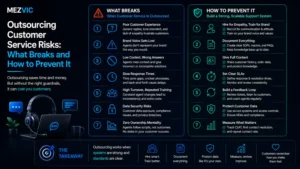
What actually arrives in a store support inbox
Sort a week of your own messages into these buckets before you scope any bot. The split decides what it should do.
The proportions vary by store, which is exactly why you sort your own inbox rather than trusting a vendor benchmark.
Where a Chatbot Should Hand Off to a Human
The fastest way to make customers hate your bot is to trap them in it. The best bots know their limits. Whoever picks up at that point still needs to be available, which is customer service outsourcing territory.
Hand off to a human when someone is frustrated, when money or a complaint is involved, or when the bot is unsure.
A chatbot that gracefully says “let me get a person for this” builds more trust than one that pretends to know everything.
Aim to automate the routine and escalate the emotional. That balance is where customers stay happy.
Chatbot, Voice, or Live Chat: Which When?
A chatbot is one channel among several, and they work best together. Phone-heavy businesses usually leak more on unanswered calls, which is where AI voice agents fit instead, explained in this guide.
Use a chatbot on your website and messaging apps for text questions and product help. It handles volume cheaply and instantly.
For phone lines, AI voice agents do the same job in conversation, answering and qualifying calls that would otherwise ring out.
Keep live human chat for high value or sensitive conversations. The goal is to route each customer to the cheapest channel that still delights them.

How Much Does an eCommerce Chatbot Cost?
There are two paths, and they cost very differently. Model it against your real numbers using the profit margin calculator before committing to a monthly platform fee.
Off the shelf tools charge a monthly fee, often based on conversation volume. They are quick to start and fine for simple needs.
Custom development is a one time build plus running costs. It fits your store exactly and connects deeply to your data.
The right question is not “what does it cost” but “what does one recovered cart or deflected ticket a day save me”. That framing usually settles the budget.
Measuring the Return
A chatbot is easy to justify once you track the right numbers. Conversion gains only count if the store converts in the first place, covered on eCommerce CRO.
- Deflection rate: the share of questions resolved without a human.
- Conversion lift: do shoppers who chat buy more often?
- Recovered revenue: sales saved by cart nudges and answers.
- Response time: now effectively instant, day and night.
Run the margins on that recovered revenue with our eCommerce profit margin calculator and the payback usually becomes obvious.

Common Chatbot Mistakes
Most disappointing chatbots fail for the same avoidable reasons.
- Hiding the human option, so frustrated customers feel trapped.
- Launching without real product and order data behind it.
- Trying to automate every question instead of the common ones.
- Never reading the transcripts, so it never improves.
- A pushy tone that nags shoppers instead of helping them.
Avoid these five and you are already ahead of most stores running a bot.
The through line is respect for the customer. A bot that respects their time and never traps them will almost always be welcomed.
Build vs Buy
Should you use an off the shelf platform or build custom? It depends on how much the bot matters to your business. If this is one piece of a wider programme, start at AI automation.
If you want something live this week for basic FAQs, a ready made tool is the sensible start.
If the chatbot is central to how you sell and support, custom development pays off, because it fits your catalog, your tone, and your systems.
Many stores start with a tool, learn what they need, then commission a custom build once the value is proven. That is a smart, low risk path.
Fitting the Bot Into Your Wider Systems
A chatbot is most powerful when it is not an island. The leads and answers it produces should flow into the rest of your stack. Order and customer records usually live in the CRM, so the join is CRM automation.
Captured emails should land in your CRM and trigger the right follow up automatically.
Order questions should read live data, and escalations should create real tickets. This is where broader AI automation turns a chat widget into a genuine sales engine.
For busy stores, this is also part of good day to day eCommerce management, since the bot quietly handles work your team used to.
Getting Started
Do not start with the software. Start with your top ten customer questions and your biggest support headaches.
Build the bot to handle those first. Nail the common cases, then expand into recommendations and recovery.
Launch small, read the conversations, and improve weekly. You can see how we approach builds like this across our case studies.
What a Good Chatbot Conversation Looks Like
Theory is easy. Here is a short example of an AI chatbot for eCommerce doing its job on a real product question.
Shopper: Do these boots run true to size?
Bot: They run about half a size large. If you are between sizes, most customers size down. Want me to check stock in your size?
Shopper: Yes, size 9.
Bot: Size 9 is in stock and ships tomorrow. There is also a matching care kit people usually add. Want me to drop both in your cart?
In four messages the bot answered a real question, removed a doubt, confirmed stock, and offered an upsell. That is the whole game.
Notice what it did not do. It did not dump a wall of policy text or force the shopper through a menu. It just helped.
Keeping Your Chatbot Accurate
An AI chatbot is only as good as the information behind it. The scary failure mode is a confident wrong answer. Accurate product data is the prerequisite, and that is product listing work.
Ground the bot in your own content so it answers from your policies and catalog, not from guesses.
When it does not know, it should say so and offer a human, rather than invent a shipping date or a return rule.
Review a sample of conversations each week. You will catch the handful of wrong or awkward answers before they cost you a customer.
Accuracy is not a launch task, it is a habit. The stores that win treat their bot like a team member who needs occasional coaching.
Where eCommerce Chatbots Are Headed
The bar for what a chatbot can do keeps rising, and shopper expectations rise with it.
Bots are moving from answering questions to completing tasks: placing orders, processing simple returns, and updating details on request.
They are also getting more personal, remembering past orders and preferences to make recommendations that actually fit.
The stores that start now build the data and the habits to take advantage of each new capability as it lands.
Waiting for the technology to settle is a mistake. It is settling into something better every quarter, and the learning curve is real.
Who Benefits Most From a Chatbot
A chatbot helps almost any store, but some see outsized returns. Stores fielding the same delivery questions daily benefit most, which usually points at fulfilment as the underlying fix.
- High traffic stores where support volume is overwhelming the team.
- Considered purchases where shoppers have lots of pre-sale questions.
- Global sellers who need to answer in several languages and time zones.
- Lean teams that cannot staff support around the clock.
If any of those describe you, an AI chatbot for eCommerce is likely one of the highest-impact tools you can add this year.
Your First 30 Days With a Chatbot
Launching the bot is the start. The first month is where you turn a decent bot into a great one.
In week one, watch it handle live questions and fix the answers it gets wrong. Early corrections have the biggest payoff.
By week two, check your handoff rate. If too many chats reach a human, find the gaps in the bot’s knowledge and fill them.
In week three, look at what shoppers ask most and make sure the bot nails those first. Common questions deserve your best answers.
By week four, add one revenue feature, such as a recommendation or a cart nudge, now that the basics are solid.
Keep that rhythm and your AI chatbot for eCommerce compounds in value instead of drifting out of date.
Does a Chatbot Hurt the Customer Experience?
It is a fair worry. Plenty of us have been trapped in a useless bot that would not let us reach a person.
The difference is intent. A bad bot exists to block your support team. A good one exists to help the customer faster.
When a chatbot answers in one second at midnight, that is a better experience than an email reply two days later.
The trick is honesty. Make it obvious it is a bot, make the human option easy, and let it shine at the fast, simple stuff.
Frequently Asked Questions
What is an AI chatbot for eCommerce?
An AI chatbot for eCommerce is a conversational tool that talks to shoppers in natural language, answers product and order questions, recommends items, and recovers carts.
It connects to your catalog and order data so it can help with real purchases 24/7.
Do chatbots actually increase sales?
Yes, when built well. They keep sales alive by answering buying questions instantly, recommending the right products, recovering abandoned carts, and capturing leads that would otherwise leave without a trace.
How long does it take to build one?
A simple chatbot on an off the shelf tool can launch in days. A custom AI chatbot connected to your catalog and order data usually takes a few weeks, most of it spent on data and conversation design.
Will a chatbot replace my support team?
No. It handles the repetitive questions so your team can focus on complex and high value conversations. The best setups pair automation for routine queries with humans for anything sensitive.
What platforms can a chatbot work on?
An eCommerce chatbot can run on your website, and on messaging channels like WhatsApp, Instagram, and Facebook Messenger, so it meets customers wherever they already are.
What happens when the chatbot gives a customer wrong information?
You honour it, then fix the source. A bot quoting an out-of-date returns window or a discontinued spec is your error rather than the customer’s, and arguing the point costs more than the refund. The prevention is unglamorous: connect the bot to live data instead of a copied document, and read a sample of transcripts every week to catch drift early.
Should the chatbot say it is a bot?
Yes, and it costs you nothing. Shoppers work it out within two messages anyway, and pretending otherwise turns a neutral experience into a resented one. Disclosure also sets expectations correctly, which makes people more willing to accept a quick automated answer and more patient when they get handed to a person.
Can a chatbot handle multiple languages?
Modern models handle common languages well, with two caveats worth planning for. Product names, sizing conventions and returns terminology often translate badly, and your policies may genuinely differ by market. Decide which languages you will support properly rather than switching everything on and hoping, because a confidently wrong answer in a language nobody on your team reads is very hard to catch.
Where should the chatbot appear on the site?
On product pages, the cart and the order tracking page, which is where hesitation actually happens. Avoid launching it automatically on the homepage within two seconds of arrival, since that is the pattern people have learned to close without reading. A bot that waits until someone is on a product page for a while gets far better engagement than one that interrupts.
Does a chatbot affect my SEO or site speed?
The conversation itself is invisible to search engines, so it neither helps nor harms rankings directly. What can hurt is the script weight, since many chat widgets load a substantial JavaScript bundle that slows the page. Load it after the page is interactive rather than blocking render, and check the difference on a real mobile connection rather than your office wifi.
The Bottom Line
An AI chatbot for eCommerce is no longer a novelty. It is a always on member of your team that answers, recommends, and recovers while you sleep.
Build it around your real customer questions, give it your data, and always leave an easy door to a human. Do that and it earns its keep quickly.
Want a chatbot built around your store and your customers? Book a free strategy call and we will map the questions worth automating first.