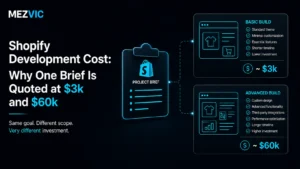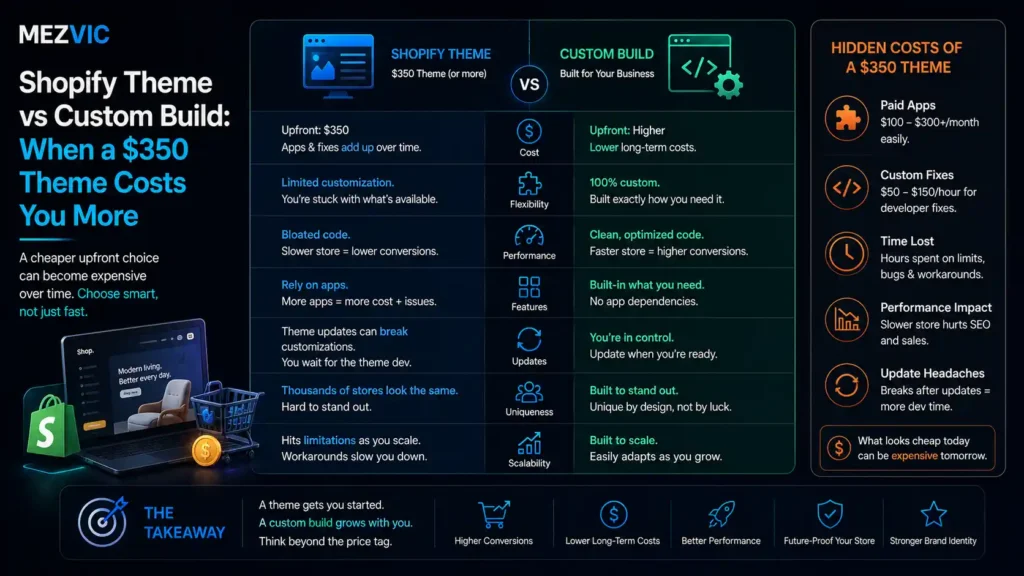
The quote lands and the gap makes no sense. One developer says $400 and two weeks. The next says $45,000 and four months. Same store, same products, same brief.
Both are quoting honestly. If you are still choosing between platforms entirely, our Shopify and WooCommerce cost comparison is the earlier decision. They are just answering different questions, and the Shopify theme vs custom build decision is the reason.
Below: what the Shopify theme vs custom build choice genuinely gives you, where themes stop being enough, how long each path takes, and the hybrid that most stores should actually be buying.
Key Takeaways
- Shopify’s Theme Store lists 1,206 paid themes, most priced between $220 and $500 as a one-time purchase, plus free options including Dawn.
- A theme licence is per store, not per merchant. Shopify’s own wording is “one-time payment, lifetime licence for your store.” A second store is a second purchase.
- Themes fail on merchandising logic, not looks. If your product needs configuring, bundling or per-customer pricing, no amount of theme editing fixes it.
- The honest middle option is a paid theme with custom sections built on top, which covers most stores under roughly $5m.
- Timelines differ more than budgets do: about 3 weeks versus 17, and that gap decides more launches than price does.
What Is the Real Difference Between a Shopify Theme and a Custom Build?
Shopify theme vs custom build comes down to one line. A theme is a finished storefront you configure. A custom build is a storefront written for your products from an empty file. Everything else follows from that one distinction.
The confusion comes from the word “custom”, which gets used for three different things.
Customising a theme means changing colours, fonts, images and section order inside Shopify’s editor. No code. Anyone on your team can do it.
Customising theme code means a developer edits the Liquid templates to add behaviour the theme did not ship with. Still a theme underneath.
A custom build means the templates are yours. Nothing is inherited, nothing is fought against, and nothing gets overwritten by an update you did not ask for.
Most quotes labelled “custom Shopify” sit in the middle of the Shopify theme vs custom build spectrum. That is not dishonest, but it is worth knowing which you are buying before you compare two numbers.
Shopify themes are built in Liquid, with JSON templates acting as wrappers around reusable sections, which is documented in Shopify’s theme architecture reference. That section model is why the middle option works so well.
If you want the money side of this in detail rather than the decision side, our breakdown of what Shopify development costs covers where the quote actually goes.
What Can a Shopify Theme Actually Do Out of the Box?
Far more than most people assume, and that is the honest starting position for any Shopify theme vs custom build conversation.
A current paid theme handles product galleries, variant pickers, filtering, search, recommendations, reviews integration, discount display, cart drawers, multi-currency and mobile layout without a developer touching it.
Themes accepted into the Theme Store also have to meet Shopify’s published requirements for customisation options, style and features, so the floor is higher than it was.
The pricing is unusually clean too. Shopify lists 1,206 paid themes, the visible range runs from $220 to $500, and the wording on the theme page is explicit: one-time payment, lifetime licence, no expiration.
Read that phrase carefully though, because “for your store” is doing real work in it. The licence covers one store. Expansion stores, a wholesale storefront or a second market each need their own purchase.
For a store selling straightforward physical products, a good theme plus decent photography beats a mediocre custom build every single time. It also launches four months sooner.
Where a theme does need shaping around a brand rather than replacing, that work sits with Shopify store design rather than with development.

Where Do Shopify Themes Start to Break Down?
Almost never on appearance. Themes break on merchandising logic, which is the part nobody demos.
Five patterns account for most of it, and they share a shape: the theme assumes a customer picks one product from a grid and buys it.
- Configurable products. Anything where the customer builds the item, and price depends on the choices, rather than picking a preset variant.
- Bundles and kits. Especially when inventory has to decrement across several SKUs from one line item.
- Customer-specific pricing. Trade accounts, tiered wholesale, contract rates. Themes assume one price list for everyone.
- Deep catalogues with real attributes. Fitment data, technical specs, compatibility. Standard filtering was not designed for it.
- Content that has to sell. Guides, comparisons and sizing tools woven into the buying path rather than parked in a blog.
If none of those describe your catalogue, the Shopify theme vs custom build question is already answered and you should stop reading and go buy a theme.
The other failure mode is quieter: a theme that has been edited by six different developers over four years. It is technically a theme, but nobody can update it any more.
At that point you are paying custom build maintenance costs for theme capability, which is the worst square on the board.
Speed is where that damage shows first, and it is usually accumulated app scripts rather than the theme itself, which is the argument in our work on Shopify speed optimisation.
How Long Does Each Shopify Build Option Take?
Roughly 3 weeks, 7 weeks or 17 weeks. In the Shopify theme vs custom build comparison, and the timeline gap matters more than the price gap for most businesses.
A store launching in March and a store launching in July are not the same business decision, whatever the invoices say.
Add several weeks to any of them if you are also replatforming, because moving a catalogue to Shopify is its own project with its own risks.
Three paths, same brief, very different calendars
Working weeks from kickoff to live store, assuming your content and photography are ready on time.
Typical agency schedules, not a study. Delays almost always come from content, not code.
Notice where the custom build actually spends its time, because this is the part of Shopify theme vs custom build that budgets never show. Design and build are 12 of the 17 weeks, and QA gets 2 more, because there is no shipped code to inherit.
The theme track spends almost nothing on either, because both were done by the theme author and paid for by 4,000 other merchants.
One thing the chart cannot show: the custom timeline is the one that slips. More decisions, more review rounds, more chances for a stakeholder to change their mind in week 11.
What Does a Custom Shopify Build Actually Buy You?
Control over the buying experience. That is the entire Shopify theme vs custom build premium, and nothing else that a theme cannot eventually fake.
That sounds dismissive. It is not. Control over the buying experience is the whole game for some catalogues and completely irrelevant for others.
Concretely, a custom build lets you decide what happens between “customer is interested” and “customer adds to cart”, instead of accepting the theme author’s answer.
For a candle brand, the theme author’s answer is fine. For a company selling made-to-measure blinds, the theme author’s answer is a contact form and a lost sale.
The second thing you buy is the absence of fighting. No overriding, no workarounds stacked on workarounds, no app installed purely to bend something the theme insists on.
That matters at the third or fourth change, not the first. Themes are cheap to change once and expensive to change repeatedly.
What the Shopify theme vs custom build premium does not buy is speed, SEO or conversion rate. Those come from decisions and discipline, and a custom build can be slower and worse at all three if nobody is paying attention.
Anyone selling you a custom build on the promise of a ranking improvement is selling the wrong thing, which is a distinction our Shopify SEO work starts by drawing.
Which Shopify Build Option Fits Your Stage of Business?
Match the option to how much of the storefront you need to control, not to how much you can afford.
Budget tells you what you can buy. Control tells you what you need. Those are different questions and only one of them has a right answer.
It is not two options, it is four points on one line
Ordered by how much of the storefront you control, and who has to be involved to change it.
Theme prices read from the Shopify Theme Store. Positions on the line are editorial, not a scale.
Point 3 is where the Shopify theme vs custom build argument usually resolves, and it is the one nobody pitches because it does not sound impressive in a proposal.
You keep the theme’s tested foundation for the 80% of pages that are ordinary, and you build genuinely custom sections for the handful of pages that earn money.
Stage is the honest filter here. Under about $1m, points 1 and 2 are almost always right. Between $1m and $5m, point 3. Above that, point 4 becomes arguable rather than automatic.
Revenue is a proxy for complexity, not a licence to spend, and the same logic runs through our look at whether Shopify Plus is worth it.
What Do the Two Storefronts Look Like Side by Side?
In a Shopify theme vs custom build comparison the visible difference is smaller than the structural one, which is exactly why this decision confuses people.
Both storefronts below sell the same catalogue. What separates them is which blocks you can move and which ones the theme decides for you.
What you control, block by block
Cyan blocks are yours to arrange. Grey blocks exist in the shape the theme author chose.
Illustrative page structure. The gold blocks are a product configurator and a fitment finder.
Look at the grey blocks on the left. None of them are ugly. They are simply fixed, and four of the six are where a theme quietly makes your merchandising decisions for you.
The gold blocks on the right are the only two that genuinely cannot exist in a stock theme. Everything else on that side is a preference, not a requirement.
That ratio is the real Shopify theme vs custom build test. If your version of this diagram has zero gold blocks, you are looking at a design project rather than a development one.

How Do You Get Most of a Custom Build From a Theme?
Buy a well built paid theme, then have a developer add custom sections only where the theme cannot express what you sell.
Shopify’s section model makes this work properly rather than as a bodge. Sections are self-contained, so a new one sits beside the theme’s own rather than inside it.
Four rules keep the result maintainable, and skipping them is how stores end up with the unupdatable theme described earlier.
- Add, do not edit. New files for new behaviour. Every edit to a theme’s own file is a future merge conflict you have agreed to.
- Keep custom sections schema-driven. If your team cannot configure it in the editor, you have built a dependency rather than a feature.
- Write down every change. A one-page log of what was added and why is worth more than the code comments nobody reads.
- Decide the update policy up front. Either you take theme updates and keep edits minimal, or you freeze the version and own it. Drifting between the two is the failure.
Done this way, the Shopify theme vs custom build gap narrows to the two or three things that genuinely needed building, at a fraction of the timeline.
It also fails gracefully. If the custom sections turn out to be wrong, you delete them and still have a working store, which is not true of a bespoke build you have outgrown.
This hybrid is what most of our Shopify development work actually looks like, and it is a much easier project to hand back to a client.
What Does Each Shopify Option Cost You to Own?
Shopify theme vs custom build is usually argued as a build price. The build is one payment. Ownership is every month afterwards, and it is where the two paths separate permanently.
Nothing below is about price. It is about who you need on hand, and what happens when Shopify ships a change you did not ask for.
Ownership, not price
| What happens | Paid theme | Theme + sections | Custom build |
|---|---|---|---|
| Change homepage layout | You, same day | You, same day | Developer ticket |
| Add a new page type | Only if the theme has one | Developer, days | Developer, days |
| Shopify ships a platform change | Theme author handles it | Author handles core, you handle yours | All yours |
| Theme update available | Apply it | Apply, retest your sections | Does not apply |
| Your developer disappears | No impact | Minor, sections are isolated | Serious, and common |
| Launch a second store | Buy the licence again | Licence again, port sections | Copy it, no licence |
| Fix something that broke | Theme support | Depends which half broke | You, always |
The last row is the one merchants underestimate. On a custom build there is nobody else to call.
Row five deserves more attention than it gets. A custom build ties you to whoever wrote it, and small agencies close, developers move on and contractors get busy.
The same question applies to the people running the store day to day, not just the ones who built it. Ask any prospective builder how a new developer would get up to speed on their code. A good answer is documentation and conventions. A bad answer is a shrug.
Whichever path you take, someone has to own the store afterwards, which is why ongoing Shopify maintenance belongs in the plan rather than in the panic.

When Should You Choose a Custom Shopify Build?
When the way customers choose your product cannot be expressed as a grid of variants, and that limitation is costing you sales you can name.
Four signals justify it. One on its own usually does not.
- You have already outgrown a theme, with evidence. Support tickets, abandoned carts at a specific step, or a workaround someone running the store performs by hand every week.
- Your buying journey is genuinely unusual. Configuration, quoting, fitment, subscription logic or account-based pricing that apps only half solve.
- Volume makes small gains valuable. At sufficient revenue a percentage point of conversion funds the build, and below that it does not. Run it through the profit margin calculator before assuming.
- You have someone to maintain it. In-house, on retainer, or contracted. Without this, a custom build decays faster than a theme ever would.
Notice what is absent from that list of Shopify theme vs custom build triggers. “We want to stand out” is not on it, because standing out is a design and photography problem long before it is a code problem.
Neither is “the theme feels limiting”. That feeling is real, but it is worth testing against the actual list of things you tried to do and could not.
If you write that list and it has two items, buy two custom sections. If it has fifteen, you have your answer and the Shopify theme vs custom build debate is over.
At the top end, where the build is genuinely bespoke and the store is large, the platform tier matters too, which is where Shopify Plus development comes into the conversation.
Frequently Asked Questions
Is a Shopify theme good enough for a serious store?
Yes, for most catalogues. In the Shopify theme vs custom build comparison plenty of eight-figure stores run paid themes with a few custom sections, because the theme handles the ordinary pages and the custom work goes where money is actually made.
How much does a Shopify theme cost?
Paid themes in the Shopify Theme Store are mostly $220 to $500 as a one-time purchase, and free themes including Dawn cost nothing. There is no recurring theme fee.
Can you customise a Shopify theme without a developer?
Yes, within the options the theme exposes. Colours, fonts, imagery, section order and most content are editable in the theme editor, but new behaviour and new page types need code.
What is the difference between a custom theme and a custom build?
A custom theme is usually an existing theme with edited code, while a custom build starts from empty templates. Ask any agency which one their quote describes, because both get sold as custom.
Do you have to buy a Shopify theme for each store?
Yes. Shopify describes a theme purchase as a one-time payment and lifetime licence for your store, so a second storefront, an expansion store or a separate wholesale site each need their own licence.
How long does a custom Shopify build take?
Around 16 to 20 weeks for a genuine build, against roughly 3 weeks for a theme and 7 for a theme with custom sections. Content readiness causes more delay than development does.
Will a custom Shopify build be faster than a theme?
Not automatically. A custom build can be leaner because it ships only the code you use, but modern paid themes are well optimised, and most real-world slowness comes from apps and images rather than the theme.
Does a custom Shopify build help SEO?
Only indirectly. Shopify controls URL structure either way, so the gains come from better internal linking, richer page types and faster templates, all of which a well configured theme can also deliver.
Can you switch from a theme to a custom build later?
Yes, and it is usually the sensible order. Products, customers and orders live in Shopify rather than in the theme, so the storefront can be replaced without touching your data.
What happens when a Shopify theme updates?
You choose whether to apply it. Updates are safe on an unedited theme, but any file a developer has edited must be reconciled by hand, which is the strongest argument for adding sections instead of editing existing ones.
Are free Shopify themes worth using?
For a first store, yes. Free themes are maintained by Shopify and cover the essentials, and the honest reason to upgrade is a specific layout or feature you need rather than a general feeling of cheapness.
Should you use a page builder app instead of custom development?
For landing pages, often yes. For core product and collection pages, be careful, because builders add weight to your most important templates and become another dependency you cannot easily remove later.
The Bottom Line
The Shopify theme vs custom build choice is decided by your catalogue, not your ambition or your budget.
Write down every specific thing you have tried to do on your storefront and could not. If that list is short, buy custom sections. If it is long and expensive, build.
And whichever you pick, decide today who maintains it in two years, because that answer ages worse than any design ever will.
If you want a straight answer on which one your catalogue needs, send us the list and we will tell you which items are sections and which are a build.