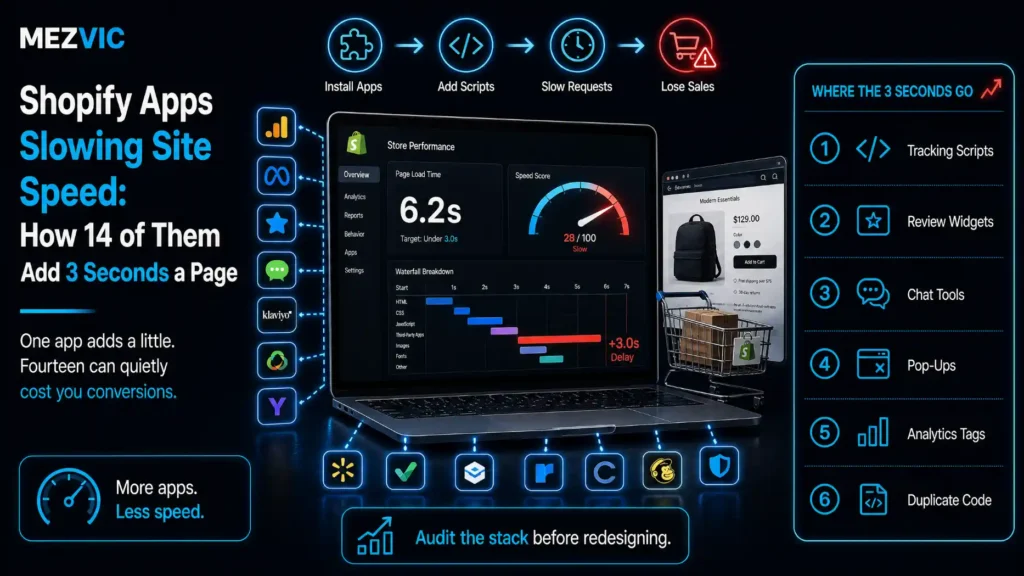
Nobody installed fourteen apps on purpose. They arrived one problem at a time, each solving something real, each adding a few hundred milliseconds nobody measured.
Shopify apps slowing site speed is rarely one bad app. Then the product page takes six seconds on a phone and the conversation turns to redesigning the theme.
Below: exactly how Shopify apps slowing site speed adds up, why uninstalling often changes nothing, and the audit that finds the four apps responsible for most of it.
Key Takeaways
- Fourteen typical apps add roughly 3,000 milliseconds, and the top six cause 79% of it. The other eight are noise you can leave alone.
- Uninstalling rarely removes the code. Snippets injected into theme files stay behind, so the app leaves and the script keeps loading.
- Shopify’s own guidance is to evaluate whether each app creates enough value to offset the performance loss. That is a cost-benefit test, not a speed rule.
- The damage lands on INP, where good is 200ms or less at the 75th percentile. Main-thread work from apps is exactly what pushes it past that.
- Audit by blocking time, not file size. A 40KB script that runs on the main thread hurts more than a 300KB image that does not.
How Much Do Shopify Apps Actually Slow a Page?
Individually almost nothing, collectively seconds. That is how Shopify apps slowing site speed goes unnoticed. That gap is the entire reason this problem goes unnoticed for years.
No single app is the culprit, which is what makes this hard to spot, which is why every app looks defensible when examined on its own.
Six of them cause most of the damage
Milliseconds each app adds to a product page, ordered heaviest first. The cyan line is the running share of the total.
Illustrative figures from audits we have run, not a study. Measure your own store before acting.
Read the cumulative line rather than the bars. Six apps out of fourteen account for 79% of the delay.
That changes the job of finding Shopify apps slowing site speed completely. You are not auditing fourteen apps, you are auditing six, and the other eight can stay unless something else is wrong with them.
Notice which ones sit at the top. Reviews, upsell, live chat and page builders are consistently the heaviest, because all four inject their own interface into the page.
Anything that renders visible UI has to load a framework, fetch data and then draw. Anything that merely records an event does not. The same principle governs how filter URLs multiply: cheap to add, expensive in aggregate.
That single distinction predicts most of this chart before you measure anything.

Why Does Uninstalling an App Not Speed Things Up?
Because uninstalling removes the app, not the code it wrote into your theme. Shopify apps slowing site speed can outlive the subscription entirely.
This is the single most common surprise when auditing Shopify apps slowing site speed, and it explains why a store with nine active apps can be carrying scripts from twenty.
Three separate places accumulate leftovers, and only one of them is cleaned automatically.
- Theme file edits. Older apps asked you to paste a snippet into theme.liquid or a product template. Uninstalling cannot reach that.
- Duplicated themes. The snippet gets removed from the live theme and survives in every copy, waiting for someone to publish an old backup.
- Tag managers. Tags added for a trial keep firing long after the trial ended, which is why Shopify’s guidance includes auditing your tag manager for unused tags.
Store design decisions interact with this too, since every added section carries weight, as covered in store design. The modern alternative is cleaner. Theme app extensions load through app blocks rather than editing your files, so removing the app genuinely removes its code.
When choosing between two apps that do the same job, that difference matters more than any feature comparison.
Practically, this means an audit has to read the rendered page rather than the app list. The app list is a statement of intent. The page is what customers get.
If your theme has been edited by several developers over the years, expect more of this, which is one of the arguments in theme versus custom build.
What Happens on the Main Thread While Apps Load?
Shopify apps slowing site speed do it on the main thread. The browser stops responding to the customer while it executes their JavaScript, one script at a time, on the same thread that handles taps.
This is why file size is the wrong metric. A large image downloads in parallel and blocks nothing. A modest script blocks everything while it runs.
Where the page stops listening
Two seconds of main-thread activity on a mid-range phone loading a product page.
Illustrative profile in the shape a real trace takes. Record your own in the performance panel.
Every coloured block is time the page cannot respond, and most of them are Shopify apps slowing site speed. Tapping during those windows does nothing, and the customer taps again.
That experience is measured by Interaction to Next Paint. Google’s guidance on INP puts good responsiveness at 200 milliseconds or below, with anything above 500 milliseconds rated poor.
Both thresholds are judged at the 75th percentile of real visits, segmented across mobile and desktop, so your slowest quarter of visitors decides the score.
INP also takes the longest interaction on the page rather than the average, which is exactly the interaction that lands mid-script.
So Shopify apps slowing site speed do not just make the page arrive later. They make it feel broken for the first few seconds after it appears.
That distinction matters commercially. A slow page loses patient visitors. An unresponsive page loses the ones who were ready to buy.
What Does the Delay Look Like to a Customer?
Shopify apps slowing site speed look like a page that keeps changing its mind, which is a different complaint from a page that is slow.
Four and a half seconds, frame by frame
The same page load a shopper experiences, rather than a score out of 100.
Illustrative reconstruction of a common pattern. Capture your own filmstrip before changing anything.
Notice frame four, where Shopify apps slowing site speed become visible to a shopper. The product is visible and the buy button is not, because an app is still deciding what to draw there.
That gap is where mobile customers leave, and it never appears in a page speed score expressed as one number.
Then look at frame five. Content moves down as a widget finally loads above it, which is the layout shift customers experience as tapping the wrong thing.
Shopify frames all of this the same way, describing web performance as three areas that mirror the Core Web Vitals: loading measured by LCP, layout stability by CLS, and responsiveness by INP.
Apps can damage all three at once, and usually do.
If you are also weighing a platform move, the same discipline applies during a migration. Record your own filmstrip before changing anything. It is the only artefact that makes the problem obvious to people who do not read waterfall charts.
Which Shopify Apps Are Worth Their Weight?
The ones you can point at a number for. Everything else is Shopify apps slowing site speed for no return. Shopify’s own guidance asks you to evaluate whether installed apps and third-party code create enough value to offset the performance cost.
Shopify sets this out in its guidance on improving store performance, noting that every feature you add can affect performance.
That is a useful sentence to hold vendors to, because it turns a taste argument into an arithmetic one.
What each category costs and what it has to earn
| App type | Typical cost | Keep it if | Cheaper alternative |
|---|---|---|---|
| Reviews widget | Heavy | Reviews show on product pages and convert | Server-rendered reviews via theme extension |
| Upsell and cross-sell | Heavy | You can show the incremental revenue | Native product recommendations |
| Live chat | Heavy | Someone actually answers within minutes | Load on click, not on page load |
| Page builder | Heavy | Used on landing pages only | Custom sections in the theme |
| Popups and email capture | Medium | Signup rate justifies it | Delay until scroll or exit intent |
| Currency converter | Medium | You sell internationally in volume | Shopify Markets pricing |
| Trust badges | Light | Never, in most cases | A static image in the theme |
| Analytics and heatmaps | Light to medium | Someone opens the reports monthly | Run in bursts, not permanently |
The last column is where most of the win is. Same outcome, a fraction of the main-thread cost.
The live chat row deserves a note. Loading a chat widget on every page so that 0.4% of visitors can use it is the clearest example of the trade going the wrong way.
Loading it when somebody clicks a button costs nothing and works identically.
Where the volume genuinely justifies always-on support, an automated first line earns its place. Where it does not, the widget is a tax on every visitor.

How Do You Audit Shopify Apps Slowing Site Speed?
To find the Shopify apps slowing site speed, measure the page as customers get it, attribute every script to an owner, then remove one thing at a time and measure again.
The whole audit of Shopify apps slowing site speed takes an afternoon and needs no tooling beyond a browser and a spreadsheet.
- Take a baseline on a real product page. Mobile, throttled, three runs, median. One run tells you nothing because variance is large.
- List every third-party request. Open the network panel, sort by domain, and write down every domain that is not your store or Shopify.
- Name the owner of each one. Match every domain to an installed app. Anything you cannot match is a leftover, and leftovers are free to remove.
- Sort by blocking time, not by size. The performance panel gives you main-thread time per script. That column is the one that matters.
- Remove one, measure, record. One change per measurement, or you will not know which change did what.
- Check the real-user data after two weeks. Lab numbers move immediately, field data does not, and field data is what counts.
Step three finds the leftovers, and it is usually the most productive twenty minutes of the day. Removing code from an app you already cancelled is a change with no downside to weigh.
Step six matters because Shopify’s Web Performance reports use Core Web Vitals from real visitors rather than a simulated run.
Field performance also feeds the thresholds covered in our Core Web Vitals work. A lab tool tells you what could happen on one device. Field data tells you what did happen across your actual traffic, which includes a lot more mid-range phones than the team owns.
You can run a first pass across several pages at once with our bulk page speed checker before opening a single developer tool.
What Should You Do Instead of Removing Everything?
Change when things load rather than whether they exist, because most Shopify apps slowing site speed are a timing problem, because most of the cost is timing rather than presence.
Shopify apps slowing site speed do so by timing. An app that loads after the page is interactive costs the customer almost nothing. The same app loading in the critical path costs everything.
Four changes, in the order they usually pay off.
- Load on interaction. Chat, wishlist, size guides and anything behind a click can wait until that click happens.
- Load below the fold on scroll. Reviews and Instagram feeds sit far down the page and have no reason to load before the customer heads that way.
- Restrict apps to the pages that need them. A page builder script has no business on product pages if it only powers landing pages, which is a development change rather than an app setting.
- Reserve the space. Where a widget will appear, give it fixed dimensions so nothing jumps when it arrives.
That last one costs nothing and fixes layout shift outright. It is also the change customers notice fastest, because the page stops moving under their thumb.
Done together, these four routinely recover most of the three seconds without removing a single feature anyone asked for.
Which is the honest resolution to Shopify apps slowing site speed. The problem is almost never the apps you chose. It is that all of them were treated as equally urgent.
Where the work needs doing properly across a whole store, that is what Shopify speed optimisation actually consists of.

How Do You Stop the Problem Coming Back?
Give app installation the same friction as any other store change as any other change to the store, because Shopify apps slowing site speed is an accumulation problem rather than an event.
Every store with fourteen Shopify apps slowing site speed got there by making fourteen individually reasonable decisions, none of which were reviewed together.
Four habits prevent the rebuild, and they cost nothing beyond attention.
- Record a baseline before every install. One measurement of a product page, saved with the date. Without it you can never attribute a regression.
- Set a removal date on every trial. Trials that quietly convert into permanent scripts are the single largest source of leftovers.
- Require a theme app extension where one exists. It decides whether you can cleanly remove the app in two years.
- Review the whole list quarterly. Not individually, together, with the performance numbers in front of you.
The quarterly review is where the value is. Apps are approved one at a time and can only be judged as a set.
Keep a one-line note per app recording who asked for it and what it was meant to achieve. When nobody can remember either, the decision to remove it becomes easy.
That register takes ten minutes to start and is the difference between an audit that holds and one that has to be repeated every eighteen months.
It is the same discipline that keeps any store maintainable, and it belongs in whoever handles your ongoing store maintenance rather than in a one-off project.
One final warning worth stating plainly. Do not run this audit during your busiest trading month.
Removing scripts changes tracking, and tracking changes attribution. Do it in a quiet week, document what you removed, and tell whoever reads the marketing reports before they notice a gap.
Does Site Speed Actually Change Sales?
Shopify apps slowing site speed change the experience of the customers who were already going to buy, which is where the honest case sits.
Be careful with the conversion statistics quoted about Shopify apps slowing site speed. Most trace back to studies on other kinds of sites, and the effect on your store depends on your traffic, your devices and your price point.
What is defensible is the mechanism. Shopify states that optimising web performance makes customers more likely to stay and convert, and the three metrics it names map onto three specific frustrations.
Slow loading loses the impatient. Layout shift causes mis-taps. Poor responsiveness makes a working page feel broken. Each one shows up as a support question too, which carries its own cost per ticket.
Measure your own before and after rather than borrowing someone else’s percentage. Two weeks of field data on either side of a change is worth more than any published figure.
And if conversion is the real concern, speed is one of eight things worth checking first, which is the order we set out in fixes to try before a redesign.
Frequently Asked Questions
How many apps is too many on Shopify?
There is no number, because weight varies enormously by type. Six apps that render visible interfaces will cost more than fifteen that only record events, so audit by main-thread time rather than by count.
Does uninstalling a Shopify app remove its code?
Not always. Apps that asked you to paste a snippet into theme files leave that snippet behind, and copies survive in duplicated themes, so the script can keep loading after the app is gone.
What is a theme app extension?
It is the modern way apps add functionality, using app blocks instead of editing your theme files directly. The practical benefit is that uninstalling the app genuinely removes its code from your store.
Which Shopify apps slow a site down most?
The ones that draw their own interface: reviews widgets, upsell tools, live chat and page builders. Anything that loads a framework, fetches data and then renders will always cost more than something that fires a single event.
Is file size or blocking time more important?
Blocking time, by a wide margin. A large image downloads alongside everything else without stopping the page, while a small script occupies the main thread and prevents the page responding to taps while it runs.
What is a good INP score?
Google puts good responsiveness at 200 milliseconds or below, needs improvement between 200 and 500, and poor above 500. It is assessed at the 75th percentile of real page loads, split between mobile and desktop.
Should I use PageSpeed Insights or Shopify’s own report?
Both, for different jobs. Shopify’s Web Performance reports use Core Web Vitals from real visitors, while PageSpeed Insights is useful for diagnosing a specific page and seeing which scripts occupy the main thread.
Can I make an app load only on certain pages?
Often yes, either in the app’s own settings or by conditionally including its block in the template. A page builder that only powers landing pages has no reason to load on product pages.
Does removing apps hurt my conversion rate?
Only if the app was earning its place. Before removing anything, check whether it produces measurable revenue or signups, and if nobody can point to a number, that is your answer.
Why does my speed score change every time I test?
Lab tests vary with network conditions and third-party response times, so single runs are unreliable. Take the median of at least three runs, and treat field data over a fortnight as the real answer.
Do apps affect SEO as well as speed?
Indirectly, through Core Web Vitals and through what customers do after arriving. The larger risk is usually commercial rather than ranking, since an unresponsive page loses buyers regardless of where it sits in results.
What should I do before installing a new app?
Record a baseline, install it, and measure the same page again the next day. Also check whether it uses a theme app extension, because that determines whether you can cleanly remove it later.
The Bottom Line
Six of the fourteen Shopify apps slowing site speed cause most of the delay, so start by finding your six rather than debating the whole list.
Then hunt the leftovers, which are Shopify apps slowing site speed after cancellation. Scripts from apps you already cancelled are free to remove, and most stores are carrying several.
After that, change timing rather than features. Load on interaction, load on scroll, restrict by template, and reserve the space so nothing jumps.
If you want the audit done properly with before and after field data, send us your store URL and we will tell you which six are costing you.