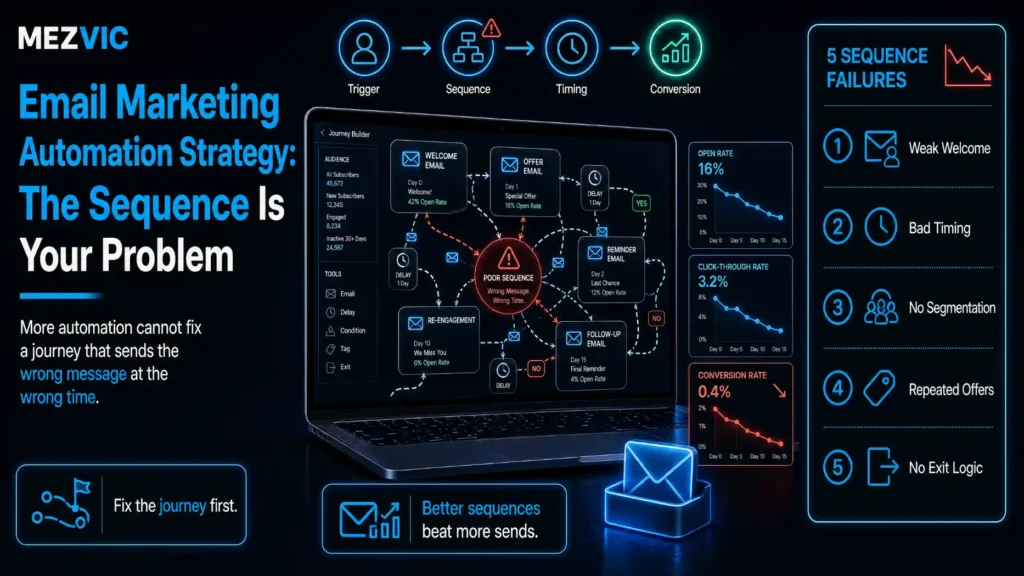
Almost every article about email automation is really about tools.
Your tool is fine.
Whatever you are using will send an email at a chosen time to a chosen person. That problem was solved a decade ago and switching platforms will not fix what is wrong. If you are still deciding which platform to sit on top of, that is a separate question and we have covered it in our comparison of n8n, Zapier and Make.
When a client tells me their emails are not working, the messages are usually decent. The sequence around them is the problem.
Wrong order, wrong spacing, no exit, and a list nobody has pruned since 2023. The same four faults show up whether the list came from a shop, a form or a free tool.
An email marketing automation strategy is the architecture, not the copy. Seven steps.
Key Takeaways
- An email marketing automation strategy is sequence architecture, not copy: one job, defined exits, honest spacing.
- Gmail asks senders to keep spam rates below 0.10% and never reach 0.30%. Yahoo sets the same 0.3% ceiling.
- At 0.3%, three complaints per thousand sends is the entire budget. One badly targeted sequence spends it.
- Google states plainly that letting people unsubscribe improves open rates, click-through rates and sending efficiency. Exits are not losses.
- Google also advises unsubscribing people yourself if they never open. Most brands do the opposite and mail them harder.
- Yahoo’s guidance is to honour the frequency the list expected. A weekly list does not become a daily list because you launched something.
- Every sequence needs one job. Sequences that try to nurture, sell and onboard at once do none of them.
- Write the exit conditions before the messages. An email sequence with no exit will email a customer about buying the thing they already bought.
- Branch only where behaviour genuinely differs. Most branched sequences are two identical paths with different subject lines.
- Send more than 5,000 messages a day and one-click unsubscribe becomes a Gmail requirement, not a courtesy.
- Authentication is table stakes: SPF or DKIM for everyone, SPF, DKIM and DMARC for bulk senders, on both Gmail and Yahoo.
- Measure the sequence, not the email. A brilliant message inside an email sequence nobody finishes is a brilliant message nobody reads.
- Expect to keep roughly four in five subscribers through a well-built seven-message sequence. Far below that is an architecture problem.
Why Do Good Emails in a Bad Sequence Fail?
Because the reader experiences the whole email sequence, and you only ever review the emails one at a time.
Each message gets written, approved and tested on its own. Nobody sits through the whole thing in order, at the real spacing, as a person who just handed over an email address.
So the failures are invisible in review and obvious in an inbox.
Four of them account for most of the damage.
- Three emails in four days, then silence for a month. Nobody planned that. It emerged from two sequences overlapping.
- Message four assumes they read message two. They did not, and now the sequence makes no sense.
- The purchase does not stop the pitch. They bought on Tuesday and got the “still thinking about it?” email on Thursday.
- Nobody ever leaves. Subscribers who stopped opening in 2024 are still receiving everything, quietly poisoning your deliverability.
The third one is the one customers actually mention, usually with some feeling.
The fourth is the one that costs you the most, and nobody mentions it at all, because the people affected stopped paying attention long before they stopped receiving.

Step #1: Give the Sequence ONE Job
Write it in a sentence before writing anything else.
“Get a new subscriber to their first purchase.” “Get a trial user to invite a colleague.” “Recover an abandoned cart.”
If the sentence contains the word “and”, you have two sequences pretending to be one.
This matters because the job determines everything downstream: how many messages, how far apart, what counts as success, and when somebody should stop receiving it.
A welcome sequence trying to also upsell will do neither, because the two jobs want different pacing and different exits. Our guide to email automation workflows lists the sequences worth running, each with a single job attached.
Step #2: Write the Exit Conditions Before the Messages
This is the step that gets skipped, and it is the one that causes the emails people complain about.
Every sequence needs four exits defined before a single message is drafted.
- Success exit. They did the thing. Stop immediately, and never send the next message in the arc.
- Disqualified exit. They became a customer, cancelled, or moved to a segment where this no longer applies.
- Disengaged exit. They have not opened the last four. Stop sending and move them to a re-engagement path or off the list.
- Completion exit. The email sequence ended and they did nothing. Decide explicitly where they go, because “nowhere” means they get everything forever.
The success exit is the one worth being aggressive about.
Somebody who bought on Tuesday should not receive Thursday’s gentle nudge about the thing sitting in their hallway.
Step #3: Space the Sends to What the List Expected
Email cadence is where sequences quietly become spam, and the mailbox providers are explicit about it. This is the step of an email marketing automation strategy that mailbox providers actually police.
That is a deliverability rule, not a politeness rule. Sending faster than the expectation you set produces complaints, and complaints have a hard ceiling.
Seven messages in nine days, or in thirty
Send spacing for the same sequence, drawn on one 30-day timeline.
Spacing patterns we use. Yahoo asks senders to honour the frequency the list expected.
The aggressive comb delivers the same seven messages in nine days. The matched comb takes thirty.
Both look reasonable in a planning document. Only one of them looks reasonable in an inbox on a Wednesday morning.
Two practical rules cover most cases.
Match the trigger’s urgency, not your own. An abandoned cart is genuinely urgent and earns a message within the hour, and it is worth reading alongside the other reasons a store stops converting. A newsletter signup is not urgent at all.
Widen the gaps as the email sequence goes on. Interest decays, so the spacing should stretch to match. Days 0, 2, 5, 9, 14, 21, 30 works far more often than seven consecutive days.
And count every sequence a person could be in at once. The cadence that matters is the total they receive, not the one you designed in isolation. This is the same discipline that keeps wider business automation from turning into a pile of overlapping triggers nobody owns.
Step #4: Order Messages by What the Reader Needs Next
Not by what you want to say next, which is how most sequences get ordered.
The reliable order follows the questions a person actually asks, in the order they ask them.
Who are you. Why should I believe you. Does this work for someone like me. What does it cost. What happens if it goes wrong. What do I do now.
Most underperforming sequences answer question four in message one, which is why they get deleted.
Two structural rules keep the order honest.
Every message must stand alone. Assume they missed the previous one, because roughly half of them did.
Every message needs one action. Two calls to action is a choice, and a choice in an email is usually resolved by closing it. The same rule holds in automated social posting, for exactly the same reason.
Step #5: Branch Only Where Behaviour Actually Differs
Branching feels sophisticated. Most of it is decorative, and it is the part of an email marketing automation strategy people build first and regret longest.
The middle shape handles most real cases
Blast, linear with exits, and branched, drawn at the same scale.
An email sequence without exit gates sends message seven to somebody who converted at message two.
The middle option handles the large majority of real cases, and it is the one nobody demos because it is not impressive.
A branch earns its place when the two paths would genuinely say different things.
Someone who viewed the pricing page needs a different next message from someone who read one blog post. That is a real branch, and most decent CRM platforms can record the signal you branch on.
Someone who opened message two versus someone who did not is usually not a real branch, because open tracking is unreliable and the content would be nearly identical anyway.
Every branch doubles what you have to test, maintain and remember, and it halves the volume you can learn from. The same restraint applies when you build the logic in a visual tool, which is why our Make.com scenarios guide keeps branches to a minimum.
Step #6: Prune the People Who Stopped Reading
This is the step that feels like losing and is actually the highest-return maintenance in email.
Google is unusually direct about it.
Google also states that letting people opt out can improve open rates, click-through rates and sending efficiency.
Read that as an instruction rather than a consolation. A smaller engaged list outperforms a larger indifferent one on every metric that decides whether your mail reaches an inbox.
The numbers behind that are unforgiving.
Gmail asks senders to keep spam rates below 0.10% and to avoid ever reaching 0.30%. Yahoo sets the same 0.3% ceiling for all senders.
A healthy sequence loses people slowly and deliberately.
Where 174 of 1,000 subscribers went
Subscribers remaining after each message, with the losses broken out underneath.
Illustrative attrition. Complaints clustering late in an email sequence usually points at email cadence, not copy.
Note the shape. Unsubscribes cluster early, which is normal and healthy, because people who did not want this are removing themselves.
Complaints stay flat and tiny. If they rise as the email sequence progresses, your email cadence is wrong rather than the content.
The quiet category is the one to watch. People who neither open nor unsubscribe are the ones dragging your reputation down, and they will never tell you.
Set a rule and automate it. No opens in 90 days moves them to a single re-engagement message, and no response to that removes them. If your platform will not do that on its own, a scheduled job in Zapier will, and our Zapier automation examples cover the pattern.
Both mailbox providers also expect authentication before any of this matters. Gmail requires SPF or DKIM for all senders and SPF, DKIM and DMARC for bulk, and Yahoo’s requirements match.
Above 5,000 messages a day, Gmail requires one-click unsubscribe on marketing and subscribed messages. That is a requirement, not a best practice.

Step #7: Measure the Sequence, Not the Email
Open rate on message three tells you almost nothing useful. An email marketing automation strategy is measured at the sequence level or it is not measured at all.
Four sequence-level numbers tell you everything.
Four numbers, and what each one blames
| Metric | What it means | If it is bad, fix |
|---|---|---|
| Completion rate | Share who reach the end without exiting | Cadence and message count |
| Goal rate | Share who do the one job before finishing | Offer, order and targeting |
| Time to goal | How long the average conversion takes | Spacing, usually too slow early |
| Complaint rate | Share marking it spam, against a 0.3% ceiling | Targeting and frequency, immediately |
Only the last one has an externally imposed limit, which makes it the one to alert on.
Time to goal is the underused one.
If most conversions happen after message two, messages five through seven are costing you complaints for almost no return, and the email sequence should be shorter.
That is a strategy decision you can only see at the sequence level, which is the entire argument of this article. An email marketing automation strategy lives at that level or it does not exist at all.
Which Sequences Should You Build First?
In the order of how close the reader already is to buying.
Most teams build the welcome sequence first because it feels like the beginning. It is the beginning of the relationship, but it is the furthest thing from revenue, and it is the hardest one to get right.
Build in this order instead.
- Abandoned cart or abandoned enquiry. The person has already told you what they want. Three messages, first within the hour, done in 72 hours.
- Post-purchase. Cheapest revenue you will ever earn, and almost nobody builds it. Delivery expectations, then usage, then the second purchase.
- Re-engagement. This is the list hygiene work from Step #6, running permanently rather than as an annual panic.
- Welcome. Now build it, with everything you learned from the first three about what people actually ask.
Each of those is one job, one set of exits, one cadence. That is the whole method, applied four times.
One more sequencing note that costs people money. Do not build all four in the same fortnight. Ship one, watch it for a month, then build the next, because the second one will be better for what the first one taught you about your own customers.
What Quietly Breaks a Working Sequence?
Things that were fine on launch day and are not fine now. An email marketing automation strategy is not a document you finish, it is a thing that rots quietly.
Six things that break sequences after launch
| What changed | What breaks | How you find out |
|---|---|---|
| A second sequence launched | People receive both, cadence doubles | Complaint rate rises with no other cause |
| A product was discontinued | Message four links to a dead page | Click rate on one message collapses |
| Pricing changed | The sequence quotes the old number | A customer tells you, eventually |
| The exit condition field was renamed | Nobody exits, everyone finishes | Completion rate hits 100% |
| Seasonal campaign overlapped | Five emails in one week | Unsubscribes spike for a fortnight |
| Nothing at all, for two years | List ages, engagement decays, reputation slides | Deliverability drops with no change to blame |
Row four is the sneakiest. A completion rate of 100% is not success, it is a broken exit.
Row four deserves the emphasis, because it looks like a triumph on a dashboard.
If nobody is exiting your sequence early, your exits are not working. Some people should always be leaving because they succeeded.
Put a quarterly review in the calendar. Enrol yourself, walk the whole thing, click every link, and check the numbers against the four metrics above.
Frequently Asked Questions
What is an email marketing automation strategy?
An email marketing automation strategy is the architecture around your messages: what each sequence is for, how the messages are ordered and spaced, when someone exits, and how you measure the whole thing. The copy matters, but the structure decides whether anyone reads it.
How many emails should an email sequence contain?
As many as the one job requires, which is usually five to seven, and our workflow guide gives typical lengths per sequence type. Check your time-to-goal metric, because if most conversions happen by message two then the later messages are earning complaints rather than revenue.
How far apart should automated emails be?
Match the urgency of the trigger and widen the gaps as the email sequence progresses, because email cadence is what mailbox providers judge you on. Yahoo’s guidance is to honour the frequency the list expected, so a weekly list should not suddenly receive daily messages.
What spam complaint rate is acceptable?
Gmail asks senders to stay below 0.10% and never reach 0.30%, and Yahoo sets the same 0.3% ceiling. In practice that means about three complaints per thousand messages is your entire budget.
Should I remove subscribers who never open?
Yes, and Google explicitly suggests it, advising senders to consider unsubscribing recipients who do not open or read messages. Google also notes that letting people opt out improves open rates, click-through rates and sending efficiency.
When is one-click unsubscribe required?
Gmail requires it for marketing and subscribed messages once you send more than 5,000 messages per day. It is implemented with specific headers rather than just a link in the footer.
What authentication do I need?
Gmail requires SPF or DKIM for all senders and SPF, DKIM and DMARC for bulk senders. Yahoo matches that, asking for SPF or DKIM at minimum and both plus a valid DMARC policy for bulk senders.
How many branches should an email sequence have?
As few as possible. A branch is justified only when the two paths would say genuinely different things, and if you cannot describe the difference in one sentence you need a better single message instead.
Why is my completion rate 100%?
Because your exit conditions are not firing. If nobody leaves early, people who already converted are still receiving messages asking them to convert, which is the most common complaint driver in automated email.
Should I email people who are in another sequence?
Only if you have counted the total they will receive that week. The cadence that matters to a recipient is everything landing in their inbox, not the schedule of the one sequence you happen to be looking at.
How often should I review a live sequence?
Quarterly, by enrolling yourself and walking the whole thing at real spacing. Products get discontinued, prices change and fields get renamed, and none of those failures announce themselves. Handing the review to somebody outside the team introduces its own set of risks, so keep the walkthrough in-house.
Does switching email platforms fix poor performance?
Almost never. Every major platform, including the CRM-led ones, can send the right message to the right person at the right time, so if results are poor the problem is usually sequence design, list hygiene or targeting rather than the software.
Next Steps
Three things, and the first one takes ten minutes.
First, enrol yourself in your main sequence and complete the goal at message two. If messages three onward still arrive, stop reading and go fix that.
Second, pull your complaint rate and compare it against the 0.3% ceiling. If you are anywhere near it, the fix is targeting and frequency, not subject lines.
Third, write the exit conditions for every live sequence on one page. Most teams discover they have never defined them at all.
A working email marketing automation strategy is mostly those three habits repeated. Both sender guides are short and worth reading in full: Gmail’s email sender guidelines and Yahoo’s sender best practices.
If you want your sequences mapped and the exits fixed properly, send us a list of what is live and we will tell you which ones are competing with each other.