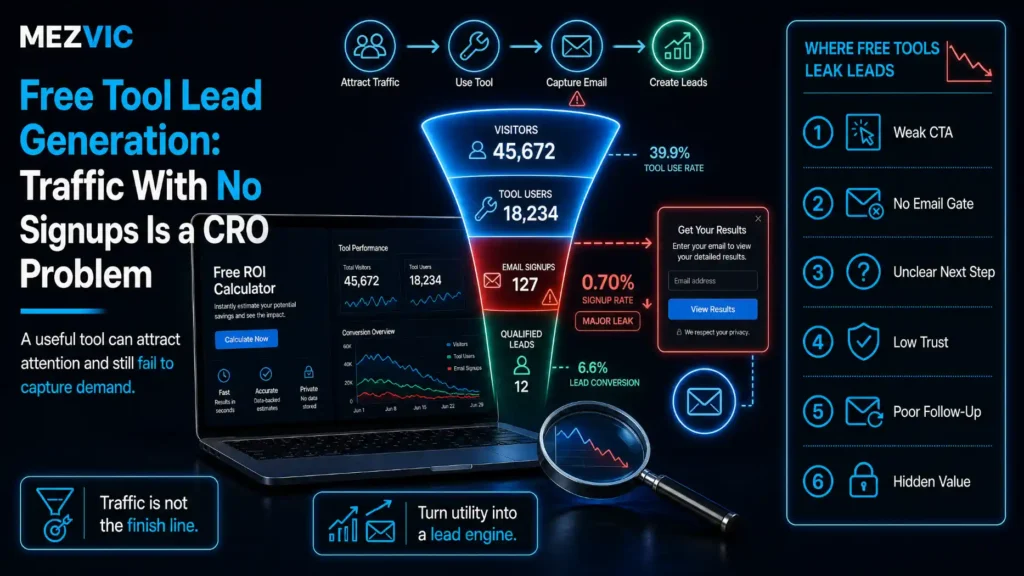
Your calculator gets 4,000 sessions a month.
It has produced eleven signups since March.
Somebody in the next meeting is going to suggest buying more traffic, and they will be wrong. This is what broken free tool lead generation looks like.
We run 16 free tools on this site, from an ACoS calculator to a bulk page speed checker, and we have got the gating decision wrong on most of them at least once.
Here is the thing nobody says out loud about free tool lead generation.
Traffic with no signups is almost never a traffic problem. It is a conversion problem wearing a traffic problem’s clothes.
This guide walks the six free tool lead generation steps we use now, in order.
Key Takeaways
- A tool that ranks but never converts is a CRO problem, not an acquisition problem. The audience already arrived.
- Gate after the value, never before it. Show the answer, then offer to save, send or extend it.
- Every extra form field costs you signups. Going from one field to five roughly halves completion in our own testing.
- Email address only. Company size, phone number and job title can be enriched later or asked in the reply.
- In the UK and EU you need specific consent before marketing by email. The soft opt-in covers previous customers, and a tool user is not a customer.
- In the US, CAN-SPAM penalties run to $53,088 per email, so the follow-up sequence needs the same care as the tool.
- Some tools should never be gated. Their job is links and authority, and a form kills both.
- Track two numbers per tool: completion rate and qualified lead rate. Traffic is vanity until both are known.
- A tool that takes more than 30 seconds to produce something useful will lose most of its visitors before the gate appears.
- The output is the product. If the result is not worth keeping, no amount of form optimisation will save it.
- Tools attract practitioners, not buyers. Expect a longer path to revenue and judge them on pipeline, not same-week sales.
- One well-maintained tool beats five neglected ones, because a broken calculator is worse than no calculator.
Why Do Free Tools Get Traffic But No Signups?
Because the visitor got what they came for and left, exactly as designed. Free tool lead generation fights that instinct rather than removing it.
That is not a bug in your tool. It is what a tool is.
Somebody needed a number. You gave them a number. The transaction is complete and nobody owes anybody anything, which is the honest starting position for free tool lead generation.
So free tool lead generation only works when you build a second reason to stay, and that reason has to be worth more than the friction you are about to add.
Which brings us to the only diagram that matters here.
Five things asked, one thing given
Every gated tool is a trade. Most of them are a bad one, and the visitor works that out in under a second.
Conceptual, not measured. The point is the direction of the tilt, not the exact weights.
Most free tool lead generation fails this test before anyone opens an analytics tab.
They ask for five fields and offer a PDF of something the visitor could already see on the screen.
The balance tips, the visitor leaves, and somebody suggests buying more traffic.
Step #1: Decide What the Tool Is Actually For
Tools do three different jobs and they are not compatible, which is where most free tool lead generation goes wrong on day one.
Pick one before you build, because the answer decides whether free tool lead generation is even the goal.
- Link and authority tools. Built to be cited. Never gated, ever. A form is a wall between your tool and every writer who might link to it.
- Lead tools. Built to start conversations with people who have a problem you solve. Gated after the value.
- Qualification tools. Built to tell you who is worth talking to. Gated, and the form is allowed to be longer because the visitor is already invested.
Our word counter is the first kind. It will never have a form on it and it will never generate a lead, and both of those things are fine.
Our automation audit is the third kind. By the time somebody has answered a dozen questions about their operation, an email address is a small ask.
The mistake is building the first kind, then bolting free tool lead generation onto it because the traffic looked tempting.

Step #2: Put the Gate AFTER the Value, Not Before
This single change does more for free tool lead generation than every other item on this page combined.
The free tool lead generation pattern is simple. Let the tool run. Show the answer. Then offer something that extends it.
Three gate positions, and only one of them works.
Three positions, three completely different outcomes
| Gate position | What the visitor sees | What you get | Verdict |
|---|---|---|---|
| Before the tool | A form standing between them and the thing they came for | Few emails, no links, high bounce | Almost always wrong |
| Instead of the result | Inputs accepted, then a wall where the answer should be | Emails, plus genuine resentment | Works once per visitor |
| After the result | Their answer, then an offer to save or extend it | Fewer but far better leads, and the links | The one to build |
Middle row converts on paper and costs you the audience that would have recommended you.
The middle row deserves a warning, because it tests well and ages badly.
Showing someone a spinner and then a form where their answer should be is the digital equivalent of taking their coat and asking for money.
They will give you the email. They will not come back, and they certainly will not link to you, which costs more than the signup was worth once you price earned links properly.
Good things to offer after the result, in rough order of how well they work for us.
- Send me this as a report. The same numbers, formatted, in their inbox. Highest intent because they want a record to share internally.
- Save and compare later. Useful for anything someone will run repeatedly, like our margin calculator or ACoS calculator.
- Benchmark me against others. Works only if you genuinely have the data, and is very hard to fake.
- Tell me what to do about it. A short, specific action list based on their inputs. This is the one that produces conversations.
Notice that all four are more of the thing they already wanted. None of them is a newsletter.

Step #3: Cut the Form to the Fewest Fields That Work
Every field you add is a small tax on your free tool lead generation, collected from every visitor, forever.
Every field is a tax on every visitor
Relative completion as fields are added, from our own tool testing.
Indexed figures from our own tools, not a published study. Your curve will differ, its shape will not.
The curve is steeper than most teams expect, and it is steepest exactly where sales teams want to add things.
Job title, company size and phone number are the three most requested additions and the three most expensive.
Here is the trade in plain terms.
Ask for one field and you get volume with less context. Ask for five and you get context about a much smaller group, plus a quieter pipeline.
We default to one field, then enrich or simply ask in the first reply. It is the single biggest free tool lead generation lever we have.
Two field-level details that matter more than they should.
Do not ask twice. If the tool already collected their domain, do not ask for it again in the form. People notice, and it reads as carelessness.
Never use a checkbox for consent that is pre-ticked. It is not valid consent in the UK or EU, and it is a bad way to start.
Step #4: Make the Output Worth Keeping
The output is the product. In free tool lead generation the tool is just the interface.
Most free tools produce a number and stop, which is fine for the visitor and useless for you.
A good output does three things a bare number does not.
- It says whether the number is good. A 2.1% conversion rate means nothing without context, and context is the thing only you can supply.
- It names the next action. Not “contact us”, but the actual next thing they should check, in their situation.
- It is shareable without embarrassment. Something they can paste into a team chat that makes them look informed rather than marketed to.
That third one is quietly the growth mechanism behind good free tool lead generation. Internal sharing is how a tool reaches the person who actually holds the budget.
It is also why heavy branding on the output backfires. A result covered in logos does not get pasted anywhere, which is a conversion principle long before it is a design one.
Step #5: Get the Follow-Up Legal Before You Send It
You have collected an email address. In free tool lead generation that is not the same as permission to market to it.
The UK and EU position is the stricter of the two and it catches most tool builders out.
Read the exception carefully.
It applies to previous customers. Somebody who used your free calculator has bought nothing, so the soft opt-in does not cover them.
Which means the consent has to be asked for, separately and clearly, at the point of capture.
The US position is different but not lax. The FTC sets out what every commercial email must do, and the penalties are per message.
Three practical rules keep this clean without a lawyer on retainer.
- Separate the delivery from the marketing. Sending the report they asked for is fulfilling a request. A nurture sequence is marketing, and it needs its own tick box.
- Say what they are signing up to, in the label. Not “keep me updated”, but what you will send and roughly how often.
- Make unsubscribing trivial and instant. The FTC prohibits charging a fee or demanding extra personal information to opt out, and honouring it quickly is simply good practice.
Doing this properly also improves free tool lead generation numbers, which is the part people find surprising.
A list built on explicit consent opens better, complains less, and tells you more about who actually wants to hear from you.
Once the permission is right, the sequence itself is the next problem, and that is covered in email marketing automation strategy.

Step #6: Measure the Two Numbers That Matter
Sessions is not one of them, which is the hardest part of reporting free tool lead generation honestly.
Track completion rate and qualified lead rate, per tool, and everything else becomes diagnostic detail.
Completion rate is the share of people who start the tool and reach a result. Low completion means the tool is confusing, slow or asking for inputs people do not have.
Qualified lead rate is the share of completions that become someone worth talking to. Low here means the tool is attracting the wrong people, which no form change will fix.
Those two numbers diagnose almost everything in free tool lead generation.
High completion and low leads: the gate offer is weak, or the audience is students and competitors. Either way it is a conversion problem rather than a traffic one.
Low completion and high leads: the tool is too hard, but the people who get through are exactly right. Fix the tool, not the funnel.
Low on both: it is a link asset. Stop measuring it as a lead source and start measuring referring domains, which is the economics we set out in link building cost.
Three kinds of tool, one dashboard that only sees one
Eight tools plotted by traffic and lead rate, sized by the links they have earned.
Relative positions from our own tool set. Judging the purple group on leads would delete all of them.
Read the bottom-right of that chart before anything else.
Those are tools doing real work that a leads-only dashboard would have deleted last quarter.
What Makes a Free Tool Fail Completely?
Four failures kill free tool lead generation, and none of them is the form.
Why tools die, in order of how often we see it
| Failure | What it looks like | The fix |
|---|---|---|
| Answers a question nobody asks | Ranks for nothing, no direct traffic | Check search demand before building, not after |
| Needs inputs people do not have | High starts, almost no completions | Pre-fill, estimate, or ask for less |
| Output nobody can act on | Completions fine, zero engagement after | Add interpretation and a next action |
| Quietly broken | Traffic decays over months with no obvious cause | Test it monthly like any other product |
Row four is the most common and the least discussed. Tools are software, and software rots.
Row four deserves its reputation as the quiet killer of free tool lead generation. A calculator that silently started returning wrong numbers after an API change is worse than no calculator, because people acted on it.
Put every tool on a monthly test. It takes ten minutes and it is the single highest-return maintenance job we do, and it automates neatly with a scheduled check.
Row one is the expensive one, because it is discovered after the build rather than before. It is also the cheapest to avoid, since a day of keyword research costs less than a week of development.
Check that people search for the thing your tool does, in the words they would use, before writing a line of code. It is the same discipline as any other page, and the method is in how to check what you already rank for.
Frequently Asked Questions
Should I gate my free tool behind an email?
Only after the visitor has received the value. Show the result, then offer to send it as a report, save it for comparison or explain what to do about it, because a gate placed before the result costs you both leads and links.
Why does my tool get traffic but no signups?
Usually because the offer at the gate is worth less than the friction of the form. The visitor already got what they came for, so anything you ask for afterwards needs to extend that value rather than repackage it.
How many form fields should a tool have?
One, in most cases. Completion falls sharply with each additional field, and job title, company size and phone number can be enriched afterwards or simply asked in your first reply.
Do I need consent to email people who used my tool?
In the UK and EU, yes. The ICO states you must not send marketing emails without specific consent, and the soft opt-in exception applies to previous customers, which someone using a free tool is not.
What are the penalties for getting email marketing wrong?
In the US the FTC states each separate email in violation of CAN-SPAM is subject to penalties of up to $53,088. The rules also require a valid physical postal address and an opt-out honoured within 10 business days.
Should every tool be gated?
No. Tools built to earn links and authority should stay completely open, because a form prevents the citations that make them valuable in the first place.
How do I know if a tool is working?
Track completion rate and qualified lead rate separately for each tool. Sessions tell you nothing on their own, and the combination of those two numbers diagnoses whether the problem is the tool, the gate or the audience.
What should the tool output include?
Whether the number is good, what to do next, and something shareable internally without embarrassment. A bare figure with no interpretation gives the visitor no reason to remember where they got it.
How long should a tool take to produce a result?
Under thirty seconds from landing to something useful. Anything longer loses most visitors before they reach the gate, and the fix is usually fewer required inputs rather than a faster server.
Do free tools actually generate revenue?
Indirectly and slowly. Tools attract practitioners rather than buyers, so judge them on pipeline contribution over quarters rather than same-week sales, and expect some of the value to arrive as links and brand recall.
Is it better to build one tool or several?
One maintained properly beats five neglected. Tools break silently when APIs change or assumptions age, and a calculator returning wrong numbers damages trust more than never having built it.
Can I use a tool to qualify leads?
Yes, and that is the one case where a longer form is acceptable. Once someone has invested several minutes answering questions about their own operation, additional fields feel proportionate rather than extractive.
Next Steps
Do these three things this week and your free tool lead generation improves without new traffic.
First, open your tool as a stranger would and time how long it takes to get something useful. If it is over thirty seconds, that is the whole problem.
Second, move the gate after the result and change the offer to something that extends the answer rather than repeating it.
Third, check your consent wording against the ICO guidance and your sequence against the FTC CAN-SPAM guide. Both are short and both are free.
Then borrow shamelessly. Our 16 free tools are all built on the patterns above, and the ones that work are obvious from the outside.
If you want a second opinion on which of your tools should be gated and which should stay open, send us the list and we will mark it up.