Client nine signs on a Tuesday.
By Thursday somebody is asking where the kickoff document lives, and three people answer with three different links. All three are out of date.
Nobody did anything wrong. The agency just crossed the size where remembering stops working.
I have watched this happen at roughly the same point in almost every agency I have worked with, and it is never the client work that breaks first. It is everything wrapped around the client work.
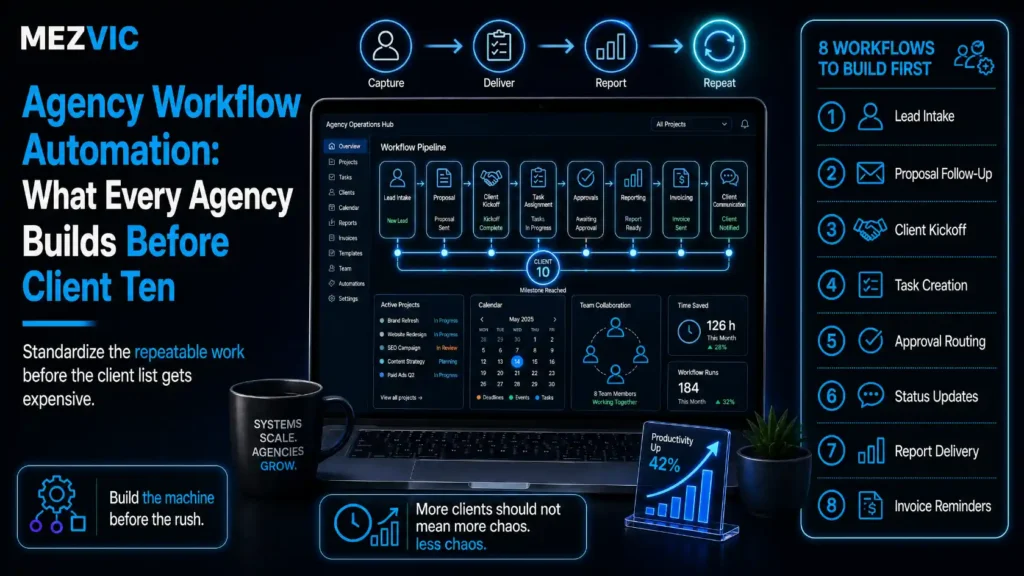
Agency workflow automation is how you stop paying senior people to chase files. Seven things to build, in the order that pays back fastest. This is the process layer, not the tool layer, so it sits above whichever platform you have already picked in n8n, Zapier or Make.
Key Takeaways
- Agency workflow automation is about the work around the work: onboarding, reporting, approvals, invoicing and asset hunting.
- Seven recurring admin jobs cost roughly 190 minutes per client per week. At ten clients that is 31.7 hours, or four fifths of a full-time person.
- BLS puts private-industry employer compensation at $46.60 per hour worked, with wages only 69.9% of it. Divide any salary by 0.699 to get the real cost.
- On a $58,000 account manager that is $82,976 a year, so the admin load above costs about $65,700 a year in wages alone.
- McKinsey found 45% of the activities people are paid to perform can be automated with already demonstrated technology. Agency admin sits well above that average.
- Automate onboarding first. It is the only workflow where a mistake compounds through the entire relationship.
- Standardise before you automate. Automating a process nobody agreed on just produces inconsistency faster.
- Status reports should assemble themselves from the tools that already hold the numbers. Rebuilding them by hand is the single biggest recurring cost on the list.
- Approvals are a routing problem, not a reminder problem. Chasing is what happens when the request never had a deadline or an owner.
- Automate QA checks, never creative judgment. Machines are good at asking whether the alt text exists, not whether it is any good.
- Capacity data belongs where sales can see it before they sign, not in a spreadsheet operations updates on Fridays.
- Automation defers a hire, it rarely deletes one. The honest pitch is more clients per person, not fewer people.
- Measure the agency, not the task: hours per client, time to first deliverable, rework rate and admin share of payroll.
Why Do Agencies Break at Around Ten Clients?
Because coordination grows faster than headcount does.
Three clients fit in one person’s head. Everyone knows what is happening, and the process lives in the memory of whoever set it up.
Ten clients do not fit anywhere. The same work now needs writing down, handing over and checking, and none of that was ever costed. It is the same capacity argument that decides whether to hire in-house or use an agency, only pointed inward.
Here is what the week actually looks like once you count it.
Where 190 minutes per client actually goes
Seven recurring admin jobs, mapped across the working week for a single client.
Typical distribution from agency time-tracking work. Multiply every number by your client count.
Notice the shape rather than the totals. Monday and Friday carry most of it, because reporting clusters at the start of the week and invoicing at the end.
That is why hiring feels urgent on exactly two days and reasonable on the other three. Any workflow automation you build should attack Monday and Friday first.
The cost of that is easy to get wrong, because most agencies price it at salary.
Salary is not what a person costs. The Bureau of Labor Statistics puts total employer compensation for private industry workers at $46.60 per hour worked, with wages and salaries making up 69.9% of it and benefits the other 30.1%.
So divide any salary by 0.699 to get the real number. A $58,000 account manager costs about $82,976 a year, which is $39.89 for every hour they work.
Multiply that by the 31.7 hours and the admin load is running at roughly $65,700 a year before anyone has touched client work.
None of this is a productivity failure. It is arithmetic, and it arrives on schedule at about the same client count every time. The same per-unit thinking works on support, where we broke down the true cost per support ticket.

Step #1: Automate Client Onboarding Before Anything Else
Onboarding first, because it is the only workflow where a mistake keeps charging you for months.
A missing access credential in week one turns into four emails in week three, a delayed first report in week five, and a client who has decided you are disorganised before you have shown them anything.
Everything else on this list costs you the same amount every week. Client onboarding compounds.
A working onboarding automation does five things from one trigger, usually the signed proposal.
- Creates the workspace. Project, folder structure, channel, naming convention already applied. Nobody decides what to call it.
- Sends the access request. One list, one link, one deadline, with the specific permission level named for each platform.
- Books the kickoff. Scheduling link with the right duration and the right attendees, not a thread about availability.
- Starts the clock on the first deliverable. Due dates generated from the start date, so nothing depends on somebody remembering the promise in the proposal.
- Tells the team it exists. One notification with the scope, the owner and the dates, which removes the recurring “are we doing anything for them yet” question. Most of this client onboarding sequence is a handful of connected steps, and our Zapier automation examples cover the pattern.
The access request is the one worth building carefully. It is where onboarding actually stalls, and it stalls on the client’s side, which means your reminders have to be automatic or they will not happen at all.
Step #2: Make Status Reports Assemble Themselves
This is the biggest recurring line on the list, and the easiest to fix badly.
Most agencies rebuild the same report every month by hand. Somebody opens four dashboards, copies numbers into a template, writes three paragraphs of commentary, and sends it.
Three of those four steps are pure retrieval. Only the commentary is worth paying a human for. This is the highest-value workflow automation on the list.
So split the report in two and automate only the half that is retrieval.
Which half of a status report is worth a salary
| Part of the report | Who should do it | Why |
|---|---|---|
| Pulling the numbers | Automated | The data already exists in a system with an API |
| Formatting and branding | Automated | A template does not need judgment |
| Period-on-period comparison | Automated | Arithmetic, and humans make more errors at it |
| Flagging what moved | Automated, with a threshold | A rule catches it more reliably than attention does |
| Explaining why it moved | Human | Requires knowing what you changed and what the client did |
| Recommending what to do next | Human | This is the entire product the client is buying |
The bottom two rows are the report. The other four are assembly.
Build it so the account manager opens a report that is already populated and writes two paragraphs into it.
That change alone takes each status report from about 45 minutes per client per week to under 10, and the commentary usually gets better because the person writing it is not tired by the time they reach it. Where the numbers live in a CRM, a properly configured GoHighLevel setup can assemble most of the status report for you.

Step #3: Route Approvals Instead of Chasing Them
Chasing is a symptom. The disease is a request that went out with no deadline and no named owner.
“Let me know what you think” is not an approval request. It is a message that can be ignored without consequence, and it will be.
A routed approval carries four things the chased version does not.
- One named approver. Not a team address. A person, agreed at onboarding.
- A stated deadline. With what happens if it passes, decided in advance.
- A default. Usually “we proceed as drafted”, which is the clause that actually ends the chasing.
- An automatic reminder schedule. Two nudges, then an escalation to the person who signed the contract.
The default is the part agencies flinch at, and it is the part that works. Nobody enjoys writing “if we have not heard back by Thursday we will publish as drafted” into a contract. Every agency that does it stops losing days.
The automation itself is simple once the policy exists. That is the recurring theme of this whole article, and it is why the next step matters more than the tooling. An approval workflow with more than two branches is where a visual builder earns its place, which is what our Make.com scenarios guide is about.
Step #4: Standardise the Process Before You Automate It
Automating a process nobody agreed on produces inconsistency faster.
If three account managers run onboarding three different ways, building the automation forces the argument you have been avoiding. Have the argument. It is cheaper than encoding one person’s habits as company policy by accident.
The test is whether you can write the process down in one page without using the word “usually”.
Once it is written, the split becomes obvious.
Only about half an agency hour is delivery
Share of total agency hours, split two levels deep. Arc angle is proportional to share.
Representative allocation. Run it against your own time tracking before believing it about your agency.
Delivery is the part clients pay for. Everything in the other three segments is overhead, and about half of it is mechanical.
McKinsey’s estimate is that 45% of the activities people are paid to perform can be automated using already demonstrated technology, across roughly 2,000 work activities assessed against 18 capabilities. Agency admin sits comfortably above that average, because so much of it is retrieval and formatting.
They also found the benefits of automating a process typically run between three and ten times the cost. That range is worth holding on to when somebody asks whether a build is worth the week it will take. It is the same case we make for automation across the wider business.
Step #5: Automate QA Checks, Not Creative Judgment
Machines are good at asking whether the alt text exists. They are not good at asking whether it is any good.
So automate the checklist, keep the review.
A pre-delivery check that runs automatically catches the things that embarrass agencies: a missing meta description, an internal link pointing at staging, a tracking parameter left on a live URL, an image nobody compressed, a document still titled with the previous client’s name.
Every one of those is a rule. None of them requires taste.
Where teams overreach is scoring the work itself. A rule that flags “readability below target” is useful. A rule that blocks delivery on it is how you end up with copy written for a checker instead of a customer.
Flag, do not gate. The reviewer decides. The same restraint applies to automated social posting, where scheduling is safe and judgment is not.

Step #6: Put Capacity Data Where Sales Can See It
Most agency overload is sold, not caused.
Somebody signs a client in a week the delivery team was already full, because the only person who knew that was in a different conversation.
The fix is not a meeting. It is a number that updates itself and lives where the proposal gets written.
Three fields are enough: committed hours for the next 30 days, available hours, and the earliest start date the current queue allows. Generated from live project data, not from what anyone remembers.
Then the conversation changes from “can we take this on” to “we can start on the 14th”, which is a better sales answer anyway because it is specific. Capacity data usually lives in the CRM, so it is worth knowing which CRM actually reports on it.
Admin load steps up and never steps back
Weekly non-billable hours as the client count grows from four to ten.
Client count times 3.17 hours. The arithmetic is from the punchcard above, not from a study.
The thing to notice is that the line never returns to zero.
Overload is not a bad week. It is a level that steps up when a client is signed and stays there, which is exactly why it is invisible to anyone looking at a single week.
Step #7: Measure the Agency, Not the Task
Counting how many hours a specific automation saved is a satisfying number that tells you nothing about whether the agency got better.
Four numbers do.
Four numbers, and what each one blames
| Metric | What it means | If it is bad, fix |
|---|---|---|
| Non-billable hours per client | The admin load this article is about | Reporting and approvals first |
| Time to first deliverable | How long from signature to something real | Onboarding and access requests |
| Rework rate | Share of deliverables sent back | Briefs and QA checks, not effort |
| Admin share of payroll | What fraction of wages buys nothing billable | Standardisation, then automation |
Track all four monthly. Only the last one survives a growth spurt without being misleading.
Time to first deliverable is the underused one, because clients form their opinion of an agency in the first three weeks and almost never revise it.
An agency that halves it wins renewals it has not earned yet. Client-facing nurture is a separate discipline again, covered in our email sequence guide.
Which Workflows Should an Agency Automate First?
In the order of how often the work repeats, not how annoying it is.
Annoyance is a bad ranking signal. The thing everyone complains about is often quarterly, and the thing nobody mentions happens forty times a week.
- Client onboarding. Lowest frequency of the four, but the only one where errors compound. Build it first anyway.
- Status reporting. Highest recurring cost. Biggest single saving available.
- Approvals and reminders. Cheap to build, and it removes the work nobody wants to own.
- Invoicing and time capture. Boring, weekly, and it quietly decides whether you get paid on time. Client-facing sequences such as the nine in our email automation workflows guide come after these four, not before.
Build one, run it for a month, then build the next. Agencies that try to automate everything in one quarter end up with six half-finished builds and a team that has stopped trusting any of them. Industry-specific follow-up, like real estate lead follow-up, is a later project.
Where Does Agency Workflow Automation Usually Go Wrong?
Predictably, and in about five ways.
- One person built it and nobody else understands it. They leave, and the agency inherits a black box it is afraid to touch. Handing the build to a contractor carries the same risks as outsourcing any core process.
- It was built on a process that had not been agreed. Now the disagreement is encoded and harder to see.
- Nobody owns it. Automations need a maintainer the same way a client does.
- It silently stopped working. No alert, no failure notification, and three weeks of reports that never sent.
- It removed the human from a moment that needed one. Usually a send, usually badly timed.
The fourth one is worth building against explicitly. Every automation should tell somebody when it fails, and that somebody should be a person, not a channel nobody reads.
Frequently Asked Questions
What is agency workflow automation?
It is automating the recurring operational work that surrounds client delivery: onboarding, status reporting, approvals, QA checks, capacity tracking and invoicing. It is process-level work, distinct from automating a single tool or a single marketing channel.
At what size does an agency need workflow automation?
Usually somewhere between eight and twelve clients, because that is where coordination stops fitting in one person’s memory. The trigger is not headcount, it is the point at which the same question gets answered differently by two people.
Which agency workflow should be automated first?
Client onboarding, because it is the only one where a mistake compounds through the whole relationship. Status reporting is the bigger recurring saving, but onboarding errors cost you renewals rather than hours.
How much non-billable time does agency admin actually take?
Seven recurring jobs commonly run to about 190 minutes per client per week. At ten clients that is 31.7 hours, which is roughly four fifths of one full-time person and about $65,700 a year in employer cost.
What does an employee actually cost per hour?
More than salary. BLS reports private-industry employer compensation at $46.60 per hour worked, with wages and salaries only 69.9% of that. Dividing a salary by 0.699 gives a realistic total, so $58,000 becomes about $82,976.
Will workflow automation let an agency cut staff?
Rarely, and it is not the honest pitch. What it does is defer the next hire and raise how many clients each person can carry without the quality dropping. Selling it internally as headcount reduction is also the fastest way to make your team quietly resist it.
Should status reports be sent automatically?
No. Automate the assembly and keep a human on the send. An auto-delivered report is how a client discovers bad news from a PDF before anyone has framed it, and that conversation is far more expensive than the ten minutes you saved.
What should never be automated in an agency?
Creative judgment, the explanation of why a number moved, the recommendation that follows it, and any first contact after something went wrong. Automate retrieval, formatting, routing and checking.
How do you stop an automation from silently failing?
Give every automation a named owner and a failure alert that reaches a person rather than a channel. Most agencies discover a broken workflow when a client asks where their report is, which is three weeks too late.
Do you need a developer to build agency automations?
Not for most of it. Onboarding, approvals, reminders and report assembly are all achievable with connector platforms. You need development help when the data lives somewhere without an API, or when the logic branches more than twice.
How long does an agency automation take to build?
The build is usually days. Agreeing the process it encodes is usually weeks, and that is the honest part of the estimate. If a project is running long, it is almost always the standardisation, not the tooling.
How do you measure whether agency workflow automation worked?
Track non-billable hours per client, time to first deliverable, rework rate and admin share of payroll. Hours saved on one task is a vanity number, because the work usually reappears somewhere else if the process did not change.
Next Steps
Three things, and the first one is measurement.
First, track non-billable time honestly for two weeks. Not estimated. Most agencies are surprised by the reporting number and unsurprised by everything else.
Second, write your client onboarding process on one page without using the word “usually”. If you cannot, that is the work, and no tool will do it for you. Do the same for whatever feeds your pipeline, including any free tool you use to generate leads.
Third, build one automation and run it for a month before starting the next. One finished workflow beats six half-built ones every time.
Both sources behind the numbers here are worth reading directly: the BLS Employer Costs for Employee Compensation release and McKinsey’s four fundamentals of workplace automation.
If you want the admin load mapped and the first two workflows built properly, tell us how many clients you run and we will tell you which one is costing you most.