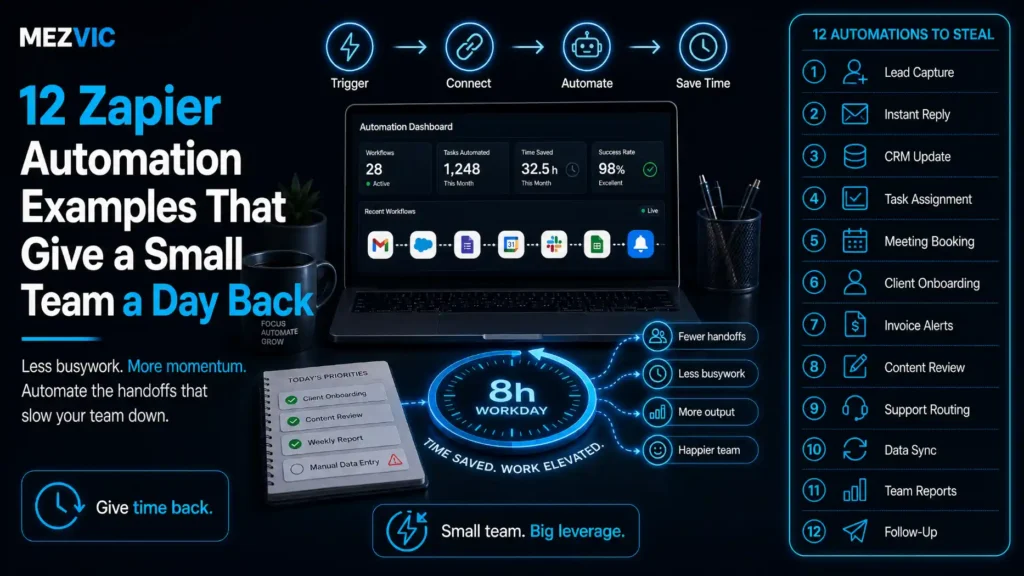
Nobody on a small team has a spare day. They have ninety spare minutes, scattered across five afternoons, in pieces too small to use.
That is what the best Zapier automation examples actually return. Not a heroic transformation, just the copying and pasting between tools that quietly eats a working day every week.
Below: twelve Zapier automation examples worth building, what each one genuinely saves, how the task billing really works, and where Zapier stops being the right tool.
Key Takeaways
- The twelve examples below add up to 480 minutes a week, which is exactly one eight-hour working day.
- Zapier’s free plan only runs two-step Zaps. Almost every useful automation needs three or more, so Professional from $19.99 a month is the real entry price.
- Every step consumes a task, not every run. A six-step Zap firing 200 times a month costs 1,200 tasks. This is the single most common budgeting mistake.
- Tasks come from one shared pool across Zaps, AI steps, code and MCP, so an AI step quietly competes with your invoice chaser.
- Automate the boring and frequent, never the rare and judgement-heavy. The second category is where automation creates work rather than removing it.
What Does a Zapier Automation Actually Replace?
Zapier automation examples all replace the same thing: a human moving information from one screen to another without changing it. That is the entire category, and it is bigger than it sounds.
Zapier lists over 9,000 apps in its app directory, but the connection is not the value. The value is that nobody has to remember to do the moving.
Three qualities make a task worth automating, and a task needs all three.
- It repeats on a trigger, not a whim. A form is submitted, a payment lands, a deal changes stage. Something observable starts it.
- The rules fit on one line. If describing the logic takes a paragraph of exceptions, you are automating a decision rather than a transfer.
- Being wrong is cheap and visible. A misfiled row is fixable. A wrongly issued refund is not.
Judged that way, most of the Zapier automation examples people publish fail the second test. They automate something clever and fragile instead of something dull and constant.
Dull and constant is where the day comes back, and the best Zapier automation examples are exactly that. That is also why this list is boring on purpose.
If you want the wider framing of what to automate before choosing any tool, our guide to where AI automation works and where it fails covers the decision itself.
Where Do the Repetitive Hours Actually Go?
Into the gaps between real work, which is where Zapier automation examples earn their keep, in blocks of five to fifteen minutes that never appear on a timesheet.
Map a week honestly before building anything. The pattern is remarkably consistent across small teams.
The admin sits at the edges of every day
Repetitive copy-paste minutes by hour, across one person’s working week.
Illustrative map of a week, not a study. Build your own before choosing what to automate.
Two things stand out every time a week is mapped before choosing Zapier automation examples.
The first is that admin clusters at the start and end of the day, which is precisely when attention is worth most and gets spent worst.
The second is Monday morning and Friday afternoon. Both are dominated by assembling information that already exists somewhere else.
Those two blocks alone usually justify the subscription, and they are the easiest to automate because the inputs are already structured.
What Are 12 Zapier Automation Examples Worth Building?
Twelve Zapier automation examples that survive contact with a real week, grouped by the part of the business they quietly drain.
Sales and lead handling
1. New lead lands in the CRM and the right person is told. Form or ad lead creates the contact, assigns an owner by territory, and posts one message to a channel. Saves 55 minutes a week and, more importantly, removes the four-hour response delay.
2. Form submission is filed and acknowledged. Response writes to a sheet, creates a folder for attachments, and sends a real confirmation rather than a silent success page. Saves 40 minutes.
3. Proposal accepted starts the onboarding checklist. Signature triggers task creation, a kickoff calendar hold and a welcome email. Saves 60 minutes, the biggest single item on the list.
Industry versions of this exist too, and the follow-up sequence is the part that decides the outcome, as in real estate lead follow-up. That third one matters beyond the time. Onboarding is where inconsistency is most expensive, because the client is forming their opinion of you that week.
Money and admin
4. Overdue invoice chases itself. A scheduled check finds invoices past terms and sends a polite, escalating reminder. Saves 45 minutes and collects faster, which is the actual return.
Where the sequence itself is the product rather than a single alert, that is email sequence design rather than a Zap, and it is worth separating the two.
5. Receipts reach the accountant without a shoebox. Expense photo or emailed receipt goes to storage, gets logged with amount and category, and appears in the month’s sheet. Saves 35 minutes.
6. Weekly report assembles itself before the meeting. Pulls the numbers you always paste manually into one document on Friday morning. Saves 55 minutes.
Delivery and operations
7. New order writes to the fulfilment sheet. Order details, shipping method and any note land where the person packing can see them. Saves 30 minutes.
8. Support email becomes a tagged ticket. Inbound mail creates a ticket, tags it by keyword and routes it. Saves 50 minutes and stops things being missed in a shared inbox.
9. Delivery confirmation asks for the review. Fires a request a set number of days after delivery, not at dispatch. Saves 20 minutes and the timing genuinely changes the response rate.
Where the volume justifies it, an automated first line handles the repeat questions before a ticket exists at all. Number 8 is worth pairing with real measurement, because ticket volume is a cost you can calculate, as we set out in what a support ticket really costs.
Meetings, content and the rest
10. Meeting notes turn into tasks. Transcript or notes doc creates the follow-up items with owners. Saves 35 minutes and stops the quiet decay of agreed actions.
11. Tomorrow’s calendar builds a prep document. Each external meeting gets a doc with the attendee, the last email thread and the open items. Saves 25 minutes.
12. Published post enters the repurposing queue. New article creates draft social variants in a queue for a human to approve. Saves 30 minutes.
Note the word approve. Number 12 stops short of posting, because unattended publishing is how brand voice quietly drifts, a point we make in social media automation.
Twelve automations, 480 minutes, one working day
Every automation from the list above, placed by what it saves in a week.
Time estimates are ours, from building these workflows. Arithmetic, not a study.
Across these Zapier automation examples the distribution matters more than the total. Three automations carry 170 of the 480 minutes, and the smallest three contribute 75 between them.
Build these Zapier automation examples in descending order and stop when the remaining items stop being worth the maintenance.
Nobody needs all twelve of these Zapier automation examples. Four or five usually recovers most of the day, and every Zap you own is a small ongoing liability when an app changes its API.
How Do the Apps Connect in a Real Workflow?
A handful of hub apps carry almost every one of these Zapier automation examples, which is why the twelve above need far fewer integrations than you would expect.
Eight app categories carry all twelve workflows
Connections used by the twelve examples. Node size reflects how many workflows touch it.
Categories rather than brands, because the pattern holds whichever tools you use.
Read the thick arcs first, because they carry the most workflows. The email, sheet and chat nodes appear in most workflows, because they are where humans already look.
This is the practical argument for starting with the tools you already have open, rather than adding a new app to hold the automation.
It is also why these Zapier automation examples stay cheap. Most of them touch two or three systems you already pay for.
When the same connections start appearing in six or seven Zaps, that is the signal to consider a proper workflow automation design rather than more individual Zaps.

How Many Tasks Will These Zaps Actually Consume?
Far more tasks than the number of times they run, because Zapier counts every step rather than every trigger.
Zapier’s own pricing page states it plainly: every step in a Zap and every external connector call uses tasks, and rates vary by AI model tier, code runtime and connector type.
So the sum you need is runs multiplied by steps, not runs.
Runs times steps, not runs
| Automation | Steps | Runs a month | Tasks used |
|---|---|---|---|
| New lead to CRM and notify | 4 | 120 | 480 |
| Support email to tagged ticket | 5 | 400 | 2,000 |
| Order to fulfilment sheet | 3 | 600 | 1,800 |
| Invoice chaser | 6 | 40 | 240 |
| Receipt to accounting | 4 | 90 | 360 |
| Review request after delivery | 3 | 600 | 1,800 |
| Six Zaps, monthly total | 25 | 1,850 | 6,680 |
1,850 runs consume 6,680 tasks, which is 3.6 times what a per-run estimate would predict.
Six modest Zapier automation examples land near a 10,000 task tier rather than the 2,000 most people would budget for.
Two details make it worse if you miss them. Tasks are drawn from one shared pool covering Zaps, AI steps, code and MCP, so an experimental AI step competes with your invoice chaser.
And filter steps that stop a Zap early still cost you the steps that already ran, which is why filtering as early as possible is the cheapest optimisation available.
Three habits keep the bill sane.
- Filter in step two, not step five. Decide whether this run matters before doing any work.
- Batch the high-frequency, low-value ones. A daily digest of 600 events costs a fraction of 600 individual runs.
- Check the yearly price. Zapier advertises 33% off paying yearly, which changes the tier you can afford.
You can sanity check the return before committing with our business automation audit, which works on the same runs-times-steps arithmetic.
Which Zapier Plan Do These Examples Need?
Professional, for almost all of these Zapier automation examples, and the reason is structural rather than about volume.
None of the Zapier automation examples above fit the free plan comfortably. It includes unlimited Zaps and 100 tasks a month, but it runs two-step Zaps only. A trigger plus one action.
Look back at the twelve. Only the simplest are two steps. The moment you add a filter, a lookup or a second destination, you need multi-step, which starts on Professional at $19.99 a month.
Team, from $69 a month, buys 25 users with shared Zaps, shared folders and shared app connections.
That shared connection detail is the one worth paying for earlier than you expect. On lower plans the Zaps belong to whoever built them, and they leave when that person does.
Which is the same ownership problem that turns up in every automation project, and the reason we insist on documenting who owns each workflow in any process automation engagement.

How Do You Build Your First Zap Without Breaking Anything?
Build any of these Zapier automation examples alongside the manual process for a fortnight, then remove the manual step once it has proved itself.
Almost every Zapier automation examples horror story comes from switching over on day one and discovering the edge case in week three.
Five steps, in this order, and the first two happen away from the keyboard.
- Write the rule in one sentence. “When a form is submitted, create a contact and tell the owner.” If you cannot, the process is not ready to automate.
- List the exceptions out loud. Duplicates, missing fields, test submissions, the one client who is handled differently. Each becomes a filter or a documented gap.
- Build it pointing somewhere harmless. A test sheet, a private channel, your own inbox. Never build straight into the live CRM.
- Run both for two weeks. Compare what the Zap did against what the human did. Differences are the edge cases you did not think of.
- Switch over and set up the alert. Error notifications to a place a person reads, plus a note of what the Zap does and who owns it.
Step two is the one that gets skipped, and it is where the real work lives. Most Zapier automation examples look trivial until somebody asks what happens to a duplicate.
Three guardrails are worth applying to every one of these Zapier automation examples, regardless of what it does.
- Nothing sends externally unattended in week one. Draft it, queue it, or route it to a person until you trust the trigger.
- Every Zap has a named owner. Not a team. A person who gets the error email and knows why it exists.
- Review the list quarterly. Automations outlive the processes they served, and a Zap feeding a spreadsheet nobody opens is pure cost.
That last point compounds. Teams that automate steadily for two years without reviewing end up with forty Zaps, of which perhaps twenty-five still matter.
The other fifteen are consuming tasks, holding app connections open and occasionally writing to systems nobody is watching.
A short quarterly cull is the highest-return half hour in the whole practice, and nobody schedules it.
If several of these workflows need to share data or run in sequence, that is the point where individual Zaps stop scaling and a connected system earns its keep, which is what our CRM platform comparison is really about.
When Should You Not Use Zapier?
Zapier automation examples stop being the right answer when the work is high volume, tightly coupled, or carries consequences that a silent failure would hide.
Four situations where a different answer is better, and none of them is a criticism of the tool.
- Very high event volume. Tens of thousands of runs a month makes per-task pricing expensive against a small custom integration, and it is where Make scenarios usually come out cheaper.
- Money movement or irreversible actions. Refunds, payouts, cancellations. Automate the notification, keep the decision human.
- Complex branching logic. Once a workflow has a dozen paths, a visual builder becomes harder to reason about than code, not easier.
- Regulated or sensitive data. Where records must stay inside specific systems, check what a connector stores before it stores it.
Zapier automation examples carry a quieter failure mode too. A Zap that breaks silently is worse than no Zap, because everyone has stopped checking the thing it replaced.
Turn on error notifications on day one and route them somewhere a human actually reads.
Agencies hit this earliest, because the same workflow gets rebuilt per client until somebody standardises it, which is the pattern behind agency workflow automation.
If your requirements are already past this list, the honest answer is a purpose-built automation rather than more Zaps stacked on each other.
Frequently Asked Questions
What is a Zapier task?
A task is one step running successfully, not one workflow running. Zapier states that every step in a Zap and every external connector call uses tasks, so a five-step Zap consumes five tasks each time it fires.
Is the free Zapier plan enough for a small business?
Rarely, because it is limited to two-step Zaps and 100 tasks a month. A trigger and a single action covers very few real workflows, so most teams need the Professional plan starting at $19.99 a month.
How much does Zapier cost?
Free is $0 with 100 tasks a month, Professional starts at $19.99 a month, and Team starts at $69 a month for 25 users. Task tiers run from 100 a month up to millions, and paying yearly is advertised at 33% less.
How many apps does Zapier connect to?
More than 9,000. In practice most small teams build everything on five or six of them, because the useful automations connect the tools people already have open all day.
What should I automate first?
The task you do most often that never requires a decision. Frequency beats complexity, so a three-step Zap that runs 600 times a month returns far more than a clever one that runs weekly.
Do filters still use up tasks?
Steps that already ran before the filter are still consumed, so placing filters as early as possible in the Zap is the cheapest optimisation available. Filtering at step two costs far less than filtering at step five.
Can Zapier replace a developer?
For moving data between apps, usually yes. For high volume, complex branching or anything where a silent failure is expensive, a purpose-built integration is cheaper to run and far easier to monitor.
What happens if a Zap fails?
It stops, and unless you have configured error notifications nobody finds out. This is the main risk of automation, because the manual habit it replaced has already been forgotten by the team.
Is Zapier or Make better for small teams?
Zapier is faster to build in and has broader app coverage, while Make tends to be cheaper at high volume and handles complex branching more comfortably. Start with whichever connects your specific apps.
How long does a Zap take to build?
Most of the examples here take 20 to 90 minutes including testing. The build is rarely the hard part, because deciding the exact rules and edge cases is what actually takes the time.
Should I automate customer emails?
Automate the trigger and the draft, keep a human on anything that carries tone or a decision. Confirmations and receipts are safe, while complaints and negotiations are not.
How do I stop automations from breaking when an app updates?
Turn on error notifications, review your Zap history monthly, and keep a short written note of what each Zap does and who owns it. Most breakages are found by users rather than dashboards.
The Bottom Line
Map a week before you build any of these Zapier automation examples. The blocks that repeat at the same time every day are the ones worth removing, and they are usually not the ones people complain about.
You can put a number on the return first with our automation ROI calculator. Then build the four or five biggest, filter early to control tasks, and turn on error notifications before you trust any of it.
The day does come back. It arrives in fifteen-minute pieces, which is exactly how it was lost.
If you would rather have the whole set designed, built and monitored properly, we do that, and the first conversation is about what not to automate.