A client asked me to automate their quoting process. Twenty minutes into the first call it became obvious that four of the six steps were genuinely automatable and two were not.
They had been sold AI business automation for all six.
Nine months later the two impossible steps were still being done by hand, and the software licence had been paid for all along.
AI business automation is genuinely excellent at a specific shape of work and reliably poor at another, and the boundary is more predictable than vendors let on.
Below: the four things AI business automation handles well, the three it fails at quietly, and a way to tell which is which before you commit a budget.
Key Takeaways
- The dividing line is judgement, not difficulty. Complex rule-based work automates well. Simple decisions requiring context do not.
- Expect to reach about 75% of a task, not 100%. The last quarter is exceptions, and exceptions are where the judgement lives.
- Document extraction is the most reliable win. Invoices, orders and forms into structured data is the closest thing to a guarantee.
- The three quiet failures are exceptions, relationships and anything irreversible. All three fail without producing an error message.
- Reversibility decides how much autonomy to grant. If a mistake can be undone in a click, let it run. If it cannot, a person approves.
- Measure exception rate, not time saved. A rising exception queue is the earliest sign a project is failing.
What Is AI Business Automation?
AI business automation is software that completes work requiring interpretation, rather than software that follows fixed rules.
That distinction matters more than any AI business automation product category. Traditional automation moves data when conditions are met. AI automation reads something ambiguous and decides what it means.
A rule that says “if invoice total exceeds $5,000, route to finance” is ordinary automation. Reading a PDF invoice from a supplier who changed their layout and still finding the total is the AI part.
Most real deployments are both, and that is the healthy pattern. Interpretation at the edges, deterministic rules in the middle.
Where a workflow is entirely deterministic, you do not need AI at all, and connecting existing tools with workflow automation will be cheaper and more reliable.

Which Tasks Does AI Business Automation Handle Well?
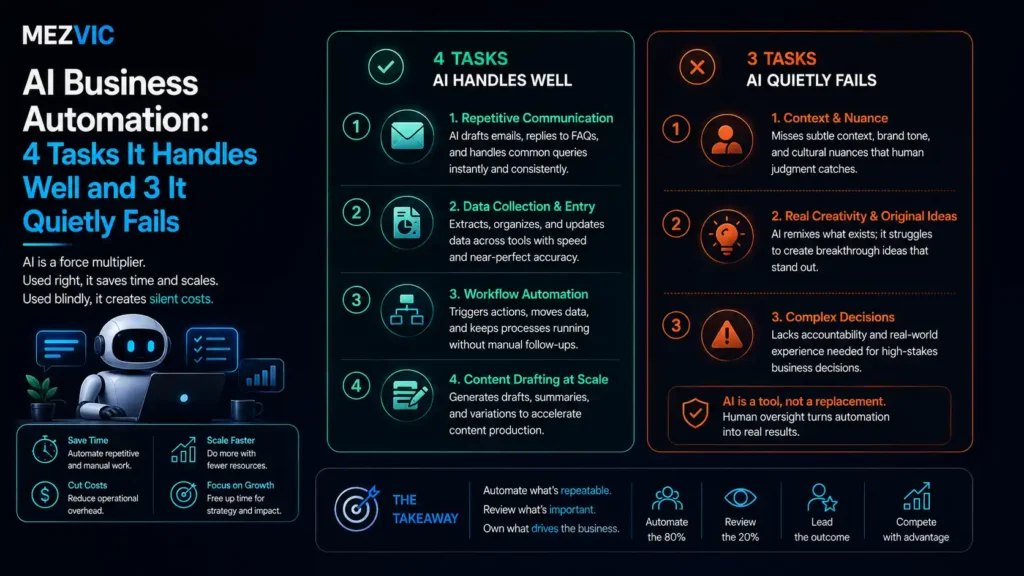
Four categories of AI business automation work reliably, and all four share one property: a correct answer exists and can be checked.
1. Turning documents into structured data
Invoices, purchase orders, delivery notes, application forms. Anything where the information exists on a page and needs to end up in a field.
This is the most dependable category because success is verifiable. The number either matches the document or it does not, so errors surface immediately rather than compounding silently.
2. Sorting and routing incoming work
Reading an email or a form and deciding which queue, person or process it belongs to.
Routing is forgiving, which is why it works, and it is the same principle behind an AI support layer that triages rather than resolves. A misrouted item costs a few minutes and gets corrected, so occasional mistakes are survivable rather than expensive.
3. Drafting the first version of something
Replies, summaries, product descriptions, meeting notes, first-pass reports.
The same logic underpins automation that does not sound automated. The value is not that the draft is good, it is that editing is faster than starting. A person still decides what ships, so the failure mode is wasted time rather than a wrong outcome.
4. Watching for patterns in data nobody has time to read
Flagging unusual orders, spotting stock about to run out, noticing that a supplier’s delivery times have drifted.
Monitoring works because the output is an alert to a human, not an action. The machine says “look at this”, and the person decides.
Notice the shared shape across all four: the machine produces something a person checks, or the mistake is cheap. That is the entire pattern.

Where Does AI Business Automation Quietly Fail?
Three categories of AI business automation fail, and the word that matters is quietly. None of them throw an error, which is precisely why they are expensive.
1. Anything that is mostly exceptions
If 40% of cases are unusual, you are not automating a process, you are automating the easy half and creating a queue for the rest.
Worse, the remaining work is now harder on average, because every simple case has been removed and only difficult ones reach a person.
Teams report feeling busier after automation for exactly this reason, and it is usually read as resistance rather than as accurate feedback.
2. Anything where the relationship is the product
Complaints, negotiations, retention conversations, anything where the customer is upset or the deal is significant.
The failure here is not incorrect output. The output can be perfectly accurate and still damage the relationship, because the customer wanted acknowledgement rather than information.
No metric catches this. Resolution time improves, satisfaction quietly falls, and the connection is only obvious months later.
3. Anything irreversible
Issuing refunds, cancelling orders, sending contracts, changing prices, deleting records.
The accuracy might be 97%, which sounds excellent until you calculate what the other 3% costs when it cannot be undone.
At 500 actions a month, 3% is fifteen irreversible mistakes. Whether that is acceptable depends entirely on what the action was, and “issue a refund” and “delete a customer record” are not the same risk.
The pattern across all three failures is the mirror of the successes: nobody checks the output, or the mistake is expensive.
How Do You Tell the Difference Before You Build?
Two questions sort almost any task for AI business automation correctly: is there one right answer, and can a mistake be undone?
Where does your task land?
Follow the branches. The four outcomes need four different amounts of autonomy, and only one of them should run unattended.
Reversibility is the question people skip. It decides autonomy far better than accuracy does.
The amber box is where most of the real value sits, and it is the least exciting to sell.
Machine drafts and a human approves in seconds is unglamorous, safe, and genuinely saves hours. It is also the arrangement vendors describe as “not fully autonomous” as though that were a criticism.
The red box deserves respect rather than ambition. Some work should stay human because the cost of being wrong is not measured in minutes.
If you want to size which of your own tasks fall where, our free business automation audit walks through the same questions against your actual workflows.
How Much of a Task Can AI Actually Take?
Roughly three quarters. AI business automation climbs fast and then stops. The plateau is the most important shape in this entire subject.
Share of a task handled without a person, over twelve months
The curve climbs quickly, then flattens near 75%. The remaining quarter is exceptions, and exceptions are not a tuning problem.
Most projects are sold on the first four months of that curve, where progress is steep and everything feels inevitable.
Then it flattens, and the conversation changes to tuning, more training data and better prompts, none of which move a plateau caused by genuine ambiguity.
Planning for 75% from the start changes everything. You staff the exception queue deliberately, you write the handover properly, and nobody is disappointed in month six.
It also changes the business case honestly. Saving 75% of a task is an excellent outcome, and it is a smaller number than the one in most proposals.

What Should You Automate First?
Score each AI business automation candidate on three things: how often it happens, how clear the rules are, and whether a mistake can be undone.
Scored on volume, rule clarity and reversibility
All three bars long means start here. A short reversibility bar caps how much autonomy the task should ever get.
Scores are judgement, not measurement. Rate your own tasks the same way and the order becomes obvious.
Refunds are the interesting card. Volume and rule clarity are respectable, and reversibility alone drops it out of contention for autonomy.
That does not mean leave it manual. It means the machine prepares the refund and a person clicks approve, which still removes most of the work.
Complaints score badly on everything, and that is the correct answer rather than a gap to close later.
Where enquiries need qualifying before a person spends time on them, that is a well shaped job for an AI qualification layer, because the output is a routing decision rather than an irreversible action.
How Do You Know If It Is Working?
Measure the exception rate of your AI business automation, not time saved. Time saved is easy to report and tells you almost nothing about whether the system is healthy.
Four numbers worth watching monthly.
- Exception rate. The share of cases a human had to take over. Rising means the process changed and the automation did not.
- Silent error rate. Cases it handled confidently and got wrong. Sample twenty at random every month, because nothing else will surface these.
- Time to resolve an exception. If exceptions take three times longer than before, the automation moved the work rather than removing it.
- Override rate on drafts. If people rewrite 80% of generated drafts, the draft is costing time rather than saving it.
The silent error rate is the one nobody tracks, and it is the only one that can quietly destroy trust in the whole programme.
Twenty random samples a month takes about half an hour and is the cheapest insurance in AI business automation.
NIST publishes a voluntary AI Risk Management Framework built on four functions, govern, map, measure and manage, which is a useful sanity check that measurement belongs at the start rather than the end. Set those four numbers up before launch rather than after. Retrofitting measurement onto a running system is how projects end up defended on anecdote.
What Does It Cost to Get Right?
AI business automation costs less than most people fear on software and far more than most expect on process work.
| Line | Typical | What it actually buys |
|---|---|---|
| Platform or API usage | $50 to $600 a month | The smallest and most visible line |
| Process mapping | $1,500 to $6,000 once | Writing down what actually happens, which nobody has |
| Build and integration | $3,000 to $25,000 | Connecting systems that were never meant to talk |
| Exception handling design | 15 to 25% of build | The part that decides whether it survives month three |
| Ongoing tuning | 2 to 5 hours a month | Processes drift, and unattended automation drifts with them |
Process mapping is the line people try to skip. It is also the one that determines whether the build works.
The second row causes the most resistance and prevents the most failure.
Whoever runs day to day operations should be in that room, since operational reality rarely matches the documented version. Nearly every business believes it knows its own process. Nearly every mapping exercise discovers three undocumented exceptions and one step that exists because somebody left in 2021.
You cannot automate a process you have not written down, and the writing down is frequently where the value appears, before any software is bought.
That mapping work sits with business process automation rather than with the AI layer, and it should happen first.
How Long Does an AI Automation Project Take?
Six to twelve weeks for a single well defined AI business automation task, and most of that is not building.
Weeks 1 to 2, mapping. Sitting with whoever does the work now and writing down what actually happens, including the exceptions nobody documented.
Weeks 3 to 5, building. The part everyone imagines is the whole project. It is usually the shortest phase.
Weeks 6 to 8, shadow running. The automation processes real work while a person also does it, and you compare. This is where silent errors surface.
Weeks 9 to 12, handover. Exception routing, monitoring, and teaching the team what to do when it behaves oddly.
Shadow running is the phase most often cut, and cutting it is how AI business automation gets switched off in month four after one visible mistake.
Two weeks of parallel operation is cheap compared to rebuilding trust with a team that watched it get something badly wrong in front of a customer.
If the workflow spans several systems, the plumbing choice matters less than people expect, and our comparison of n8n, Zapier and Make covers where each fits.
What Should You Ask a Vendor Before Signing?
Five questions separate a serious AI business automation proposal from a demo, and none of them are about features.
- What happens when it is not sure? A good answer describes a confidence threshold and an escalation path. A bad answer is that it is very accurate.
- What share of cases will still need a person? Anyone promising under 10% on a judgement heavy task is guessing or selling.
- How will we detect a confident mistake? If the only answer is customer complaints, you have no detection at all.
- Who owns the prompts, rules and training data? You should, and it should be exportable, or switching vendors means rebuilding.
- What happens when our process changes? Processes drift constantly. Ask who updates the automation and what that costs.
The third question is the one that produces the longest silence, and it is the most important. Confident mistakes are the defining risk of AI business automation.
Traditional software fails loudly with an error. This category fails politely, with a plausible answer that happens to be wrong, and only sampling will catch it.
Where the work involves live conversation rather than back office processing, the same questions apply with more urgency, which is why voice agents need tighter escalation rules than document workflows do.
Where Does AI Business Automation Fit With Everything Else?
AI business automation sits underneath the tools you already run, not beside them. That distinction changes how you budget for it.
Most businesses already have a CRM, a helpdesk, an email platform and a store. The automation layer connects those and handles the interpretation between them.
Which means the first question is rarely “what AI should we buy”. It is “which handover between two existing systems is currently done by a person copying and pasting”.
Those handovers are where the hours hide, and they are usually invisible on any org chart.
In sales, that handover is normally lead data arriving somewhere nobody owns, which is a CRM automation problem before it is an AI one.
In marketing, it is usually the follow-up nobody has time to send, and triggered sequences solve more of that than any model will. Our guide to the nine workflows worth building covers the practical version.
In support, it is triage, and the arithmetic on whether that saves money is set out in our breakdown of what a support ticket really costs.
Only once those handovers are mapped does buying a model make sense, and by then you usually need less of one than you thought. That sequencing is the whole approach behind our AI automation work.
Where a task genuinely needs to act rather than advise, that becomes an agent rather than a workflow, and the safety requirements change accordingly. We cover that under AI agent development.
Frequently Asked Questions
What is AI business automation?
AI business automation is software that completes work requiring interpretation rather than fixed rules. Reading a supplier invoice with an unfamiliar layout is AI automation, while moving the total into your accounts once it is found is ordinary automation.
Which business tasks should I automate first?
High volume tasks with clear rules and reversible outcomes. Document data entry, routing incoming enquiries and stock alerts score well on all three and are the safest starting points.
How much of a task can AI realistically handle?
Around 75% for most processes. The curve climbs quickly for four months then plateaus, because the remaining quarter is genuine exceptions rather than a tuning problem.
Why do AI automation projects fail?
Usually because a judgement based or irreversible task was given full autonomy. The second most common cause is nobody designing what happens to exceptions.
Should AI ever act without human approval?
Only when the action is reversible and there is a single correct answer. Refunds, cancellations, contracts and price changes should always pass through a person, however accurate the system appears.
How much does AI business automation cost?
Software is typically $50 to $600 a month, with the real cost in process mapping at $1,500 to $6,000 and a build of $3,000 to $25,000. Budget a further 15 to 25% for exception handling.
Does AI automation reduce headcount?
Rarely in the way people expect. It removes the routine portion of roles, leaving harder work behind, so teams often report feeling busier even as total volume handled rises.
What is a good exception rate?
Under 25% for a mature deployment. If more than 40% of cases need a human, you are automating the easy half and creating a difficult queue rather than saving time.
How do I measure whether it is working?
Track exception rate, silent error rate, time to resolve an exception and override rate on drafts. Sample twenty cases at random monthly, since silent errors never appear in any report.
Is AI business automation worth it for a small business?
Yes where a repetitive task consumes several hours weekly and mistakes are recoverable. Below roughly two hours a week the build and mapping cost will outlast the saving.
Do I need a data scientist to do this?
No for mainstream tasks like document extraction and routing, which are now configuration rather than model building. You need someone who understands your process far more than someone who understands models.
What is the difference between AI automation and a chatbot?
A chatbot is one interface to automation, aimed at conversation. AI business automation covers back office work with no interface at all, such as reading documents and routing tasks.
The Bottom Line
Sort the task before you shop for AI business automation software. One right answer or a judgement call, reversible or not, and the correct level of autonomy follows.
Plan for 75%, staff the exception queue on purpose, and treat the remaining quarter as permanent rather than as a backlog item.
Then measure the four numbers, especially the silent error rate, because it is the only one that fails without telling you.
If you want your own tasks sorted into those four boxes before anyone quotes you for a build, tell us which process is hurting and we will tell you honestly which parts are worth automating.