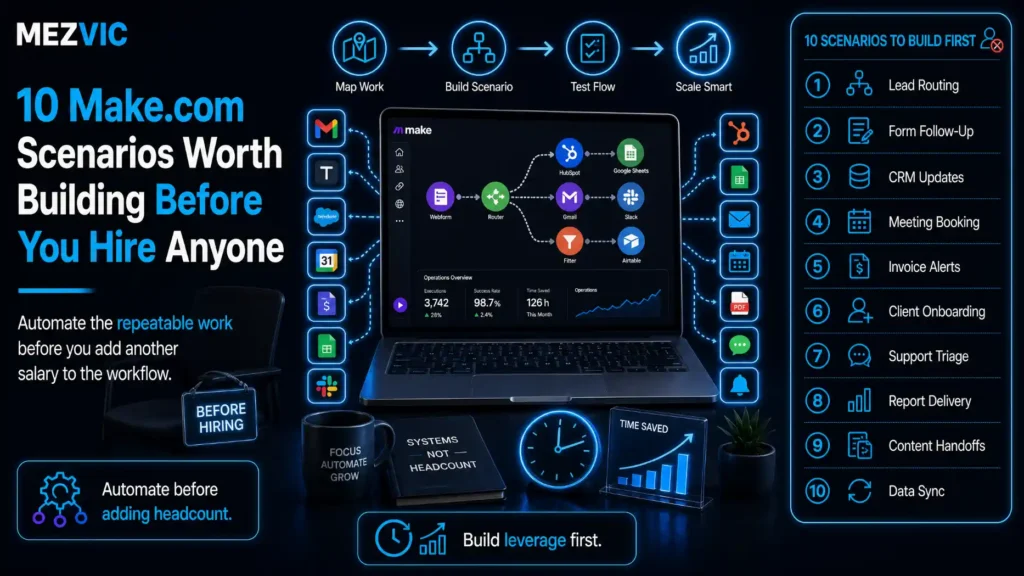
Before you write the job description, price the Make.com scenarios that would cover half of it.
The job description is written. Someone has worked out the salary. And most of the actual work in it is moving data between four systems that already hold it.
Make.com scenarios are not an argument against hiring. It is an argument for knowing which half of the role is real before you advertise it.
Below: ten Make.com scenarios that handle the mechanical half, what they genuinely reclaim, and where automation stops being the answer.
Key Takeaways
- The ten below reclaim about 84 hours a month, which is roughly half a full-time role rather than a whole one. Anyone promising a whole one is selling.
- Make bills in credits, where each module action counts as one. A ten-module scenario running 300 times costs 3,000 credits, not 300.
- The free plan allows 1,000 credits a month and a 15-minute minimum interval between runs, which rules out anything that needs to feel immediate.
- Make earns its place on branching and arrays. Routers, iterators and aggregators handle work that simpler tools cannot express at all.
- Build the reconciliation scenarios first. They prevent errors rather than processing them, and prevented errors never generate tickets.
What Makes a Task Worth Building in Make?
Make.com scenarios earn their place on branching, lists, and anything that has to reconcile two sources against each other.
Simple trigger-to-action automations are well served by almost any tool. The reason to reach for Make.com scenarios is the work that does not fit a straight line.
Three capabilities do most of the heavy lifting in Make.com scenarios, and they are worth understanding before choosing what to build.
- Routers. One trigger, several paths, each with its own conditions. An order from one channel is handled differently from another without duplicating the whole workflow.
- Iterators. Take an array and process each item. A file with 400 rows becomes 400 handled records rather than one blob nobody can use.
- Aggregators. The reverse. Collect many items into one output, which is how you get a single digest email instead of forty.
Aggregators are the most underused of the three and the most immediately appreciated by whoever receives the output.
If your candidate task is a single trigger and a single action, build it in whatever you already pay for. Our list of Zapier automation examples covers that shape properly.
The distinction matters commercially too, because tools that bill per step get expensive precisely where Make gets interesting.
How Does Make Actually Charge You?
Make.com scenarios are billed in credits, and the definition is precise enough to budget from.
Make’s pricing page states that each module action in your scenario, such as adding a Google Sheet row or fetching Gmail data, counts as one credit.
So the cost of Make.com scenarios is modules multiplied by runs, exactly as it is with any per-step tool.
Seven modules run, not one scenario
The order sync scenario, split into the stages that actually consume credits.
Arithmetic using Make’s stated model of one credit per module action. Your module count will differ.
The chart above is one run of one scenario. Multiply it by how often the scenario fires and you have your monthly number.
Two details change the budget more than the headline price does.
Filters save credits when placed early. A branch that stops at module two never runs modules three through nine, so the same scenario can cost wildly different amounts depending on where the filter sits.
Iterators multiply. Processing a 200-row file through four modules is 800 credits in one run, which is how a scenario that fires once a day consumes more than one firing hourly.
The plans themselves are straightforward. Free gives 1,000 credits a month with a 15-minute minimum interval between runs. Core is $9 a month for 10,000 credits, Pro is $16 and Teams is $29 at the same volume.
That interval limit on the free plan is the one that catches people out. Anything a customer is waiting on cannot sit on a fifteen-minute delay.

Which 10 Make.com Scenarios Are Worth Building First?
Ten Make.com scenarios that handle branching or lists, ordered by how much time they give back.
Order and inventory operations
1. Multi-channel order sync with per-channel rules. One router splits orders by source, each branch applies that channel’s shipping rules and tags, and everything lands in one fulfilment view. Reclaims 14 hours a month and removes the copy-paste that causes mis-picks.
2. Daily inventory reconciliation across channels. Pull stock from each marketplace, aggregate into one table, flag anything that disagrees by more than a threshold. Reclaims 12 hours and prevents the oversell that costs a suspension.
3. Supplier price file ingestion. Watch a folder, parse the CSV, iterate rows, compare against current costs and report only what changed. Reclaims 9 hours and catches margin erosion nobody would notice.
Numbers 2 and 3 are the Make.com scenarios to build first, because both prevent problems rather than processing them.
A prevented oversell never becomes a cancellation, a refund and an angry message, which is the compounding that makes reconciliation worth more than its hours suggest. The mechanics are covered in multichannel inventory sync.
Money and reporting
4. Weekly client or board reporting pack. Pull from several sources, aggregate into one document, deliver on a schedule. Reclaims 11 hours, and the aggregator is what makes it one document rather than six emails.
5. Batch invoice generation and delivery. Collect the period’s billable items, group by customer, generate one invoice each and send. Reclaims 8 hours and removes the month-end scramble entirely.
6. Refund and credit approval routing. Route by amount: small ones proceed automatically with a log, large ones wait for a human. Reclaims 5 hours and puts a real control where there was a habit.
Number 6 is the template for anything involving money, and it is the same control logic behind checking fulfilment charges rather than approving them blindly. Automate the routing and the record keeping, never the decision itself.
Customers and demand
Where the volume is high enough, an automated first line answers the repeat questions before triage is needed at all.
7. Support ticket triage and routing. Classify inbound messages, tag by topic and urgency, route to the right queue and escalate anything matching your risk rules. Reclaims 9 hours.
8. Lead routing with territory and round robin. A router assigns by region, a data store remembers whose turn it is, and the owner is notified in seconds rather than hours. Reclaims 7 hours.
9. Review aggregation across platforms. Collect reviews from every channel, iterate them, and deliver one digest with anything below a threshold flagged. Reclaims 6 hours.
10. Bulk product data enrichment. Iterate a list of SKUs, fetch attributes, normalise the formats and write back. Reclaims 3 hours in a normal month and far more during a catalogue expansion.
Number 10 is the clearest example of work that a straight-line tool simply cannot express, because the whole job is the loop. It pairs naturally with product data work, which is where the attributes come from.
Ten scenarios reach half a full-time month
Cumulative monthly hours reclaimed, against the 160 hours in one full-time role.
Estimates from building these workflows, not a study. Arithmetic you can redo with your own numbers.
Read the height of the final step of the ten Make.com scenarios against the dashed line. Ten scenarios, built properly, get you to roughly half of a full-time month.
That is the honest claim. Automation defers a hire or changes what the hire does. It does not delete the role.
Notice also the shape. The first three scenarios deliver 37 of the 84 hours, and the last three deliver 14 between them.
So build in order and stop when the next one stops being worth maintaining. There is no prize for owning ten scenarios.
Which Systems End Up Talking to Each Other?
Fewer systems than you would expect, and the same three sit at the centre of most Make.com scenarios, and the same three sit in the middle of almost every scenario.
Six systems, and three do the heavy lifting
Data exchanged between systems across all ten scenarios.
Categories rather than brands. Connect the three hubs properly and most scenarios become configuration.
The thick ribbons are the connections worth getting right first. Your store, your spreadsheet layer and your inbox carry most of the traffic.
This has a practical consequence. Credentials and permissions for those three systems are the ones that break everything when they expire, so they deserve a shared account rather than a personal one.
It also tells you where to start. Connect the three hubs properly, and eight of the ten Make.com scenarios become mostly configuration.
Where those hub connections start carrying real business logic, that is the point to document them properly as part of your process automation rather than leaving them in one person’s head.
Should You Use Make or Zapier?
Whichever connects your specific apps. After that, Make.com scenarios win on branching. After that, the honest split is straight-line work against branching work.
Both are good tools and the comparison is usually overstated by people selling one of them.
Where each one is genuinely better
| Situation | Better choice | Why |
|---|---|---|
| Trigger, one action, done | Either | Both handle it, pick what you already pay for |
| Branching by condition | Make | Routers keep one scenario instead of several |
| Processing a list or file | Make | Iterators and aggregators exist for exactly this |
| Very high volume, simple steps | Make | Credit pricing at $9 per 10,000 is hard to beat |
| Rare or unusual app integrations | Zapier | Broader catalogue at over 9,000 apps |
| Non-technical team maintaining it | Zapier | Linear builder is easier to read at a glance |
| Needs sub-minute reaction | Either paid plan | Make’s free tier holds a 15-minute interval |
| Error handling matters | Make | Dedicated error routes rather than a failed run |
Two of these rows favour Zapier, and pretending otherwise would waste your time.
The maintainability row deserves weight. A visual canvas with twelve modules and three routes is powerful and genuinely harder for a colleague to interpret than a numbered list of steps.
If the person maintaining these after you is not technical, that consideration outranks the pricing difference.
On price, Zapier’s Professional plan starts at $19.99 a month on its published pricing, against $9 for Make’s Core plan at 10,000 credits, so high-volume simple work does favour Make.
How Do You Build a Scenario That Does Not Break?
Assume every external system feeding your Make.com scenarios will fail eventually, and decide now what should happen when it does.
This is where Make.com scenarios differ most from simpler tools. You can attach an error route to a module and handle the failure deliberately.
Five practices separate Make.com scenarios that survive a year from one that quietly stops working in March.
- Filter first, act later. Decide whether the run matters in module two. Everything after that is credits you chose to spend.
- Attach an error handler to anything external. At minimum, log it and notify a person. Silence is the failure mode that costs the most.
- Make writes idempotent. Check whether the record exists before creating it, so a re-run repairs rather than duplicates.
- Name every module. The default names are unreadable six months later, and the person reading them will not be you.
- Run alongside the manual process for two weeks. Compare outputs daily. Differences are the edge cases you did not think of.
Point three prevents the worst class of automation incident. A scenario that duplicates records on every retry can create thousands of bad rows before anyone notices.
Point two is what turns a silent breakage into a Tuesday morning email. Without it, you find out when a customer tells you, and that arrives as a support ticket with a cost attached.
Where several of these start depending on one another, that is the moment to treat them as a system with an owner, which is the argument in agency workflow automation.
How Do You Keep Credit Costs Under Control?
Design for the runs that do nothing, because most Make.com scenarios fire far more often than they act.
A scenario watching for new orders runs whether or not an order arrived. A scenario checking a folder runs whether or not a file appeared.
Those empty runs are where Make.com scenarios quietly spend budget, and four habits deal with them.
- Use instant triggers where the app offers them. A webhook fires when something happens rather than asking repeatedly whether it has.
- Match the schedule to the reality. A supplier who sends files on Mondays does not need a scenario checking every fifteen minutes all week.
- Batch where nobody is waiting. Reporting, enrichment and reconciliation are all better as one daily run than as hundreds of individual ones.
- Cap what an iterator will process. A malformed file with 40,000 rows can consume a month’s credits in a single run if nothing stops it.
That last one is worth a limit module rather than good intentions. It is the only failure here that empties the account before anyone reads an alert.
Check consumption weekly for the first month, then monthly. The pattern stabilises quickly and the early weeks are when a mistake is cheap to find.
One more piece of arithmetic worth doing before you commit. Count the modules in each planned scenario, multiply by expected runs, and add them up before choosing a plan.
Ten modest Make.com scenarios rarely trouble a 10,000 credit plan. One badly scheduled scenario watching a busy inbox every minute will exhaust it alone.
You can sanity check the wider return first with our automation audit tool, which uses the same modules-times-runs arithmetic.
And where these scenarios start feeding a CRM rather than a spreadsheet, the platform choice matters more than the automation tool, which is the comparison in GoHighLevel versus HubSpot versus Pipedrive.
When Should You Hire Instead of Automating?
Hire when the work needs judgement, relationships, or someone accountable for an outcome rather than a process.
Four signals that the role is real and no number of Make.com scenarios will replace it.
- The exceptions are the job. If most cases need a decision, you are automating the easy 20% and keeping all the hard work.
- Customers need a person. Complaints, negotiations and anything where tone decides the outcome.
- Nothing is documented. You cannot automate a process nobody has written down, and the writing is most of the work either way.
- Nobody owns the automations. Scenarios without a named owner decay, and a decayed scenario is worse than the manual process it replaced.
The healthiest version is usually both: Make.com scenarios plus a person. Build the ten, then hire for the half of the role that was always the valuable half.
That is a better job to advertise, and it attracts a better candidate, because nobody good wants to spend their week copying rows between tabs.
If the queue is genuinely customer-facing volume rather than data movement, the honest comparison is different again and sits in outsourcing customer service risks.
Frequently Asked Questions
What is a Make credit?
Make counts each module action in a scenario as one credit, using adding a Google Sheet row or fetching Gmail data as its own examples. A ten-module scenario therefore consumes ten credits every time it runs to completion.
How much does Make cost?
The free plan allows up to 1,000 credits a month. At 10,000 credits a month, Core is $9, Pro is $16 and Teams is $29, with Enterprise priced on request.
Is the Make free plan usable for a business?
For testing and for low-volume batch jobs, yes. The limits that matter are 1,000 credits a month and a 15-minute minimum interval between runs, so anything a customer is actively waiting on needs a paid plan.
What is a router in Make?
A router splits one scenario into several conditional paths. It is what lets a single order workflow handle each sales channel differently without duplicating the entire scenario for each one.
What is the difference between an iterator and an aggregator?
An iterator breaks an array into individual items so each can be processed, while an aggregator collects many items back into one. Together they turn a file of rows into individual records and a batch of records into one summary.
Do filtered-out runs still cost credits?
The modules that already executed before the filter are consumed, but everything after it is not. Placing filters as early as possible is the cheapest optimisation available in any scenario.
Which should I build first?
Start with reconciliation rather than processing. Scenarios that compare two systems and flag disagreements prevent oversells and pricing errors, and a prevented error never becomes a refund, a ticket and a bad review.
Can Make replace a member of staff?
It replaces part of a role rather than the whole one. Ten well-chosen scenarios reclaim roughly half a full-time month, which usually defers a hire or changes what that hire spends their time on.
How do I stop a scenario creating duplicate records?
Make the writes idempotent by searching for the record before creating it, then updating if it exists. This means a re-run repairs data instead of duplicating it, which is the most damaging failure mode in any automation.
What happens when a scenario fails?
It stops at the failing module unless you have attached an error route. Adding a handler that logs the failure and notifies a person is the difference between finding out on Tuesday and finding out from a customer.
Is Make harder to learn than other automation tools?
The first scenario takes longer because the canvas is visual rather than a numbered list. The payoff arrives at the third or fourth, when branching and arrays stop requiring workarounds.
How many credits will ten scenarios use?
Multiply the modules in each scenario by how often it runs, then add them up. Batch scenarios that process files are the ones to watch, because an iterator over 200 rows through four modules is 800 credits in a single run.
The Bottom Line
Of the ten Make.com scenarios, build the two reconciliation ones first. They prevent the errors that generate everything else, and prevented errors never show up in a queue.
Budget Make.com scenarios in credits rather than in scenario count, filter early, and put an error handler on anything that touches an external system.
Then be honest about the hire. Ten scenarios buy back about half a month, which is a better job description rather than one fewer person.
If you want the ten scoped against your actual systems before you advertise the role, tell us what the week looks like and we will map which half is mechanical.