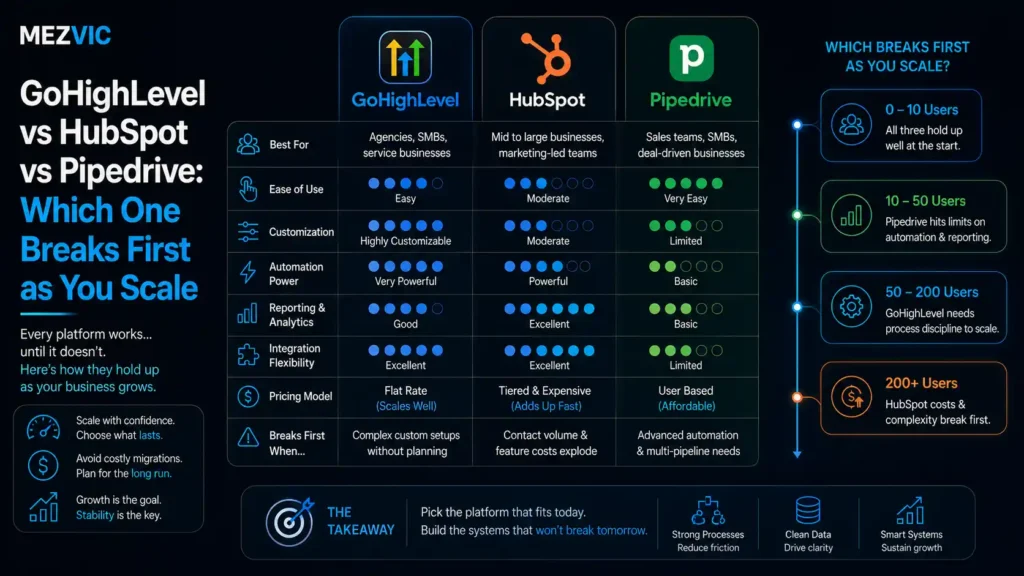
GoHighLevel vs HubSpot vs Pipedrive is three completely different pricing models, and that is the entire story.
GoHighLevel charges a flat fee with unlimited users. Pipedrive charges per seat. HubSpot charges per seat, plus a mandatory onboarding fee, plus credits for anything automated.
At three people, those three models produce prices within a hundred dollars of each other. At twenty, they diverge by more than $20,000 a year.
GoHighLevel vs HubSpot is not really a feature argument. It is a question of which pricing curve your growth plan runs into first.
Below: the real prices from each vendor, where each tool stops making sense, and the cost line that only appears in HubSpot’s small print.
Key Takeaways
- GoHighLevel is flat rate with unlimited users. Starter $97, Unlimited $297, Agency Pro $497 a month, with usage charges on top for SMS, phone and AI.
- Pipedrive is per seat and cheap. $14 to $69 per seat per month on annual billing, with most teams on Growth at $24 or Premium at $49.
- HubSpot has a fee most comparisons miss. Professional onboarding is a required one-off $1,500, and Enterprise onboarding is $3,500.
- The crossover is around six seats. Below that Pipedrive is cheapest, above it GoHighLevel’s flat fee wins outright.
- Each breaks somewhere different. Pipedrive on marketing depth, GoHighLevel on reporting, HubSpot on budget.
- Usage charges are the hidden variable. GoHighLevel’s flat fee excludes SMS, phone numbers, email sending and premium AI.
What Each One Actually Charges
These GoHighLevel vs HubSpot figures come from each vendor’s own pricing page rather than from a comparison site, because comparison sites are usually affiliates.
| Tool | Model | Published price | What is extra |
|---|---|---|---|
| GoHighLevel | Flat, unlimited users and contacts | $97, $297 or $497 a month | SMS, phone numbers, emails sent, premium AI usage |
| Pipedrive | Per seat, per month | $14 / $24 / $49 / $69 billed annually | Add-ons from $13.33 to $41 each per month |
| HubSpot Sales Hub | Per seat, plus onboarding, plus credits | Professional from $90 per seat, Enterprise from $150 | Required onboarding of $1,500 or $3,500, plus credits at $9 per 1,000 |
Figures read from gohighlevel.com/pricing, pipedrive.com/en/pricing and hubspot.com/pricing/sales in August 2026. Vendors change these often, so check before quoting them back at anyone.
The third row is the one that changes the GoHighLevel vs HubSpot answer.
HubSpot’s own pricing page states that the cost shown “does not include the required, one-time Professional Onboarding for a fee of $1,500”, and $3,500 at Enterprise.
That is not a hidden fee, it is printed plainly. It is simply absent from almost every comparison article, because those articles compare monthly numbers.
GoHighLevel has the mirror image of this problem. The flat fee genuinely is flat, and then their pricing page notes usage based charges for “phone numbers, SMS, emails sent, and premium AI usage”.
For an agency sending thousands of texts a month, that line is not a footnote. It can exceed the subscription.

The Same Money, Drawn to Scale
Here is GoHighLevel vs HubSpot vs Pipedrive drawn to scale. Width is the team size each tool suits. Height is the cost per seat. The area of each block is what you actually pay every month.
Per seat cost against team size
Each rectangle is monthly spend. GoHighLevel is wide and short because the fee does not move as you add people.
Pipedrive and GoHighLevel cost almost the same per month here. They just spread it over a very different number of people.
Two of those three rectangles cost within three dollars of each other, which is the part of GoHighLevel vs HubSpot pricing nobody expects.
Pipedrive at six seats is $294 a month. GoHighLevel Unlimited is $297, and it would still be $297 at sixty seats.
That is the whole GoHighLevel vs HubSpot vs Pipedrive pricing argument in one picture. Flat fees look expensive until the team grows, and per seat fees look cheap until the same thing happens.
How that fits a wider automation stack is a separate question, and we compared the connective tooling in n8n versus Zapier versus Make.
Where Each One Breaks
In GoHighLevel vs HubSpot vs Pipedrive, every tool works beautifully somewhere and falls over somewhere else. Knowing the second part is more useful than any feature list.
Where each tool works, and where it stops
Green is comfortable, amber is strained, red is the wrong tool. The marker shows what breaks first.
None of the three breaks on the same axis, which is why a straight feature comparison never settles this.
Pipedrive breaks on marketing depth. It is an excellent sales pipeline and a thin marketing platform, and the add-ons close some of that gap at $13 to $41 each per month.
Stack four add-ons onto a $49 seat and you are at roughly $150 per seat, which changes the comparison entirely.
GoHighLevel breaks on reporting. It does an enormous amount for $297, and the analytics are the part people outgrow first when a finance team starts asking harder questions.
HubSpot breaks on budget, and it breaks early. Below about eight seats the per seat cost plus the mandatory onboarding is difficult to justify against either alternative.
Above that it is genuinely excellent, which is the honest version of the answer nobody wants to give.

The First Year Is Not the Monthly Fee
Comparison articles quote monthly prices for GoHighLevel vs HubSpot. Finance directors sign annual numbers, and the two tell different stories.
What HubSpot Professional actually costs to start
Rectangle area is share of the first year bill. The onboarding block is the one missing from most comparisons.
The onboarding fee is 11% of the first year. It is stated plainly on HubSpot’s pricing page and omitted from almost every comparison.
Run the same ten seats through the other two and the gap is stark.
Pipedrive Premium at ten seats is $5,880 a year. GoHighLevel Unlimited is $3,564, and it would be the same at thirty seats.
So year one runs roughly $3,564, $5,880 and $13,200. That is not a close contest on price, and price is not the only thing being bought.
What HubSpot buys at that number is a single system where marketing, sales and service share one record, plus reporting that a board will accept without a spreadsheet.
Whether that is worth $7,000 a year more than GoHighLevel depends entirely on whether anybody is currently rebuilding those reports by hand.
Getting data cleanly between whichever you choose and the rest of your stack is its own piece of work, and it is what CRM automation exists to handle.
The Trap in Every Feature Comparison
Feature tables make GoHighLevel vs HubSpot vs Pipedrive look similar, because at a checkbox level they are.
All three have pipelines, email, automation, forms and reporting. Ticking those boxes tells you nothing about which one your team will still be using in a year.
What differs is depth, and depth never appears in a comparison grid.
“Automation” means three different things here. In Pipedrive it means triggering an email or a task. In GoHighLevel it means multi channel campaigns including SMS and voice. In HubSpot it means branching workflows with conditional logic across the whole customer record.
“Reporting” means three different things too. Pipedrive reports on the pipeline. GoHighLevel reports on campaigns. HubSpot reports on attribution across the entire journey, which is the reason its price exists.
So when you evaluate GoHighLevel vs HubSpot on a feature grid, you are comparing two words that mean different things and getting a false tie.
Better test: take one real workflow you run weekly and build it in each trial. Whichever takes fewest steps wins, and the grid becomes irrelevant.
If the workflow you care about crosses several systems rather than living inside the CRM, that is a workflow automation problem and the CRM choice matters less than you think.
What Usage Charges Really Add
GoHighLevel’s flat fee is genuinely flat on seats and genuinely not flat on messaging, and that catches agencies out.
Phone numbers, SMS, emails sent and premium AI all bill on usage. For a business sending a handful of texts, that is negligible.
For an agency running SMS reminders across twenty client sub-accounts, it becomes a second subscription sitting quietly beside the first.
The honest way to compare is to forecast a month of actual messaging volume and price it, rather than comparing the headline plan fees and hoping.
HubSpot has the same structure under a different name. Credits power the automated and AI features, priced at $9 per 1,000 when paid annually, and heavy automation consumes them steadily.
Pipedrive is the outlier here, since its costs are almost entirely predictable. You pay per seat and per add-on, and nothing surprises you at month end.
Predictability has real value in a small business, and it is the argument for Pipedrive that nobody makes because it is not exciting.
Where messaging volume is the point rather than a side effect, budget it as its own line the same way you would with outbound email.
A Sensible Way to Decide
Four steps to settle GoHighLevel vs HubSpot for your business, and the whole thing takes about three weeks.
Step one, count seats in two years, not today. Per seat pricing punishes growth and flat pricing punishes being small, so the answer changes with that single number.
Step two, write down your one weekly workflow. The thing somebody does every Monday. This becomes the trial task.
Step three, build it in two trials, not three. Comparing three tools properly is beyond most teams, so eliminate one on price or model before you start.
Step four, give it to your most reluctant user. If they can complete the workflow without help, adoption will follow. If they cannot, no feature list will save it.
That third step is where most evaluations go wrong. Three parallel trials produce three shallow opinions and no decision.
Use the seat count to eliminate. Under six people, drop HubSpot. Over fifteen with one brand, drop GoHighLevel. The decision is usually between two from the start.
Once chosen, the lead capture path into it matters more than the CRM itself, which is why lead routing is normally the first thing we build rather than the last.
And if the goal is genuinely to replace several tools at once rather than to buy a CRM, that consolidation is its own project. Our step by step on setting GoHighLevel up properly covers what that involves in practice.
Who Each One Is Genuinely For
Stripped of marketing language, GoHighLevel vs HubSpot vs Pipedrive is three tools aimed at different businesses entirely.
Pipedrive suits a sales team that wants a pipeline and nothing else. It is fast, people actually use it, and it does not pretend to be a marketing platform.
If your problem is that deals fall through the cracks, this is the cheapest fix on the market and the easiest to get adopted.
GoHighLevel suits agencies and multi location businesses. The sub-account structure exists so one company can run many client or branch instances, and that is where the flat fee becomes remarkable value.
Used as a single company CRM it is often more platform than anyone needs, which is a different complaint to it being expensive.
HubSpot suits companies where marketing and sales argue about attribution. One record, one timeline, one set of reports, and the argument ends.
That is worth real money in a business of thirty people. It is worth very little in a business of four, where the argument does not exist yet.
If you have already chosen GoHighLevel and want it configured properly rather than half switched on, that is covered on our GoHighLevel setup page.

The Question That Actually Decides It
GoHighLevel vs HubSpot is not decided on price or features. It is decided on adoption.
A CRM your team avoids is worth zero regardless of what it cost, and the cheapest of these three is not automatically the easiest to live in.
Three questions predict adoption better than any trial.
- How many clicks to log a call? If it is more than three, it will not get logged, and your pipeline data will be fiction within a quarter.
- Does it work properly on a phone? Field sales teams do not open laptops. If the mobile app is an afterthought, the data will be too.
- Who owns it internally? Every successful CRM rollout has one person who cares. Every failed one was owned by everybody.
The third question outweighs the other two combined, and it is the one nobody asks during a demo.
Run a two week trial with your three most sceptical people rather than your three most enthusiastic ones. Enthusiasts will make anything work, which tells you nothing.
Whatever you pick, the follow-up sequences matter more than the pipeline view, and our guide to the nine workflows worth building applies on all three platforms.
Switching Costs, Honestly
Choosing wrong is recoverable, but it is not free, and the cost is rarely the migration itself.
Contacts and deals export cleanly from all three. What does not move is everything built around them: automations, custom fields, report definitions, integrations and the habits of the people using it.
Budget four to eight weeks of parallel running and expect a temporary drop in data quality while two systems exist.
Which argues for choosing on the shape of the business you will be in two years, rather than the one you are in today. Per seat pricing punishes growth, and flat pricing punishes being small.
If you are weighing GoHighLevel vs HubSpot specifically, that is usually a choice between a flat fee with unlimited seats and a per seat platform with deeper reporting, and team size decides it more often than features do.
The wider automation layer around whichever CRM you choose is where most of the time saving actually comes from, and that is the argument on our AI automation page.
What Sits Around the CRM
A CRM is a database with opinions. Most of the value arrives from what you connect to it.
That is worth knowing before the GoHighLevel vs HubSpot decision, because two of these three arrive with a lot of that already built in and one deliberately does not.
GoHighLevel bundles funnels, calendars, SMS and email into the subscription, which is why it replaces several tools at once. Full configuration is what our GoHighLevel work covers.
Pipedrive expects you to bring your own. That keeps it fast and cheap, and it means budgeting for email automation separately rather than assuming it is included.
HubSpot includes the most and charges accordingly, which is coherent rather than greedy once you stop comparing it to a pipeline tool.
Whichever you land on, the first automation worth building is qualification, so sales only speak to people worth speaking to. That is often an AI qualification job rather than a CRM one.
If you are unsure how much of your week is currently manual, our automation audit will size it before you buy anything, and it costs nothing.
Consolidating several tools into one platform is a change project rather than a purchase, and treating it as process work is what makes it stick.
Frequently Asked Questions
How much does GoHighLevel cost?
GoHighLevel is $97, $297 or $497 a month depending on plan, with unlimited users and contacts on all tiers. Usage based charges apply for SMS, phone numbers, emails and premium AI.
How much does HubSpot Sales Hub cost?
Professional starts at $90 per seat per month and Enterprise at $150. Both carry a required one-time onboarding fee, $1,500 and $3,500 respectively, which is stated on HubSpot’s own pricing page.
How much does Pipedrive cost?
Pipedrive runs $14, $24, $49 or $69 per seat per month on annual billing. Add-ons such as LeadBooster and Campaigns are priced separately, from about $13 to $41 each per month.
Which is cheapest for a small team?
Pipedrive, comfortably, below about six seats. Above that GoHighLevel’s flat fee overtakes it, because adding users costs nothing on a flat plan.
Is GoHighLevel really unlimited users?
Yes on users and contacts across all plans. The difference between tiers is sub-accounts, with three on Starter and unlimited on the higher plans.
Does HubSpot really charge an onboarding fee?
Yes, and it is required rather than optional. Their pricing page states $1,500 for Professional onboarding and $3,500 for Enterprise, on top of the per seat cost.
Is GoHighLevel good for a single business rather than an agency?
It works, but the sub-account structure is designed for agencies running many client instances. A single company often pays for architecture it never uses.
What does GoHighLevel vs HubSpot come down to?
Flat fee with unlimited seats against per seat pricing with deeper reporting. Below roughly eight seats GoHighLevel wins on cost, and above that HubSpot has to justify the gap on reporting and integration.
Can I use Pipedrive for marketing automation?
Only lightly, and mostly through paid add-ons. If marketing automation is central to how you sell, Pipedrive plus four add-ons often costs more than a platform that includes it.
How long does a CRM migration take?
Four to eight weeks including parallel running. Contacts and deals move easily, while automations, custom fields, reports and user habits are what actually take the time.
Which CRM has the best reporting?
HubSpot, and it is not particularly close at Professional tier and above. That reporting depth is most of what the higher price buys.
What should I check before committing?
How many clicks it takes to log a call, whether the mobile app is genuinely usable, and who internally will own it. Adoption decides the outcome more than features do.
The Bottom Line
On GoHighLevel vs HubSpot vs Pipedrive under six seats, Pipedrive is the cheapest sensible answer and the easiest to get people using.
Above six, or if you run multiple brands or client accounts, GoHighLevel’s flat fee becomes hard to argue with on price alone.
HubSpot earns its cost once marketing and sales need one shared record and reporting a board will accept, which is usually somewhere past ten people.
And whichever you choose, budget the onboarding and name the owner. Those two decisions predict success better than the logo on the invoice.
If you want the three run against your actual team size and pipeline before a sales call, tell us how many seats you need and we will show you where the lines cross.