Pick the wrong automation platform and you will feel it in about three months.
Either your bill quietly triples, or you hit a wall the tool simply cannot climb, and you rebuild everything somewhere else.
The n8n vs Zapier vs Make decision comes down to three things: how technical your team is, how complex your workflows get, and how many tasks you run per month.
This guide compares all three honestly, with pricing, real limits, and a decision framework so you can pick once and stop second guessing.

The Short Answer
If you want the n8n vs Zapier vs Make answer before the detail, here it is.
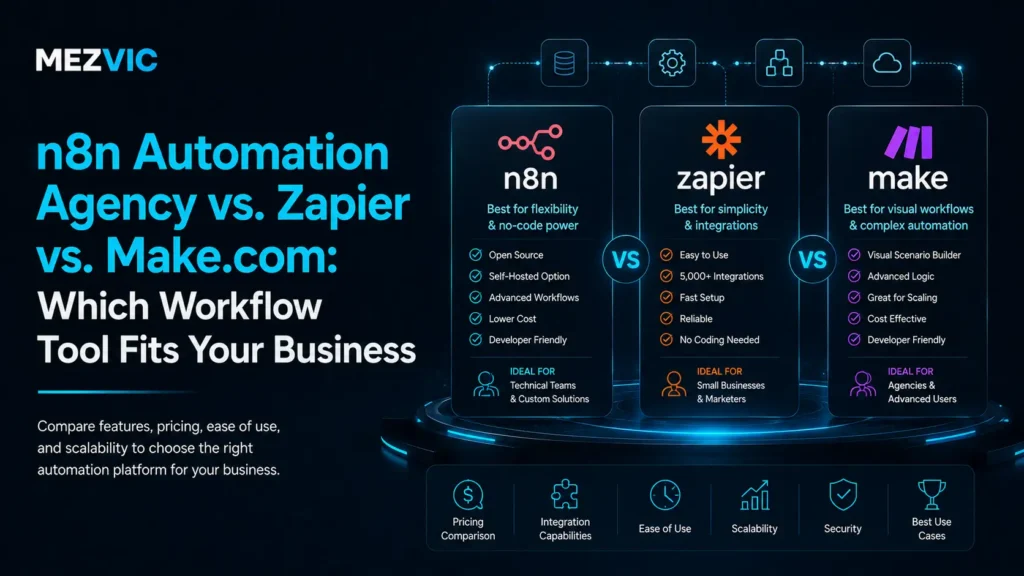
- Choose Zapier if you want the easiest setup, the most app integrations, and your workflows are fairly simple.
- Choose Make if you need multi-step logic and better value at higher volumes, and you do not mind a visual builder with a learning curve.
- Choose n8n if you have technical capability, want to self-host, need custom code inside workflows, or run high volume where per-task pricing hurts.
Most small teams start on Zapier. Most teams that outgrow it move to Make or n8n, usually because of cost or complexity.
Key Takeaways
- Zapier wins on ease and integrations, and costs the most at volume.
- Make handles complex logic well and usually costs less than Zapier at scale.
- n8n offers the most control and the lowest cost if you self-host, but needs technical skill.
- Model your monthly step count before comparing prices, because every step bills.
- Fix the process before you automate it, or you will just automate the mess.
Why the Platform Choice Actually Matters
Automation platforms all look similar in a demo. A trigger fires, some steps run, data moves. Easy.
The differences show up later, when your workflows have branches, loops, error handling, and thousands of runs a month.
That is when the pricing model matters, and when the ceiling on what the tool can do starts to bite.
Migrating between platforms is not fun. Every workflow gets rebuilt by hand, so it is worth spending an hour on this decision now.
What Is Zapier?
Zapier is the most popular automation platform, and the most beginner friendly. It connects thousands of apps with simple trigger and action workflows called Zaps. Breadth is the selling point, which is why it suits teams starting with Zapier automation before they know what they need.
Its biggest strength is breadth. If a business app exists, Zapier probably connects to it.
Its second strength is simplicity. A non technical person can build a working automation in ten minutes without reading documentation.
The catch: Zapier charges per task, and every single step in a Zap counts as a task. Complex workflows get expensive fast.
What Is Make?
Make, formerly Integromat, is a visual automation platform built around a canvas where you draw your workflow as connected modules. The visual canvas sits between the two extremes, covered on Make automation.
It handles complexity far better than Zapier. Branching, iterating over lists, error handlers, and data transformation are all first class features.
It also tends to cost less at volume, because its operation based pricing is generally more forgiving than per task billing.
The catch: the visual canvas is powerful but takes real time to learn, and a big scenario can become hard to read.

What Is n8n?
n8n is a source available automation platform you can self-host on your own server, or run as a managed cloud service. Self-hosting is the differentiator, and the build side of that is n8n automation.
It sits closest to code. You can drop JavaScript into any step, call any API, and build logic the other two platforms will not let you express.
Self-hosting changes the economics completely. Instead of paying per task, you pay for a server, and volume stops being the thing that scares you.
The catch: someone has to be technical. Self-hosting means you own updates, uptime, and backups.
n8n vs Zapier vs Make: Side by Side
Here is how the three compare on the factors that actually decide the choice.
| Factor | Zapier | Make | n8n |
|---|---|---|---|
| Ease of use | Easiest | Moderate | Hardest |
| App integrations | Most | Many | Fewer, but any API |
| Complex logic | Limited | Strong | Strongest |
| Custom code | Limited | Some | Full |
| Pricing model | Per task | Per operation | Per execution or self-hosted |
| Cost at high volume | Highest | Moderate | Lowest if self-hosted |
| Self-hosting | No | No | Yes |
| Best for | Simple workflows, non technical teams | Complex workflows, growing teams | High volume, technical teams |
No tool wins every row. That is exactly why n8n vs Zapier vs Make depends on your situation rather than a leaderboard.
Why per-task pricing punishes the workflows that work
One order-processing workflow, five steps, running on every order. Watch what happens as the business grows.
Arithmetic, not a price quote: 5 steps x orders. This is the maths that pushes high-volume teams toward self-hosting.
How the Pricing Really Works
Pricing is where most teams get surprised, so it is worth understanding the models rather than just the headline numbers.
Zapier bills per task. Every action step consumes one. A five step Zap that runs 1,000 times a month is 5,000 tasks, not 1,000.
Make bills per operation, which works similarly but is usually cheaper per unit, so the same workflow tends to cost less.
n8n bills per workflow execution on cloud, so a 30 step workflow costs the same as a 3 step one. Self-hosted, you just pay for the server.

The Decision Framework
Run through these four questions in order. The first clear answer usually settles n8n vs Zapier vs Make for you.
1. Does anyone on your team write code?
If nobody does and nobody wants to learn, rule out self-hosted n8n. You will need a partner to run it, which is fine, but plan for it.
2. How complex are your workflows?
If most are “when this happens, do that”, Zapier is fine. If you need branching, loops, and conditional logic, look at Make or n8n.
3. How many steps will you run per month?
Under a few thousand, cost barely matters. Above tens of thousands, per task pricing becomes the deciding factor on its own.
4. Do you have data or compliance constraints?
If sensitive data cannot leave your infrastructure, self-hosted n8n is the only one of the three that keeps everything in house.
When Zapier Is the Right Call
Zapier gets unfairly dismissed by technical people. For a lot of businesses it is genuinely the correct choice.
- Your team is non technical and needs to build things without help.
- Your workflows are mostly simple connections between two or three apps.
- You need a niche app integration that only Zapier supports.
- Your volume is low enough that per task pricing is not painful.
- Speed to launch matters more than cost efficiency.
Paying a bit more for something your whole team can use is a perfectly rational trade.
When Make Is the Right Call
Make is the middle ground, and often the sweet spot for growing teams.
- Your workflows need branching, filtering, or looping over lists of records.
- Zapier is getting expensive but you do not want to manage a server.
- You want to transform data between systems, not just pass it along.
- Someone on the team enjoys building and can invest a few hours learning.
If you are outgrowing Zapier but not ready to self-host, Make is usually the natural next step.

When n8n Is the Right Call
n8n is the power option, and its advantages compound as you scale.
- You run high volume and per task pricing has become absurd.
- You need custom code inside a workflow, not just prebuilt actions.
- You must connect to internal APIs or tools with no prebuilt integration.
- Data residency or compliance requires everything stay on your infrastructure.
- You are building AI workflows that need fine control over each step.
It is also the best fit if automation is core to your product rather than a side convenience. Our AI automation builds lean on n8n for exactly that reason.

Automating AI Workflows
AI has changed what people ask automation platforms to do. It is now common to run a model mid workflow to classify, summarize, or draft a reply. Most of these end up feeding a chatbot or an agent, which is AI chatbot development territory.
All three support this, but with different ceilings. Zapier keeps it simple, Make gives you more control, and n8n lets you build essentially anything.
If you are wiring a model into customer conversations, that logic usually ends up living beside your AI chatbot rather than inside it.
The same applies to voice. Automations handle what happens after the call: logging, routing, and follow up.
What About Your CRM?
One question that comes up constantly: if a CRM already has automation built in, do you still need one of these platforms? If the CRM is the hub rather than the spoke, look at GoHighLevel and the setup guide instead.
Usually yes, but for different jobs. Your CRM handles follow up and pipeline. These platforms handle everything between your other systems.
A common setup is native CRM automation for sales sequences, with n8n or Make moving data between the CRM, your store, and your finance tools.
Trying to force one tool to do both jobs is how you end up with a fragile system nobody wants to touch.
Can You Use More Than One?
Yes, and plenty of teams do. There is no rule saying you must pick one and live with it.
A practical split is Zapier for the simple connections your team builds themselves, and n8n for the heavy, high volume workflows.
The risk is sprawl. Two platforms means two places to debug when something breaks at 2am.
If you do run both, write down which tool owns which category of workflow, and stick to it.
Migration: What It Actually Takes
There is no magic import button between these platforms. Migration means rebuilding each workflow by hand. Rebuilding a documented process elsewhere is ordinary workflow automation work.
The good news is that most migrations shrink the list. Teams typically find a third of their old workflows are dead or redundant.
Start with your highest volume workflows, since those drive the cost savings that justify the move.
Run both systems in parallel for a week or two before switching off the old one. It is boring advice, and it will save you.
Mistakes to Avoid
The same few mistakes show up again and again, whichever platform people choose.
- Choosing on headline price instead of modelling your real step volume.
- Picking the most powerful tool when nobody on the team can maintain it.
- Building without error handling, so failures pass silently.
- Automating a broken process instead of fixing the process first.
- Letting one person own every workflow, then watching them leave.
That last one is the quiet killer. Document your workflows as you build them, not later.
Where to Start
Before you compare pricing pages, list the tasks eating your team’s week. The tool is the last decision, not the first. The wider programme, rather than one platform decision, sits with AI automation.
If you want a structured starting point, a business automation audit will show you which processes are worth automating first.
Then build one workflow, measure the hours it saves, and expand from there. You can see how that plays out in real builds across our case studies.

Five Workflows Worth Building First
Whichever platform you pick, the same handful of automations deliver the fastest return for most businesses. Lead follow-up is almost always first, and that is lead generation automation.
- Lead routing. New enquiry lands, gets tagged, assigned, and pushed into your CRM within seconds.
- Order and invoice sync. Sales flow from your store into your accounting tool without anyone rekeying numbers.
- Internal alerts. The right person gets pinged when something needs a human, instead of watching a dashboard all day.
- Reporting rollups. Data from several tools gets pulled into one sheet or dashboard on a schedule.
- Onboarding sequences. A new client triggers folders, tasks, and welcome messages automatically.
None of these are glamorous. All of them quietly give hours back every week.
How to Test a Platform Before Committing
Do not judge a platform by its marketing site. Judge it by building your single hardest workflow on a free plan.
Pick the automation with the most steps, the trickiest logic, and the app you are least sure is supported.
If you can build that one comfortably, the easy workflows will not be a problem. If you cannot, you just saved yourself a migration.
While you are in there, check three things: how errors are reported, how easy it is to see past runs, and how you would hand this to a colleague.
Those three details decide whether your automations survive their first year.
Reliability and Error Handling
Every automation fails eventually. An API goes down, a field comes through empty, a rate limit kicks in.
What separates a good setup from a fragile one is what happens next.
Zapier will alert you when a Zap errors, which is usually enough for simple workflows. Make and n8n let you build proper error branches that retry, log, or route the problem somewhere useful.
Build at least one alert into every critical workflow. Silent failures are far more expensive than loud ones.
The Hidden Cost Nobody Budgets For
Subscription cost is the number everyone compares. Maintenance time is the number that actually decides whether automation pays off. Before committing, our free business automation audit maps what you would actually be automating.
Apps change their APIs. Fields get renamed. A tool gets swapped and three workflows break at once.
Budget a couple of hours a month for upkeep once you have more than a handful of live workflows.
Self-hosted n8n adds server maintenance on top of that. It is cheap on subscription and not free on attention, which is the honest trade.
n8n vs Zapier vs Make for eCommerce Teams
Online sellers hit the volume problem faster than anyone else, because every order, refund, and stock change can trigger a workflow. Order, stock and channel syncing across marketplaces is a bigger job than a single workflow, covered on marketplace management.
A store doing 3,000 orders a month with a five step workflow is already at 15,000 tasks. On per task pricing, that adds up quickly.
This is why growing stores tend to land on Make or self-hosted n8n. The workflows are repetitive and the volume only goes one direction.
The same logic applies to inventory syncing and order routing across marketplaces, which is often where day to day eCommerce management eats the most hours.
If that sounds like your setup, weigh n8n vs Zapier vs Make on cost per order rather than on monthly plan price.
Frequently Asked Questions
Is n8n better than Zapier?
n8n is more powerful and cheaper at high volume, especially self-hosted, but it needs technical skill. Zapier is easier and has more integrations, so it is better for non technical teams with simple workflows.
Which is cheaper, Zapier or Make?
Make is generally cheaper than Zapier for the same workflows, because its operation based pricing costs less per unit. The gap widens as your volume and step count grow.
Is n8n free?
n8n is source available and free to self-host, so you only pay for your own server. Its managed cloud version is a paid subscription billed per workflow execution.
Can I switch from Zapier to n8n or Make later?
Yes, but there is no automatic import. Each workflow has to be rebuilt manually, so start with your highest volume automations and run both systems in parallel before switching off the old one.
Do I need a developer to use n8n?
Not for basic workflows, since n8n has a visual builder. You do need technical capability to self-host it, handle updates and backups, or write custom code inside steps.
What happens to my automations if a platform changes its pricing?
You absorb it or you migrate, and migration is the expensive option. This is the strongest practical argument for documenting what each workflow does in plain language as you build it. A documented process can be rebuilt on another platform in days; an undocumented one that only ran in somebody’s head has to be reverse engineered from the canvas first.
Which platform handles API calls to tools with no native integration?
All three can call an arbitrary API, but the experience differs sharply. n8n treats HTTP requests and custom code as normal, Make handles them competently through its HTTP module, and Zapier makes it possible but least pleasant. If a meaningful share of your stack lacks native connectors, that alone should push you away from the most opinionated platform.
How do I stop a broken automation failing silently?
Build the alert before you build the workflow. Every automation that touches money or customers needs an explicit error path that notifies a human, not just a retry. The failures that cause real damage are rarely dramatic crashes; they are workflows that quietly stopped firing three weeks ago and nobody noticed until a customer complained.
Is self-hosting n8n actually cheaper once you include the server?
At low volume, no. A small server plus the time to maintain, update and secure it usually costs more than a modest subscription. The maths flips at scale, because the server cost stays roughly flat while per-task pricing keeps climbing. Include your own hours in the comparison, since that is the line most people leave out and it is rarely zero.
Can non-technical staff maintain these workflows after handover?
On Zapier usually yes, on Make with some training, on self-hosted n8n rarely without support. This is the question that should carry the most weight and gets asked the least. Choosing the most capable platform is a poor decision if the only person who understands it leaves in six months.
The Bottom Line
There is no universal winner in n8n vs Zapier vs Make. There is only the right fit for your team, your workflows, and your volume.
Be honest about how technical your team is, model your real step count, and pick the tool that matches. Then start with one workflow, not twenty.
Want help choosing and building it properly? Book a free strategy call and we will map your processes and recommend the right platform for your situation.