Search Console says 14,000 of your pages are “Duplicate, Google chose different canonical than user”.
You set a canonical on every one of them.
That is exactly the point. Google read your canonical tag, considered it, and disagreed.
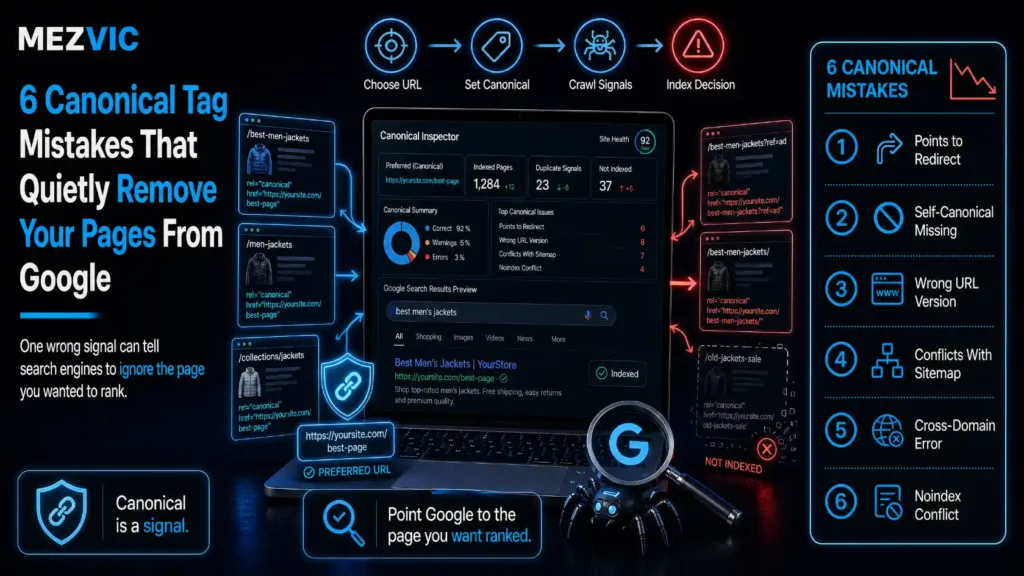
Nearly every canonical problem I have audited comes from the same misunderstanding: people think the tag is an instruction. It is a vote, and most canonical tag mistakes are ways of casting a confusing one.
Six canonical tag mistakes, all of them documented by Google, and all of them quiet. If duplicates are being generated by your platform rather than by hand, start with how Shopify creates URLs you never built.
Key Takeaways
- A canonical tag is a preference, not a command. Google says these methods “indicate your preference” and that none of them are required.
- Signal strength is documented and ordered: redirects strong, rel=”canonical” strong, sitemap inclusion weak.
- The methods stack. Google states that combining two or more increases the chance your preferred URL wins.
- A canonical tag is only accepted inside the <head>. Invalid head markup can push it into the body, where it does nothing.
- Use absolute URLs. Google supports relative ones but does not recommend them, and a crawled staging site is how that goes wrong.
- Never declare different canonicals through different methods. Google lists this as a explicit don’t.
- noindex is not a canonicalization tool. Google does not recommend it within a single site because it blocks the page from Search entirely.
- robots.txt is not one either. Blocked URLs can still be indexed without their content, and a blocked page’s canonical can never be read.
- rel=”canonical” carrying hreflang, lang, media or type attributes is ignored for canonicalization.
- With hreflang, the canonical must point to a page in the same language.
- Set the canonical in the HTML source. If JavaScript rewrites it, Google’s advice is to leave it out of the HTML and set it only in JavaScript.
- Add a self-referential canonical to the canonical page itself, and link internally to canonical URLs only.
- “Duplicate without user-selected canonical” is not an error. Google calls it working as intended.
What Does a Canonical Tag Actually Tell Google?
It tells Google which version of a page you would prefer to see in search results. That is all.
Google’s own wording is worth reading slowly, because it settles most arguments about canonical tags.
None of them are required. Read that next to the fact that Google will pick a canonical whether you declare one or not.
So your canonical tag is one input into a decision that was going to happen anyway. This is the part that separates technical SEO from on-page work, because nothing here is about content quality.
The inputs are not equal, and Google publishes the ranking.
Your canonical tag is one vote of three
How each canonicalization method influences the URL Google finally picks.
Ordering and wording taken from Google Search Central. Thickness is illustrative of that ordering, not a measured weight.
Two things follow from that diagram, and both get missed.
First, a sitemap entry is a weak signal. Listing a URL in your sitemap while your tags say something else is not a tiebreaker, it is a contradiction you will lose.
Second, the methods stack. Google states plainly that using two or more increases the chance your preferred URL appears in search results, which is why a consistent redirect, tag and sitemap beat any one of them alone.

Mistake #1: Putting the Canonical Tag Outside the <head>
This one is invisible in your template and total in its effect.
Google is unambiguous about the requirement.
The trap is the second half of that sentence. You almost never place the tag in the body on purpose.
What happens instead is that something earlier in the head is invalid, the browser closes the head early, and every tag after it lands in the body. A stray div from a tracking snippet does it. So does an unclosed comment.
Your canonical tag is still in the source. It is just no longer in the head, and it no longer counts. It is the kind of fault a proper technical audit exists to catch, because no report will flag it on its own.
Mistake #2: Using Relative URLs in the Canonical Tag
Relative canonicals work right up until the day they do not.
Google supports them and recommends against them, and gives the exact reason.
Bad <link rel=”canonical” href=”/dresses/green-dress” />
The failure case Google names is a testing site that gets crawled by accident. A relative canonical on staging resolves to the staging domain, so every page there declares itself canonical, and now you have a complete duplicate of your site all voting for itself.
Absolute URLs make that impossible. The staging copy points at production, which is what you wanted anyway. The same discipline matters during a platform migration, when two versions of the site exist at once.
The same applies to the HTTP header version of the tag, where Google also asks for absolute URLs.
Mistake #3: Declaring Different Canonicals in Different Places
This is the one that produces the 14,000-page report, and Google lists it as an explicit don’t.
Contradictions are rarely deliberate. They accumulate.
An SEO plugin writes one canonical. A sitemap generator lists a different URL. A migration adds a redirect that disagrees with both. Each was correct on the day it was configured. We see this most often after a move between platforms, where two sets of rules end up layered on one site.
Google also warns that setting the canonical in both the HTML element and the HTTP header at once is more error prone, for the obvious reason that the two can drift apart.
Here is what the four common shapes look like once you draw them.
Only the first one does what you meant
The four canonical patterns that show up in a real crawl.
Dashed node means the target is noindexed, so the duplicate leaves Search instead of consolidating.
Only the first shape does what you intended.
Chains work eventually, because Google follows them, but every hop is a chance to lose the thread and they are usually a sign nobody owns the rules.
Loops are self-cancelling. Two pages each insisting the other is canonical gives Google no preference at all, so it picks for you.

Mistake #4: Combining a Canonical Tag With noindex or robots.txt
These are two different tools that people reach for as if they were the same one.
A canonical says “treat these as one page, and prefer that one”. noindex says “remove this from search”. They are not interchangeable, and Google says so directly.
The damage is that consolidation never happens. A noindexed duplicate does not pass its signals to the canonical, it simply leaves.
robots.txt is worse, because it fails in a way that looks like success.
Google’s guidance is not to use robots.txt for canonicalization at all, noting that it may still index disallowed URLs without their content. And there is a second-order problem people miss: if a URL is blocked, Googlebot cannot fetch it, so it can never read the canonical tag you put on it.
You have hidden the instruction inside the room you locked. Blocking also fails to save crawl budget in the way people expect, which we covered in what Googlebot actually wastes its time on.
Which tool does what you actually want
| What you want | Correct tool | What people use instead |
|---|---|---|
| Consolidate duplicates into one URL | rel=”canonical” | noindex, which deletes rather than merges |
| Remove a page from search entirely | noindex | robots.txt, which can leave it indexed without content |
| Retire a duplicate permanently | 301 redirect | canonical alone, leaving the URL live forever |
| Save crawl budget on junk URLs | Stop linking to them, then 404 | robots.txt, which keeps them queued |
| Hide a page urgently | Removal tool, then noindex | Removal tool as a canonical fix, which hides every version |
Google names the last row explicitly: the removal tool hides all versions of a URL from Search.
Pick the tool that matches the outcome, not the one that is easiest to deploy. Getting this wrong is one of the quieter ways an SEO budget gets spent on work that undoes itself.
Mistake #5: Pointing hreflang and Canonical at Different Languages
On international sites this is the most common canonical tag mistake, and the most expensive.
The rule is short. Google asks that if you use hreflang, you specify a canonical page in the same language, or the closest substitute if one does not exist.
What teams do instead is point every language version’s canonical at the English original, reasoning that it is the source of truth.
That instruction says the German page is a duplicate of the English one. Google obliges, consolidates them, and stops serving the German page to German searchers.
Each language version should carry a self-referential canonical URL, with hreflang describing the relationships between them. Consolidating them by accident is one of the fastest ways to end up indexed but not ranking.
<link rel=”canonical” href=”https://example.com/de/kleider” />
<link rel=”alternate” hreflang=”en” href=”https://example.com/en/dresses” />
Wrong, on the German page
<link rel=”canonical” href=”https://example.com/en/dresses” />
There is a related rule that catches people building these tags programmatically.
So a canonical tag that also carries an hreflang attribute is not a clever two-in-one. It is ignored, and the page falls back to having no declared preference at all.
Mistake #6: Letting JavaScript Rewrite the Canonical Tag
The failure here is not JavaScript. It is having two canonicals that disagree, separated in time.
The HTML ships one canonical URL. The framework hydrates and replaces it with another. Which one Google uses depends on when it looked, which is not a thing you control.
Google’s advice is specific and slightly counterintuitive.
Read the second sentence again. If your stack cannot put the right canonical in the source, Google would rather you shipped no canonical tag than a wrong one that gets corrected later.
One canonical tag, set once, in one place. Rendering problems of this kind often travel with the same scripts that slow a site down.
How Do You Read Google’s Canonical Verdict in Search Console?
By reading the status string literally. Each one names who chose the canonical and whether it agreed with you.
What each Search Console status is actually telling you
| Status | What it means | What to do |
|---|---|---|
| Duplicate without user-selected canonical | You declared nothing, so Google chose | Nothing, unless it chose wrong. Google calls this working as intended |
| Duplicate, Google chose different canonical than user | You declared one, Google preferred another | Inspect the URL, compare user-declared against Google-selected, then fix the contradiction |
| Alternate page with proper canonical tag | The page correctly points at an indexed canonical | Nothing. This is the healthy state |
Wording taken from Google’s Page indexing report documentation.
The middle row is the one worth acting on, and the URL Inspection tool gives you both halves of the disagreement: the canonical you declared, and the one Google selected.
Compare them and the cause is usually obvious within a minute. The Google-selected URL is nearly always the one your internal links, redirects or sitemap have been quietly voting for, which is why the links pointing at a page matter to canonicalization and not just to rankings.

Which Canonical Tag Mistakes Should You Fix First?
The ones that stop the tag being read at all, then the ones that make it say the wrong thing.
- Canonical outside the head. Total failure, silent, and usually template-wide. One broken template can affect every page on the site.
- Blocked or noindexed pages carrying canonicals. The instruction cannot be read, or the page leaves instead of merging.
- Contradictions between methods. Fix the source of truth first, then make the sitemap and redirects agree with it.
- hreflang and canonical disagreeing. High impact on international sites, near zero elsewhere.
- JavaScript rewrites. Real, but only if the two values actually differ. Check before rebuilding anything.
- Relative URLs. Works today. Fix it during the next template change, unless you have a crawlable staging site, in which case move it up.
The pattern across a whole site is easier to see as a grid than as a list of URLs. Contradicting yourself is expensive wherever it happens, which is the same reason inconsistent business listings hurt local visibility.
What a healthy canonical cluster looks like in bulk
Six URLs of one product page, and which URL each names as canonical.
Export URL and declared canonical from any crawler, pivot one against the other, and look for the column.
A healthy cluster has one column filled and a diagonal mark on the canonical itself. Anything else is a shape worth investigating.
Export the same two columns from your crawler, sort by declared canonical, and the broken clusters separate themselves. Consolidated pages also read more cleanly to AI answer engines, which struggle with the same duplicate sets Google does.
Frequently Asked Questions
Is a canonical tag a directive or a hint?
A hint. Google describes canonicalization methods as indicating your preference and states that none of them are required, so Google can and does select a different canonical when other signals disagree with your tag.
Why did Google choose a different canonical than the one I set?
Because something else on your site voted louder. Usually internal links, a redirect or a sitemap entry pointing at a different URL. Inspect the URL in Search Console and compare the user-declared canonical against the Google-selected one.
Should a page have a canonical tag pointing to itself?
Yes. Google recommends including a self-referential canonical on the canonical page itself. It removes ambiguity and protects you when parameters get appended to the URL.
Can I use noindex and canonical together?
You can, but you usually should not. Google does not recommend noindex for canonical selection within a single site because it blocks the page from Search completely, so the duplicate leaves instead of consolidating into your preferred URL.
Does robots.txt help with duplicate content?
No, and Google says not to use it for canonicalization. Disallowed URLs can still be indexed without their content, and blocking a page means Googlebot can never read the canonical tag on it.
Do canonical tags need absolute URLs?
Relative URLs are supported but Google recommends absolute ones, citing problems such as a testing site being crawled unintentionally. Absolute URLs cost nothing and remove the entire class of failure.
What happens with a canonical chain?
Google generally follows it, but each hop is a chance for the signal to weaken or for a link in the chain to break. Point every duplicate directly at the final canonical rather than at another duplicate.
Can a canonical tag point to a redirecting URL?
It should not. The target should return 200 and declare itself canonical. Pointing at a URL that redirects creates a chain and asks Google to resolve a preference you could have stated directly.
Should canonical tags be used across different domains?
Yes, cross-domain canonicals are supported and are the right tool for syndicated content. The same rules apply: absolute URLs, a target that returns 200, and no contradicting signals on either domain.
How long does a canonical change take to take effect?
It takes as long as recrawling and reprocessing take, which varies by site and by page. Nothing changes until Google refetches the page, so a page crawled monthly will not respond within a week.
Can I canonicalise a PDF?
Not with an HTML tag, because PDFs have no head section. Use the rel=”canonical” HTTP response header instead, which Google supports for non-HTML documents in web search results.
Is “Duplicate without user-selected canonical” a problem?
Usually not. Google describes it as working as intended, because duplicate pages are not served in Search. It only matters if the URL Google selected is not the one you would have chosen.
Next Steps
Three things, in this order.
First, check one template for a canonical tag sitting in the body. If it is there, that is your whole audit, and it affects every page using that template.
Second, pull the “Duplicate, Google chose different canonical than user” list and inspect five URLs. Compare declared against selected and the pattern will repeat.
Third, make your sitemap, redirects and tags agree. They stack when they agree and cancel when they do not. If you are deciding who should own this work, we compared hiring in-house against a retainer.
Both source documents are short and worth reading in full: Google’s guide to specifying a canonical URL and the Page indexing report reference.
If you want the whole site crawled and the contradictions listed, send us the domain and we will tell you which template is causing most of it.