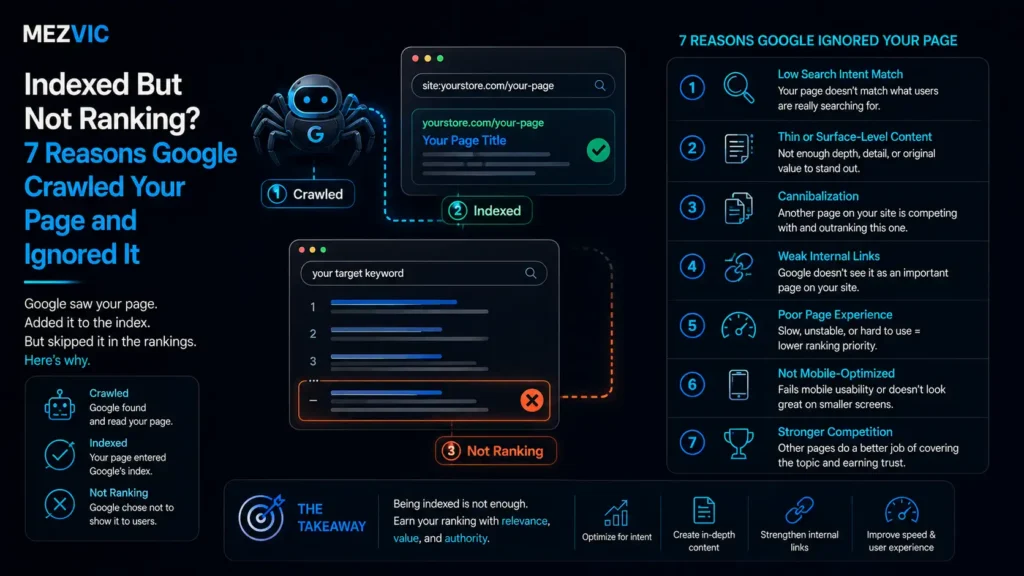
Search Console says the page is indexed. You search for the term and it is nowhere.
Not page two. Not page five. You check the actual data and it is sitting at position 61, which for practical purposes is the same as not existing.
Indexed but not ranking is the most common state a page can be in, and it is the one nobody writes about, because it is not a technical error and there is nothing to fix in a crawler.
Indexed but not ranking means Google looked at your page, understood it, and decided ten other pages answered the question better.
Below: where indexed but not ranking pages actually sit, the seven reasons this happens, and a diagnostic that tells you which one is yours in about ten minutes.
Key Takeaways
- Indexed is a low bar. It means eligible to appear, not likely to. Most indexed pages never see meaningful traffic.
- Two of your own pages competing is the most common cause, and no tool reports it because neither page is broken.
- Intent mismatch is the second. The page is good and answers a different question to the one being asked.
- Ranking is comparative, not absolute. Your page does not need to be good, it needs to be better than the ten already there.
- Position 11 to 20 is the useful signal. Pages there are close and worth fixing. Pages past 50 usually need rewriting rather than tweaking.
- Publishing more will not fix it. If existing pages are indexed but not ranking, new pages join the same queue.
Where Indexed Pages Actually Sit
Before diagnosing anything, look at how many pages are indexed but not ranking. Most people have never seen their pages arranged this way and it reframes the problem immediately.
Where a typical site’s indexed pages rank
Every one of these pages is indexed. Only the two green bars are doing anything for the business.
Two things are worth taking from that shape.
The first is that being indexed but not ranking is the normal condition, not an anomaly. If it feels like your site is failing, it is behaving like most sites.
The second is where the opportunity actually is. The 12% sitting at positions 11 to 20 are one good decision away from page one, and they already have everything they need except a reason to be preferred.
A full site audit is worth it when the pattern repeats across templates rather than pages. Pages past position 50 are a different problem. Those are not close, and treating them as fixable with a title tweak wastes months.

Why Position 11 Is Worth So Much More Than Position 12
For a page that is indexed but not ranking, attention does not decline gently down the results page. It collapses.
What a page at position 34 is actually competing with
Bar length is relative attention, not measured click share. The point is the shape, and where your page sits in it.
Deliberately unnumbered. Click share differs enormously between informational and commercial queries, so treat the curve as shape rather than data.
Position 34 is not two thirds as good as position 11. It is functionally zero.
Which matters for how you prioritise. Moving a page from 34 to 24 feels like progress in a rank tracker and changes nothing in your bank account.
Moving a page from 12 to 8 is a genuinely different outcome, and it usually takes less work than the first move did.
So sort your indexed but not ranking pages by current position before you sort them by anything else. The ones nearest the top are the cheapest wins you have.
The Seven Reasons, in Order of How Often They Are the Cause
None of the reasons a page ends up indexed but not ranking are technical faults. Every one passes a crawler cleanly.
1. Another of your pages is competing
You have a service page and a blog post covering the same question. Google cannot decide which deserves the position, so it hedges and ranks both weakly.
The tell is a page that hovers around 11 to 25 and swaps places with another of your URLs across weeks.
The fix is a decision rather than an edit. One page wins the query, the other is merged into it, redirected, or deliberately retargeted at a different question.
2. The page answers a different question
You wrote a sales page and the query wants a comparison. Or you wrote a guide and the query wants a product.
Search the term and look at the ten results. If nine are one format and yours is a different one, you are not competing, you are in the wrong race.
This is the single most fixable reason on the list, and the one that takes the most honesty to admit.
3. The page is technically fine and genuinely worse
Ranking is comparative. Your 900 word overview is competing with a 2,400 word piece containing original data, and it loses on merit.
Nobody wants this diagnosis, which is why it gets skipped in favour of technical explanations that feel more actionable.
4. Nothing on your site points at it
Internal links are how a site says which pages matter. A page with two incidental links, four clicks from the homepage, is being described as unimportant.
This one is cheap to fix and frequently produces movement within a fortnight, which makes it the best first experiment.
5. The query is out of reach for now
Some terms are held by sites with thousands of referring domains. A better page will not overturn that on its own.
The answer is not to give up, it is to target the version of the query you can win, then move up as authority builds.
6. It has not had time
New pages routinely land badly, drift for weeks, then settle. Judging a page at three weeks tells you very little.
Check the page is genuinely crawlable first, since technical faults produce the same symptom. Give a new page eight to twelve weeks before diagnosing anything, unless one of the reasons above is obviously present.
7. The result type has changed
Sometimes the page is fine and the results page is not what it was. Video, local packs, shopping units and AI answers all compress the space available.
Being indexed but not ranking can simply mean the format that now wins is one you have not produced. That is a content format decision, not an optimisation one.
Where AI answers are taking the space, the work changes shape entirely, and our guide to generative engine optimization covers what that involves.

The Ten Minute Diagnostic
Work down this in order to find why your page is indexed but not ranking. The first answer that fits is yours.
Which of the seven is yours
Three questions, asked in this order, resolve the overwhelming majority of cases without any tooling.
Only reach the bottom box after ruling out the first three. Most people start there, which is why most fixes fail.
The second question is the one people skip, and it takes thirty seconds.
Open a private window, search the term, and look at what is actually there. Nine listicles and one product page tells you exactly which format wins.
If your page is the odd one out, no amount of optimisation will change the outcome, because you are answering a question nobody asked.
Cannibalisation and intent are both content decisions rather than code, which is why they sit with on-page work rather than in a developer queue.
How to Find Cannibalisation in Five Minutes
Cannibalisation is the most common cause of a page being indexed but not ranking, so it is worth confirming quickly.
Search site:yourdomain.com your target phrase in Google. If two or more of your pages come back looking like plausible answers, you have found it.
Then confirm in Search Console. Open the performance report, filter to that query, and switch to the Pages tab. Two URLs sharing impressions on one query is cannibalisation with evidence attached.
Google’s own performance report documentation explains how to combine query and page filters, which is the exact view you need.
Once confirmed, pick a winner on commercial value rather than current position. The page that converts should win, even if the other one currently ranks higher.
| Situation | What to do | Why |
|---|---|---|
| Two pages, same intent, similar depth | Merge into one, redirect the loser | Combines signals instead of splitting them |
| Service page and blog post on one topic | Keep both, retarget the blog to a narrower question | They serve different stages and can coexist if genuinely distinct |
| Several thin pages on near identical terms | Consolidate into one strong page | One good page outranks five weak ones nearly every time |
| Category and product page competing | Differentiate by intent, category for browsing, product for buying | Both are needed, they just need different targets |
| Old post outranking a new one | Update the old one rather than promoting the new one | It already has the signals. Fighting your own page wastes both |
Merging is underused because deleting a page feels like losing something. Splitting one query across two URLs loses more.
That final row causes the most arguments internally.
When a three year old post outranks the shiny new one, the instinct is to push the new page harder. The faster route is almost always to update the old page, because it already holds the links and the history.

What to Actually Change on the Page
Once you know why the page is indexed but not ranking, the edits are specific. Generic optimisation is what produces months of no movement.
If it is intent. Change the format, not the wording. A comparison query needs a comparison table high on the page, not a better introduction.
If it is quality. Check the page reads cleanly first with our readability checker, then add the thing none of the top ten have. Original numbers, a real example, a calculation, a photograph of the actual thing. Length alone is not the answer.
If it is internal linking. Add three to five contextual links from genuinely related pages, using anchor text that describes the destination rather than saying “click here”.
If it is authority. Stop editing and go and earn a reason to be cited. That is a different project with a different budget, covered on our link building page.
Then wait. Changes need recrawling and reassessment, and judging a fix after five days produces false conclusions in both directions.
Four to six weeks is a fair window for a content change on an established page. Longer if the page is buried and rarely crawled.
The One Report That Shows All of This
You do not need paid tooling to find every page in this state. One report does it.
Open the Search Console performance report, set the date range to the last three months, and add a filter for average position greater than 10.
Sort by impressions, descending. What you are looking at is every query where Google shows your site regularly and nobody clicks, ordered by how much attention you are wasting.
The top twenty rows of that list are your entire priority queue for the next quarter. High impressions with a position around 11 to 20 is the best combination on the whole report.
Those queries already have demand and you are already visible. You are simply losing the comparison, which is a far easier problem than being invisible.
If the same page appears against several of those queries, treat it as one job rather than five. Fixing intent on one page often lifts a dozen related terms at once.
Run a crawl alongside it so you can see internal link counts next to positions. Our free SEO audit tool gives you that side of the picture without a subscription.
A Realistic 30 Day Plan
Most sites have dozens of pages indexed but not ranking. Trying to fix them all is how nothing gets fixed.
Days 1 to 3. Build the list. Every query at position 11 to 25 with meaningful impressions, and the page that ranks for it.
Days 4 to 7. Run the cannibalisation check across that list. This alone usually removes a quarter of the entries, because they turn out to be the same underlying problem.
Days 8 to 14. Take the top five by impressions and check intent properly. Search each term, look at the ten results, and decide honestly whether your page is the same kind of thing.
Days 15 to 21. Rewrite or restructure those five. Not all of them, five. Depth on a handful beats shallow edits across forty.
Days 22 to 30. Add internal links to all five from genuinely relevant pages, then stop and wait. Resist the urge to keep editing while you wait.
Check again at week six, not week two. If three of the five moved, repeat the process with the next five. If none moved, the diagnosis was wrong and the honest answer is probably authority.
That last outcome is useful information rather than a failure. It tells you the constraint is off-page, and that content edits will keep producing nothing until that changes.
Rewriting for intent is a writing job with a research step in front of it, which is why it sits with content work rather than with technical fixes.
Where This Fits Against Everything Else
This problem sits in a specific place in the diagnostic order, and getting that order wrong wastes quarters.
If pages are not indexed at all, none of this applies and you have a genuine technical problem to solve first. That distinction is the whole subject of our comparison of technical against on-page work.
If pages are indexed and ranking but nobody clicks, that is a titles and meta description problem, which is cheaper again and often overlooked.
And if everything ranks and revenue is still flat, the problem moved downstream to the page itself rather than to search.
Each of those is a different budget and a different team, which is why a general audit rarely answers the question you actually have. We set out what each depth of audit covers in our breakdown of audit pricing.
Platform shapes it too. A WordPress site tends to accumulate cannibalisation through tag and archive pages, while a store accumulates it through variants and filters.
For businesses selling to other businesses, the pattern is different again, with far lower volumes and much higher value per query. That changes which positions are worth chasing, as we cover under B2B SEO.
For a worked example of what happens once the near-miss pages get fixed systematically, the Oriental Mart case study covers a site where most of the growth came from pages that were already indexed.
When It Is Not Worth Fixing
Some pages should stay indexed but not ranking, and knowing which saves more time than any optimisation.
- The query has no commercial value. Ranking first for something that never leads to an enquiry is a vanity project with a cost attached.
- The page exists for people, not search. Shipping policies and about pages being indexed but not ranking is entirely correct behaviour.
- The top ten are all Wikipedia, government or news. That is a signal about the query, not about your page.
- You would need to become a different business to win. Some queries belong to marketplaces or manufacturers and no amount of content changes that.
Deciding not to fix something is a legitimate outcome of a diagnosis, and it frees the effort for the pages sitting at position 12.
If a large share of your catalogue is indexed and invisible, the fix is usually structural rather than page by page, which is where eCommerce SEO differs from a normal content programme.
Frequently Asked Questions
What does indexed but not ranking mean?
It means Google has crawled and stored your page and considers it eligible to appear, but ranks other pages above it for the queries you care about. It is a competitive outcome, not a technical fault.
Why is my page indexed but getting no traffic?
Most often because another of your pages targets the same query, or because the page answers a different question to the one being searched. Both are content decisions rather than crawl problems.
How long should a new page take to rank?
Eight to twelve weeks before drawing conclusions. New pages commonly appear, drift and then settle, so judging at three weeks tells you almost nothing.
How do I check my actual position?
Use the Search Console performance report rather than searching manually, since personalised and localised results distort what you see. Filter to the query and read average position.
What is keyword cannibalisation?
Two or more of your pages competing for the same query, so search engines split signals between them and rank both weakly. It is the most common reason a page is indexed but not ranking.
Should I delete pages that do not rank?
Only if they serve no purpose for people either. Merge genuinely overlapping pages, and keep policy or information pages that exist for customers rather than for search.
Does adding more content help a page rank?
Only if the extra content adds something the top results lack. Length by itself is not a ranking factor, and padding a page usually makes it worse to read.
Will internal links fix a page that is not ranking?
Frequently, and it is the cheapest experiment available. Three to five contextual links from related pages often produce movement within a fortnight when the page was previously isolated.
Why does my old page outrank my new one?
Because it already holds the internal links, history and any external citations. Updating the old page is usually faster than trying to promote the new one past it.
Is position 34 close to page one?
No. Treat anything past position 30 as needing a different page rather than a better version of this one. Positions 11 to 20 are the genuinely close ones.
Can AI answers stop my page ranking?
They can reduce the space available and change which format wins. If the results page now leads with an AI answer or video, the fix is a format decision rather than an optimisation one.
How many indexed pages should be ranking?
Far fewer than people expect. On most sites the majority of indexed pages sit below position 50, so being indexed but not ranking is the normal state rather than a sign something is broken.
The Bottom Line
Indexed but not ranking is a verdict, not an error. Google saw the page and preferred someone else’s.
Run the three questions before touching anything. Cannibalisation, intent, internal links, in that order, resolves most cases without any tooling at all.
Then work on the pages at positions 11 to 20 first, because they are close and the ones at 60 are not.
If you want the diagnosis run across your whole site rather than page by page, send us the domain and we will tell you which of the seven is costing you most.