You published 40 pages last quarter. Google indexed 9 of them.
Search Console says the rest are “Discovered, currently not indexed”, which is Google’s polite way of saying it knows the URL exists and has not got round to looking.
Meanwhile your server logs show Googlebot requesting the same filtered collection URL 4,000 times a month.
Below: whether crawl budget optimization is even your problem, the four things that genuinely waste it, and the two fixes almost everyone recommends that Google explicitly says do not work.
Key Takeaways
- Google’s own guidance says most sites should ignore this topic entirely. It is aimed at sites with 1M+ pages, or 10,000+ pages changing daily.
- Noindex does not save crawl budget. Google still requests the page, then drops it after reading the tag. The crawl is already spent.
- Blocking pages in robots.txt does not reallocate budget to your good pages unless you are already hitting your crawl capacity limit.
- A crawl budget is defined per hostname, and the capacity limit is shared across every Google crawler, so AdsBot and Shopping demand eat into Googlebot’s.
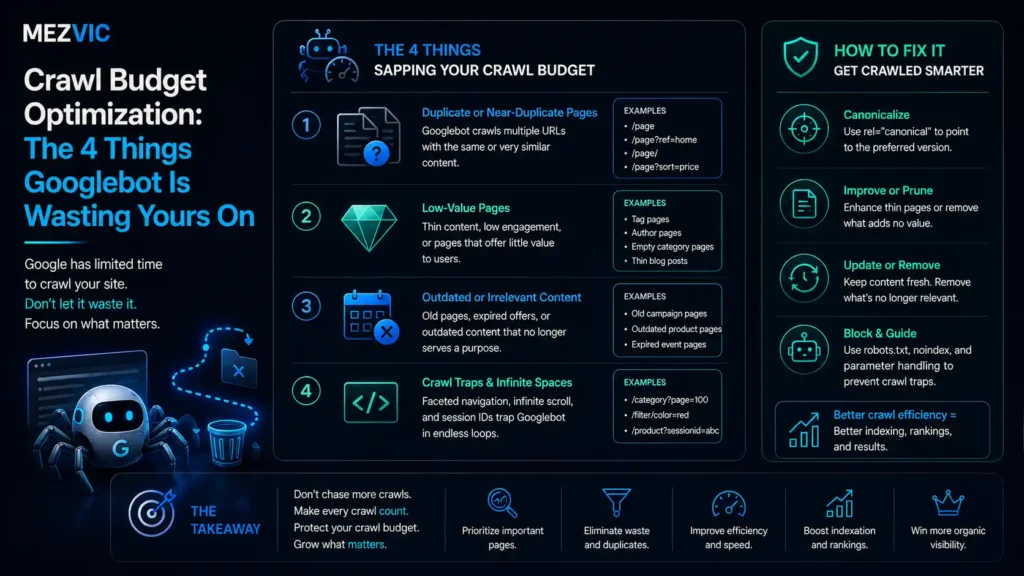
- The four real wasters: duplicate URL inventory, soft 404s, redirect chains and noindex pages. Perceived inventory is the one Google says you control most.
What Is Crawl Budget Optimization, and Who Actually Needs It?
Crawl budget is the set of URLs Google both can and wants to crawl on your site. Crawl budget optimization is the work of making sure those URLs are the ones that earn money.
Google splits crawl budget optimization into two halves, and confusing them is where most advice goes wrong.
Crawl capacity limit is how hard Google is willing to hit your server without hurting it. Google also calls this hostload. Fast, stable responses push it up. Latency, 5xx errors and HTTP 429 responses push it down.
Crawl demand is how much Google wants your URLs, based on popularity, staleness and perceived inventory.
Both halves are technical rather than editorial work, which is the line our comparison of technical and on-page SEO draws in more detail.
This is the half of crawl budget optimization you influence indirectly. Every site starts on the same conservative default capacity, and Google raises it over time if there is demand and the site stays healthy.
Now the part that gets left out of most articles on the subject. Google opens its crawl budget documentation by telling most readers to leave.
If your pages are crawled the same day you publish them, you do not need the guide. Keep the sitemap current, watch the Page Indexing report, and go do something with a return.
That single sentence disqualifies most sites that pay for crawl budget optimization, and it comes from Google rather than from us.
Does Your Site Need Crawl Budget Optimization at All?
Crawl budget optimization is worth your time only if you cross one of three thresholds Google publishes, and the third one catches far more stores than the first two.
- Large sites, 1 million or more unique pages, with content changing about weekly.
- Medium or larger sites, 10,000 or more unique pages, with content changing daily.
- Any site with a large share of URLs sitting in Search Console as “Discovered, currently not indexed”.
Google is explicit that these are rough estimates for classifying your site rather than exact thresholds.
If you do not know your real URL count, crawl the site yourself first. Our free SEO audit tool gives a rough count in minutes, and the number is usually a surprise.
Where your site sits on Google’s own scale
Unique crawlable URLs, on a logarithmic scale. Note how far apart the two markers are for the same store.
Thresholds from Google’s crawl budget documentation. Marker positions are illustrative.
That second marker is why this matters to stores that are nowhere near a million pages. Nobody built 40,000 URLs on purpose.
They appeared because colour, size, price and sort options combine, and every combination is a URL Googlebot is willing to try.
Before assuming that is your situation, check the Page Indexing report. If “Discovered, currently not indexed” is small and your new pages appear within a day, your problem lives somewhere else, and our guide to pages that are indexed but not ranking is the better starting point.

What Are the 4 Things Googlebot Wastes Crawl Budget On?
Crawl budget optimization comes down to four leaks: duplicate URL inventory, soft 404s, redirect chains and noindex pages. In that order, and the first one usually outweighs the other three combined.
1. Duplicate URL inventory
Google calls this perceived inventory, and says plainly that it is the factor you can positively control the most.
Without guidance, Google tries to crawl all or most of the URLs it knows about. If a large share of those are duplicates, that is where your crawling time goes.
On an ecommerce site the usual sources are faceted filters, sort orders, pagination combined with filters, session or tracking parameters, and the same product living under several collection paths.
Four filters with five options each do not make 20 URLs. They make hundreds, because they combine.
2. Soft 404s
A soft 404 is a page that says “not found” in the text but returns HTTP 200. Google’s guidance is blunt: they will continue to be crawled, and waste your budget.
They breed in ecommerce. Out-of-stock templates, empty filter results, discontinued products and expired category pages all tend to return 200 with an apologetic message.
The Page Indexing report lists them explicitly, which makes this the easiest of the four to audit and the most commonly skipped.
3. Redirect chains
Every hop is a request. A URL that redirects twice before resolving costs three crawls to deliver one page.
Chains accumulate quietly across replatforms, URL tidy-ups and category restructures, because each migration adds its rules on top of the last set rather than replacing them.
This is the one that punishes a site years after the decision, which is why our migration walkthrough insists on rewriting redirect maps to point at final destinations.
4. Noindex pages
This is the one that surprises people, because noindex is what most guides recommend as the fix.
Google’s guidance says do not use noindex for this purpose, because Google will still request the page and only drop it after seeing the tag in the HTML or the HTTP response.
The request already happened. The bandwidth is already gone. You have changed what gets indexed, not what gets crawled.
What each answer actually costs you
| Googlebot asks for | Your server answers | Crawl cost | Will it come back? |
|---|---|---|---|
| A filtered collection URL | 200 with a noindex tag | Full request | Yes, repeatedly |
| A discontinued product | 200 saying “not available” | Full request | Yes, it looks alive |
| A removed page | 404 or 410 | One request | Rarely, strong signal |
| A page blocked in robots.txt | Nothing, not fetched | None | Stays queued much longer |
| An unchanged page | 304 Not Modified | Minimal | Yes, and cheaply |
| An old URL, redirected twice | 301, then 301, then 200 | Three requests | Yes, all three hops |
Rows two and one are the expensive ones, and both are commonly recommended as fixes.
Read the last column rather than the third. Cost per request matters far less than whether the URL keeps coming back forever.
Auditing which of these your site returns is standard technical work, and it sits inside any competent technical SEO engagement rather than being a separate exotic service.
Why Does Blocking Pages Not Free Up Crawl Budget?
Because freed capacity is not handed to your good pages unless you were already hitting your crawl capacity limit.
Google states this directly: do not use robots.txt to temporarily reallocate crawl budget, and Google will not shift the newly available budget elsewhere unless the capacity limit was the constraint.
Which means the standard advice, block the junk and watch your important pages get crawled more, only works for sites that were genuinely capacity-bound in the first place.
For everyone else, demand was the limit, not capacity. Blocking pages changes nothing except your robots file.
Four conversations, two of them wasted
What actually happens between Googlebot and your server, and where the crawl is already spent.
Behaviour per Google’s crawl budget documentation. HTTP semantics, not a measured test.
The bottom two rows are what good crawl budget optimization looks like. The top two are what most sites are doing while believing they have fixed something.
Note also that a blocked URL is not a deleted URL. Google keeps it in the crawl queue much longer, and recrawls it once the block is removed.
So robots.txt is the right tool for pages you never want fetched, and the wrong tool for pages you want forgotten. For those, 404 or 410 does the job properly.
Which Google Crawlers Share Your Crawl Budget?
All of them, and this is the most under-discussed line for anyone doing crawl budget optimization in Google’s entire crawl budget documentation.
Each crawler has its own demand. AdsBot has higher demand when you run dynamic ad targets. Google Shopping has higher demand for products in your merchant feed.
But the crawl capacity limit is shared across all of them. Google says so directly: high demand from one crawler can reduce the capacity available for others.
Read that again if you run shopping feeds and dynamic search ads on a slow server. Your paid channels are competing with Googlebot for the same hostload.
One more definition worth internalising. Google’s crawling infrastructure defines a site as a unique hostname, so shop.example.com and www.example.com hold separate crawl budgets.
That cuts both ways. A subdomain isolates its crawl problems, and it also has to earn its capacity from the same conservative default every site starts on.

How Do You Find Wasted Crawl Budget in Server Logs?
Crawl budget optimization starts in the logs. Group every Googlebot request by URL pattern and status code, then sort by request count. The waste is always in the top ten rows.
Search Console’s Crawl Stats report is the free starting point and shows the shape of the problem. Raw server logs show the specific URLs, which is what you actually need to fix anything.
Four questions to ask the data, in order, before any crawl budget optimization work begins.
- What share of requests carry a query string? Above roughly a fifth, faceted URLs are your problem and nothing else matters yet.
- What share return 3xx? High numbers mean redirect chains or an old rule set nobody has flattened.
- What share return 5xx or 429? These actively lower your capacity limit, so they cost you twice.
- Are your money pages even in the top 50? If revenue pages are not being crawled often, that is the finding, and everything above is context.
Do this before changing anything. Crawl budget optimization done from assumptions rather than logs usually blocks something that was working.
If you have never run this analysis, it is a standard part of a proper technical SEO audit, and our breakdown of what an audit costs explains what should be included at each price.
What Does Crawl Budget Optimization Actually Change?
Crawl budget optimization changes the mix of what gets crawled, not the total. That distinction is the whole point and it is why the reporting usually disappoints people.
Total requests per day may barely move. What should move is which URLs absorb them.
The total stayed flat. The mix did not.
Share of Googlebot requests by URL class. Fixes were applied at the dashed line.
Illustrative pattern from log analysis, not a case study. Percentages are share of Googlebot requests.
Nobody gets a bigger budget out of crawl budget optimization. The pages that matter simply stop queueing behind the ones that do not.
Expect the effect on indexing to lag by weeks rather than days, and remember Google’s other reminder: not every crawled page gets indexed.
After crawling, each page still has to be evaluated and assessed for the index. Crawl budget optimization gets your page to the door. It does not decide what happens there.

How Do You Protect Crawl Capacity on the Server Side?
Answer faster and answer cheaper, because the capacity half of crawl budget optimization is calculated from how your server behaves rather than from anything you declare.
Google raises the limit when response times stay stable or improve, and lowers it on rising latency, 5xx errors or 429 rate-limiting responses.
Three things move that needle, and only one of them is glamorous.
- Support 304 Not Modified. If a page has not changed, a 304 tells Google to reuse its cached copy, saving bandwidth on both sides. Most sites never implement it.
- Fix time to first byte, not just render time. Crawl capacity responds to server response time, which is a different number from the one your speed report shows first.
- Eliminate 5xx and 429 responses under load. These do not merely fail, they actively reduce how much Google crawls you afterwards.
Core Web Vitals work overlaps here but is not the same job, because field performance metrics measure the user experience while crawl capacity responds to raw server response health. If the URL Inspection tool reports Hostload exceeded, that is Google telling you the constraint is your server rather than your URL inventory. Add resources.
Everything in that list overlaps with ordinary performance work, which is why server response time work tends to improve crawling as a side effect nobody budgeted for.
You can get a rough read on where you stand with our bulk page speed checker before committing to anything deeper.
How Do You Fix Faceted Navigation Without Losing Traffic?
Decide which filter combinations deserve to exist as pages, then make every other combination uncrawlable rather than merely unindexable.
This is the highest-value work in crawl budget optimization, and it is also where sites do real damage to themselves by swinging the axe too hard.
Some filtered pages earn money. “Waterproof walking boots size 9” is a real search with real intent, and blocking it to save crawl budget trades revenue for tidiness.
So sort your filters into three buckets before touching anything.
- Keep and promote. Filters matching real demand, usually attribute plus category. Give them clean static URLs, real copy and internal links from the parent collection.
- Keep but consolidate. Variants of a page you already have. Canonical them to the version you want, and stop linking to them in the nav.
- Never crawl. Sort orders, view toggles, price sliders, session and tracking parameters. Nobody searches for these and they multiply the fastest.
For the third bucket, robots.txt is the correct tool, because you never want those URLs fetched at all. That is a different decision from trying to reallocate budget.
The step almost everyone skips is the linking. Google finds most of these URLs because your own navigation offers them, so blocking a pattern while still linking it is a half fix.
Render your filter controls so unwanted combinations are not crawlable links in the HTML. If Googlebot never sees the href, the URL never enters the queue.
Two practical guards while you do this. Keep a list of filtered URLs that currently receive organic clicks, and re-check it after the change rather than before.
And move in stages, one filter family at a time, so that if impressions drop you know precisely which rule caused it.
On Shopify this problem has a platform-specific shape, because collection filters generate URLs whether or not you asked, which is covered properly in our Shopify SEO work.
Done in that order, crawl budget optimization stops being a blunt exercise in blocking and becomes an inventory decision, which is what Google describes it as in the first place.
Frequently Asked Questions
What is crawl budget in SEO?
Crawl budget is the set of URLs Google can and wants to crawl on your site. It comes from two things: a crawl capacity limit based on how well your server copes, and crawl demand based on popularity, freshness and how many URLs Google thinks you have.
Does my small site need crawl budget optimization?
Almost certainly not. Google says if your pages are crawled the same day they are published, you can skip the topic entirely and just keep your sitemap current and check the Page Indexing report.
How many pages before crawl budget matters?
Google’s rough guide is 1 million or more pages changing weekly, or 10,000 or more changing daily. It also flags any site with a large share of URLs stuck in “Discovered, currently not indexed”, regardless of size.
Does noindex save crawl budget?
No, and Google specifically advises against using it for that. Google still requests the page and only drops it after reading the noindex tag, so the crawl has already been spent.
Does robots.txt increase crawl budget for other pages?
Only if you were already hitting your crawl capacity limit. Google says it will not shift newly freed budget to other pages otherwise, so blocking junk URLs often changes nothing measurable.
Should I use 404 or 410 for removed pages?
Either works, and both are better than blocking. Google treats a 404 as a strong signal not to crawl that URL again, whereas a blocked URL stays in the crawl queue much longer and returns when the block lifts.
Do faceted navigation filters hurt crawl budget?
They are the most common cause of the problem on ecommerce sites. Filter values combine, so a handful of filters can turn a few hundred real pages into tens of thousands of crawlable URLs that all duplicate each other.
Does site speed affect crawl budget?
Yes, through the crawl capacity limit. Stable or improving response times let Google raise the limit, while rising latency, 5xx errors and 429 responses cause it to crawl less.
Do subdomains share crawl budget with the main domain?
No. Google’s crawling infrastructure defines a site as a unique hostname, so a subdomain gets its own crawl budget and starts from the same conservative default every site does.
Do Google Ads and Shopping crawlers use my crawl budget?
They share your crawl capacity limit. Each crawler has its own demand, but the capacity is common, so heavy AdsBot or Shopping activity can reduce what is available to Googlebot.
How long does crawl budget optimization take to show results?
Crawl budget optimization shifts crawl patterns within a few weeks, and indexing follows more slowly. Expect the mix of crawled URLs to change first, and remember that being crawled does not guarantee being indexed.
What is the difference between crawl capacity limit and crawl demand?
Capacity is how much Google can take from your server without hurting it, driven by response health. Demand is how much Google wants your content, driven by popularity, staleness and perceived inventory.
The Bottom Line
Check whether crawl budget optimization is your problem before you spend a day on it. Most sites fail Google’s own entry test and should be doing something else entirely.
If you do qualify, work the inventory first. Duplicate URLs dwarf the other three causes, and no amount of server tuning outruns 40,000 filter combinations.
Then drop the two habits that feel productive and are not: noindex to save crawls, and robots.txt to reallocate budget. Google says neither does what people think.
If your Page Indexing report is full of discovered-not-indexed URLs and you want to know which of the four causes you have, send us the report and we will tell you where the budget is going.