A client sent me a 60 page technical audit and asked which item to start with.
Their site had 240 pages, no crawl errors worth the name, and a homepage that loaded in 1.9 seconds.
The honest answer was none of them. Their problem was that eleven pages were written for a search nobody performs.
Technical SEO vs on page SEO is a real question, but it has a different answer at 240 pages than at 240,000.
Below: the technical SEO vs on page SEO dependency order that decides what genuinely comes first, where the common issues actually sit on impact, and why small sites almost always start in the wrong place.
Key Takeaways
- Under 500 pages, on-page work usually wins. Small sites rarely have technical problems large enough to hold them back.
- But technical comes first when it blocks. A noindex tag or a broken canonical outranks every content decision, because nothing else can work until it is gone.
- It is a dependency order, not a preference. Crawlable, then indexable, then relevant, then better. You cannot skip a layer.
- Most audits invert the priority, because technical problems are countable and content problems are judgement calls.
- Content work does not wait for a developer. On a small team that alone is often the deciding argument.
- Run the four blocking checks first. They take twenty minutes and settle the question for your site specifically.
What Each One Actually Covers
Technical SEO vs on page SEO gets muddled constantly, and some items genuinely belong to both.
| Area | Technical SEO | On-page SEO | Who does it |
|---|---|---|---|
| Crawling | robots.txt, sitemaps, crawl budget, redirects | Internal links pointing at the page | Developer |
| Indexation | Noindex, canonicals, duplicate URLs, parameters | Whether the page deserves its own URL at all | Developer, with an editorial call |
| Speed | Server response, render blocking, image delivery | Not fifteen embedded videos | Developer |
| Titles and headings | Template rules and length limits | The actual words and the promise they make | Marketer |
| Content | Rendering, so Google sees what users see | Depth, intent match, originality, structure | Marketer |
| Structured data | Valid markup that does not error | Whether the marked up claims are true | Both, and they rarely talk |
The last column matters more than the first two. Technical SEO vs on page SEO is often really a question of whose queue the work joins.
That final column is the practical difference nobody puts in a diagram.
Technical fixes join a development backlog with tickets, testing and a release cycle. On-page changes can often ship the same afternoon by someone in marketing.
On a small team, that alone can decide the order. Work that can start today beats work that starts in three weeks, unless the three week job is blocking everything.
Where each of those queues sits is spelled out on our technical SEO and on-page SEO pages, and they are deliberately separate engagements for exactly this reason.

The Dependency Order That Settles It
Forget which side of technical SEO vs on page SEO you prefer. There is a physical order to how a page earns traffic, and you cannot start at the top.
Four layers, bottom to top
Each layer is worthless until the one below it is true. Most small sites are solid on the bottom two and weak on the top two.
That callout is the whole answer, and it is what most advice gets wrong.
“Technical first” is only correct if something technical is actually broken. On a healthy 240 page site, layers one and two are already true, so starting there produces nothing.
Equally, no amount of layer three brilliance rescues a page carrying a noindex tag. The order is not a preference, it is a dependency.
So the useful version of technical SEO vs on page SEO is not “which discipline” but “which is the lowest layer currently failing on my site”.
Where the Common Issues Actually Sit
Plot the usual findings from both sides of technical SEO vs on page SEO by how often they appear and how much they move. The pattern is not what audit reports imply.
Nine findings, sized by the effort to fix
Cyan is technical, indigo is on-page. Bigger circles take longer. The top left corner is where you want to be working.
Circle size is effort. The two biggest wins are both indigo, and both take real work.
Three things stand out, and all three complicate the technical SEO vs on page SEO answer.
The highest impact finding is a technical one, and it is also the rarest. A stray noindex is devastating and almost never present. Check for it, then move on.
The two best combinations of common and high impact are both on-page: intent mismatch and cannibalisation. Both need judgement, and no tool reports either.
And the bottom right cluster, broken links and missing schema, is where audits spend most of their pages. Common, easy, and worth very little on its own.
That distribution is exactly why cheap audits mislead, and it is the same pattern we set out in our breakdown of what a cheap audit misses.

Where a Typical Small Site Actually Stands
Score a normal 300 page site on both halves of technical SEO vs on page SEO. The gaps are lopsided.
The gap by area on a site under 500 pages
Bars are where a typical site sits. The vertical marker is where it needs to be. Longest gap wins your attention.
Arithmetic, not a study: gaps are 7, 13, 21, 24 and 42 points. Content depth is nearly twice the next largest.
Crawlability and indexation are nearly there already. That is the normal state of a small modern site on a mainstream platform.
Page speed shows a real gap, and it is worth fixing, but it is a 21 point gap on a metric that mostly protects rankings rather than creating them.
Content depth is 42 points short. It is the largest gap by a distance, and it is the one no crawler will ever put at the top of a report.
That is the case for on-page first on small sites, stated as plainly as I can make it.
Speed still deserves its own budget line rather than being ignored, and where that work genuinely pays is covered on our Core Web Vitals page.
The Four Blocking Checks, Twenty Minutes
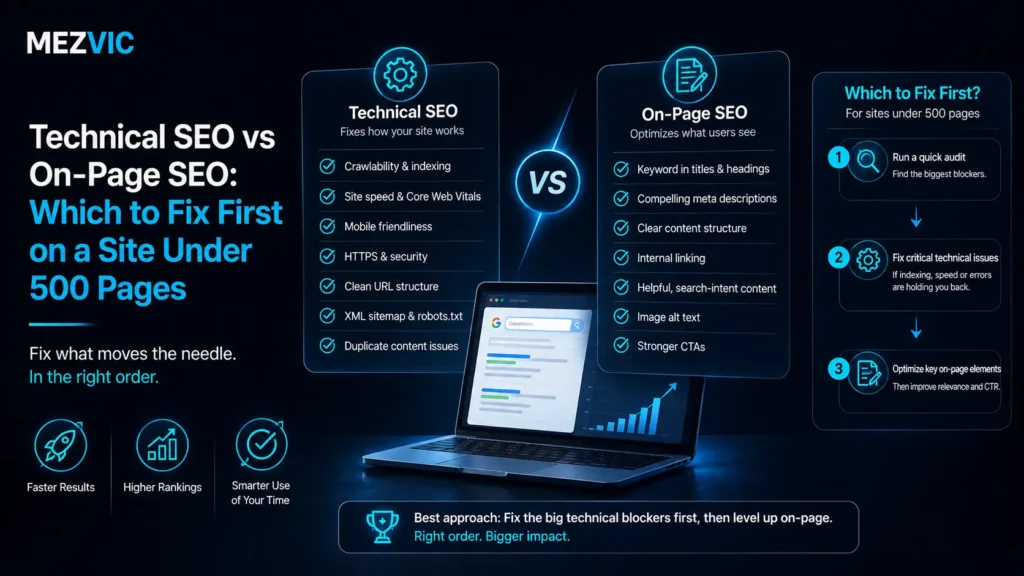
Before settling technical SEO vs on page SEO for your site, rule out the four faults that make everything else pointless. If all four pass, your answer is on-page.
1. Are your money pages indexed? Search site:yourdomain.com/your-key-page. If it does not appear, nothing else on this page matters until it does.
2. Is anything carrying a stray noindex? View source on three important templates and search for noindex. It happens after redesigns more often than anyone admits.
3. Do canonicals point at themselves? On a normal page the canonical should be its own URL. Whole sections get quietly deindexed by a template pointing everything at the homepage.
4. Does the page render without JavaScript? Disable JS and reload. If the main content vanishes, you have a rendering problem that outranks every content decision.
Google’s own Page Indexing report covers the same ground with your real data, listing exactly why individual URLs were excluded.
Four passes means technical SEO vs on page SEO is settled for you: nothing is blocking, so go and fix the pages themselves.
Any fail means stop and fix that first, whatever else the audit recommended. A blocked page cannot be optimised, only unblocked.

When Technical Genuinely Comes First
I have argued hard for one side of technical SEO vs on page SEO, so the exceptions matter. Five situations flip the answer completely.
- You just migrated or redesigned. Something specific broke on a specific date. That is a technical investigation, not a content project.
- Your URL count exceeds your product count several times over. Filters and parameters are generating pages, and content work cannot outrun that.
- Pages take more than four seconds on mobile. At that point speed stops being a tiebreaker and starts being the reason people leave.
- Search Console shows crawled, currently not indexed at scale. Google is choosing not to keep your pages, which is a signal worth chasing.
- The site is JavaScript rendered. If content only exists after scripts run, rendering is the whole ball game.
Notice that four of the five are about scale or a change event. Neither applies to a stable 300 page site that has simply stopped growing.
The migration case is the most common and the most expensive to get wrong, which is why it is scoped as its own project rather than folded into a retainer. That is the argument on our SEO migration page.
Faceted navigation is the second most common, and it is genuinely a technical problem that content cannot solve. Store owners hit it far more often than anyone else, which is why eCommerce SEO leans technical while brochure sites lean editorial.
How to Split a Budget Between the Two
Most retainers quietly split technical SEO vs on page SEO down the middle, which suits nobody.
A better split follows the site rather than the calendar.
Under 500 pages, healthy site. Roughly 20% technical, 80% on-page. The technical portion is monitoring and the occasional fix, not a programme.
Under 500 pages, post migration. Invert it completely for the first two months, then return to the ratio above once the bleeding stops.
Five thousand pages or more. Closer to 50-50 permanently, because at that scale template level problems repeat thousands of times and content cannot outrun them.
Any size, JavaScript rendered. Technical leads until rendering is solved, because everything else is being measured through a broken lens.
The mistake is treating that ratio as fixed. It should change every quarter based on what the last quarter revealed, and a retainer that never shifts is not really being managed.
How that translates into hours and money is set out in our breakdown of what SEO actually costs, which converts any retainer into a number of working days.
What Changes Above 500 Pages
The whole argument in this article has a boundary, and it is worth naming precisely.
Below roughly 500 pages, every page can be looked at by a person. Above it, that stops being true and the unit of work changes from the page to the template.
Once you are working on templates, a single technical decision affects thousands of URLs at once, and the leverage flips hard toward technical.
Three things start mattering that simply do not exist on small sites: crawl budget, faceted URL explosion, and log file evidence of what Google is actually spending time on.
This is why technical SEO vs on page SEO advice contradicts itself so often online. Both camps are right about their own site size and neither says which one they are describing.
At genuine scale the coordination problem also arrives, where knowing the fix is easy and getting it shipped across three teams is the actual job. That is the whole premise of enterprise SEO.
The Mistake Both Camps Make
Technical SEO vs on page SEO has a failure mode on each side, and they mirror each other neatly.
The technical camp optimises things nobody searches for. Perfect markup, immaculate crawl paths and a two second load time on a page targeting a query with forty searches a month.
Everything is green and nothing is growing, because the work never touched whether the page was worth ranking.
The content camp publishes into a broken container. Forty excellent articles on a site where the blog template carries a canonical to the homepage, and every one of them is invisible.
Both failures come from the same habit: choosing a discipline first and then looking for problems it can solve.
Start with the symptom instead. Traffic flat despite publishing is a different diagnosis to traffic dropped on a date, and neither is answered by picking a side in the technical SEO vs on page SEO argument.
Structured data sits awkwardly between the two, which is why it gets neglected by both. It is technical to implement and editorial to get right, and schema work tends to fall down that gap.
The same is true of authority. Neither discipline covers it, so a site can be technically perfect, editorially excellent and still lose to a competitor with more links pointing at them.
Diagnose by Symptom, Not by Discipline
Four symptoms, four different answers. Find yours before anyone quotes you for anything.
Traffic dropped suddenly on a date. Technical, almost certainly. Something changed. Compare the before and after rather than auditing the present.
Traffic is flat despite regular publishing. On-page. The pages are being seen and judged, and they are losing on merit or answering the wrong question.
Pages rank but nobody clicks. On-page, specifically titles and the promise they make. This is the cheapest problem on the list to fix.
New pages take weeks to appear at all. Technical. Crawling and indexation are struggling, and no amount of writing will speed that up.
Run a crawl of your own site first with our free SEO audit tool and check whether the symptom you feel matches what the data shows. They disagree more often than you would expect.
If speed is the suspicion, test several templates rather than the homepage, since homepages are usually the fastest page on any site. Our bulk pagespeed checker exists for exactly that.
For a worked example of the two running together on a real site, the Tech Store case study covers a build and a search programme where both sides genuinely mattered.
The Order I Would Actually Work In
For a site under 500 pages with no blocking faults, this is how I sequence technical SEO vs on page SEO, and the first two weeks are deliberately unglamorous.
Week 1. Run the four checks. Fix anything that fails. Batch the trivial technical items in one afternoon so they stop appearing in every conversation.
Weeks 2 to 3. Find pages competing for the same query and decide which one wins. Merge, differentiate or remove. This costs nothing but judgement.
Weeks 4 to 6. Take your ten most commercially important pages and check each one against what actually ranks for its target query. Rewrite the ones answering a different question.
Weeks 7 to 8. Fix internal linking so those ten pages are reachable in two clicks and described accurately by their anchor text.
Week 9 onward. Now do the speed work, because you finally know which pages are worth making fast.
That last point is the one worth arguing about. Optimising the loading time of a page nobody should be ranking is a very expensive way to feel productive.
If you would rather have the whole sequence run rather than run it yourself, that is what an ongoing SEO engagement is for, and the first month looks almost exactly like the list above.
Frequently Asked Questions
What is the difference between technical SEO and on-page SEO?
Technical SEO makes a page reachable and indexable by search engines. On-page SEO makes that page the best answer to a query. One is plumbing, the other is the argument.
Which should I do first?
Whichever is the lowest broken layer. Run the four blocking checks, and if all pass, start with on-page work because nothing technical is holding you back.
Is technical SEO more important than on-page SEO?
More foundational, not more important. Technical work sets a ceiling you cannot exceed, while on-page work is what actually moves you up within it.
Does technical SEO matter for a small website?
It matters, but it is usually already fine. Modern platforms handle crawling and indexation well, so a 300 page site rarely has technical problems big enough to explain flat traffic.
How long does technical SEO take to show results?
Unblocking fixes can show within days once pages are recrawled. Speed and architecture improvements typically take four to twelve weeks to reflect in rankings.
Can I do on-page SEO without a developer?
Almost entirely, yes. Titles, headings, copy, intent alignment and internal links are all editable through a normal CMS, which is a large part of why it starts faster.
Is page speed technical SEO or on-page SEO?
Mostly technical, with an editorial component. Servers, scripts and image delivery are technical, while choosing not to embed six videos on one page is an on-page decision.
What is keyword cannibalisation and which category is it?
It is two pages competing for the same query, and it is on-page. Tools cannot detect it because neither page is broken, so someone has to compare them and choose.
Do I need both technical SEO and on-page SEO?
Eventually yes, but not simultaneously. Sequence them by what is currently failing rather than buying both at once and diluting the budget across two teams.
How do I know if I have a technical problem?
Check whether your important pages are indexed, whether anything carries a noindex, whether canonicals point at themselves, and whether content renders without JavaScript.
Why do audits always recommend technical fixes first?
Because technical problems are countable and content problems are judgement calls. A crawler produces 400 technical findings and zero intent findings, so the report skews that way.
Does technical SEO vs on page SEO change for eCommerce?
Yes, considerably. Faceted navigation and product variants generate URLs at a scale brochure sites never reach, so catalogue stores genuinely do lean technical first.
The Bottom Line
Fix the lowest broken layer. That is the entire technical SEO vs on page SEO answer, and it is site specific rather than universal.
On a site under 500 pages, the bottom two layers are usually already sound, which means the honest recommendation is almost always on-page work.
Run the four checks before you accept any audit’s ordering. Twenty minutes will tell you whether the 60 page document in your inbox is solving your actual problem.
If you would rather have someone run those checks and tell you plainly which side you are on, send us the URL and we will give you the answer before we quote anything.