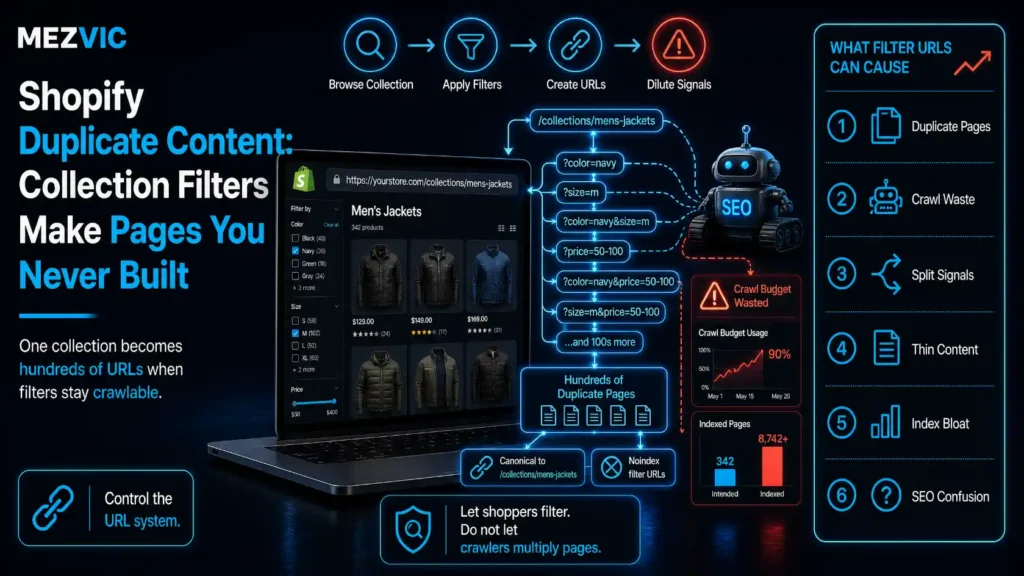
Search Console says your store has 41,000 pages. You have 800 products and about forty collections.
Nobody sat in a meeting and approved the other 40,000. Shopify duplicate content is not a decision anyone makes. They arrived on their own, one filter click at a time.
Below: where Shopify duplicate content comes from, what it genuinely costs, and how to clear it without deleting the filtered pages that actually earn money.
Key Takeaways
- Four modest filters on one collection produce 1,050 URL states. Add six sort orders and it is 6,300, from a single collection.
- Shopify lets merchants create up to 25 filters, so most stores are nowhere near the ceiling and already in trouble.
- The canonical tag is a strong signal, not an instruction. Google lists redirects and rel=canonical as strong, sitemap inclusion as weak.
- The real damage is crawl waste and split signals, not a penalty. There is no duplicate content penalty and never was.
- Some filtered pages deserve to exist. Sort by keyword demand, not by tidiness, before blocking anything.
Where Does Shopify Duplicate Content Actually Come From?
Shopify duplicate content has five sources, and only one is anything you deliberately created.
Shopify’s own documentation is straightforward about the mechanism: when filters are applied, they are reflected in the collection or search URL through URL parameters.
Every one of those parameter combinations is a URL, and every URL is a page as far as a crawler is concerned. That is the whole of Shopify duplicate content in one sentence.
- Filter combinations. Colour, size, brand, price, availability. These multiply rather than add, which is the entire problem.
- Sort orders. Sorting by price low to high does not create a new product. It creates a new URL, which Google will consider on its merits.
- Products in several collections. The same item reachable through multiple paths, each a different URL for identical content.
- Pagination combined with filters. Page three of a filtered view is its own URL, and there are a great many page threes.
- Tracking and session parameters. Campaign tags appended to any of the above, multiplying whatever was already there.
The fourth item is the one that surprises people, because pagination feels like a small technical detail rather than a multiplier.
It is a multiplier. A filtered view with five pages is five URLs, and it exists for every filter combination that returns enough products, which is how Shopify duplicate content grows without anybody adding a product.
How Many URLs Do Four Filters Really Create?
More than most people guess by a factor of about fifty, because filters combine rather than queue up politely.
Take one collection with four filters: colour with six values, size with five, brand with four, price band with four.
Each filter can also be unset, so the arithmetic is seven times six times five times five.
Four filters, one collection, a thousand URLs
Filters combine rather than add, which is why the total surprises everyone.
Arithmetic, not a study. Shopify documents a maximum of 25 filters, so four is a conservative example.
That is 1,050 states of Shopify duplicate content for one collection. Multiply by six sort orders and it becomes 6,300.
Now apply it across forty collections and the store has 252,000 crawlable URL states behind 800 products.
Not all of them will be crawled, and not all get linked. That is the only reason your Search Console number is 41,000 rather than a quarter of a million.
This is why Shopify duplicate content appears suddenly. Nothing is wrong for two years, someone improves the filtering, and the index count triples in a quarter.
Why Does Google Treat These as Duplicates?
Because to a search engine these pages are, in every way that matters, the same page wearing a different query string.
What actually differs between them
A crawler comparing these finds nineteen characters of difference and nothing else.
Parameter names follow Shopify storefront filtering conventions. Content shown is what the templates output.
Same title, same heading, same description, largely the same products in a different order. The only thing that changed is nineteen characters of URL.
A crawler has to decide which of these deserves to be in the index, and it makes that decision without asking you. That decision is the practical consequence of Shopify duplicate content.
Worth being clear about one thing, because it causes a lot of unnecessary alarm.
So the cost of Shopify duplicate content is not punishment. It is dilution and waste, which nobody sends you an email about.
What Does Shopify Duplicate Content Actually Cost You?
Shopify duplicate content costs three things, in ascending order of how much they hurt and descending order of how visible they are.
Two thirds of the links point somewhere you did not intend
One collection’s earned authority, distributed across the URLs people actually copied.
Illustrative distribution in the shape audits typically reveal. Shares sum to 100%.
Crawl waste. Googlebot spends its visits on filter combinations instead of your new products. Visible in Search Console, if anyone looks.
Split signals. Links and internal links land on whichever version someone happened to copy, so no single URL accumulates the authority the collection has earned.
The wrong page ranking. Google picks a canonical from the cluster and it is not always the one you would have chosen. A filtered view outranking your main collection is a common and irritating outcome.
That third one is where people finally notice, usually because a customer mentions that the shop link goes to a page showing only size 12. Getting the canonical wrong at scale is its own category of mistake, covered in canonical tag mistakes.
The crawl waste side compounds with everything else competing for attention, which is the argument in crawl budget optimization. It also shapes what a redesign can realistically fix, as covered in store conversion fixes.

Does Shopify’s Canonical Tag Fix It?
Partly. It is worth understanding how far a canonical tag reaches against Shopify duplicate content, because it is routinely oversold.
Shopify themes expose a canonical_url object and most themes output it correctly, so filtered views generally point back at the parent collection.
That is genuinely useful. It is also not the end of the matter.
Google’s guidance on consolidating duplicate URLs lists the methods in order of strength: redirects are a strong signal, rel=canonical is a strong signal, and sitemap inclusion is a weak one.
Read the word signal carefully. A canonical tag tells Google what you would prefer about your Shopify duplicate content, and Google decides.
More importantly for a store, a canonical tag does nothing at all about crawling. The URL is still requested, still fetched, still costs you a visit.
So canonicals solve the indexing half of Shopify duplicate content and leave the crawling half entirely untouched.
Google also notes that these methods stack and become more effective combined, which is the practical instruction hiding in that documentation.
Which is the useful reframe. The question is not whether your canonicals are right, it is whether you are inviting crawlers into 6,300 rooms and then leaving a note in each one asking them to use the front door.

How Do You Audit Shopify Duplicate Content in an Afternoon?
Count what exists, count what earns, and compare the two lists. The gap between them is the whole report.
You do not need a crawler licence or a data team for the first pass. You need Search Console, a spreadsheet and a willingness to be mildly depressed for twenty minutes.
- Open the Page Indexing report. Note the total, then the count under “Discovered, currently not indexed” and “Alternate page with proper canonical tag”. Those two buckets are usually your filter URLs.
- Filter Performance by query string. Search pages containing a question mark. This is every filtered URL Google has bothered to show to anyone.
- Sort that list by clicks. The winners appear immediately, and there are rarely more than five.
- Count your filters and multiply. Values plus one, multiplied together, times sort orders, times collections. Two minutes with a calculator and you have your theoretical maximum.
- View source on a filtered page. Check the canonical points at the parent collection, then check whether your filter controls are emitting crawlable links.
- Write down the three numbers. Theoretical URL states, URLs Google knows about, URLs earning clicks. That comparison is the business case.
Step five is the one that changes minds. Most teams believe their filters are handled because someone configured a setting once, and the HTML says otherwise. The same gap between settings and rendered output shows up with apps that slow the page.
You will also find URLs you have never seen, for filters nobody uses, on collections you forgot existed. This is normal and not a sign of negligence.
Keep that summary to one line each. Shopify duplicate content is one of the few technical problems where the numbers argue for themselves without interpretation.
If the second number is close to your product count, you do not have a problem and you can stop here.
If it is fifty times your product count, the filters are writing pages faster than you are, and they have been doing it since the day someone switched them on.
For a broader first pass across templates and speed at the same time, our free SEO audit tool gives you the rough shape before anyone opens a theme file.

Which Filtered Pages Deserve to Exist?
The ones people actually search for. Not all Shopify duplicate content deserves removing. Everything else is machinery that happens to have a URL.
This is the step almost every cleanup skips, and skipping it is how stores delete pages that were quietly earning money.
Three buckets, and only one of them is a problem
| Filter type | Real search demand? | What to do | Why |
|---|---|---|---|
| Category plus attribute | Often high | Promote to a real page | “waterproof walking boots” is a query people type |
| Brand within category | Often high | Promote to a real page | Brand plus category is commercial intent |
| Size or fit | Sometimes | Keep, canonicalised | Genuine for some niches, noise in others |
| Colour | Occasionally | Keep, canonicalised | “black ankle boots” exists, “black” alone does not |
| Price band | Rarely | Do not crawl | People filter by price, they do not search by it |
| Sort order | Never | Do not crawl | Nobody has ever searched for a sort order |
| Availability toggle | Never | Do not crawl | Changes hourly, indexes badly |
| Tracking parameters | Never | Do not crawl | Pure multiplication with zero upside |
The top two rows are worth more than the whole cleanup. They are pages you should be building on purpose.
Check the demand rather than guessing at it. Pull the filtered URLs that already receive impressions in Search Console and sort by clicks.
You will find two or three that earn real traffic, and several hundred that have never had a single impression in their lives. The same demand check decides which pages are worth building at all, as in keyword cannibalization.
Promote the first group into proper landing pages with their own copy and internal links. Delete nothing in that group, whatever the crawl report says about Shopify duplicate content.
That promotion work is ordinary Shopify SEO, and it is the only part of this project that adds revenue rather than removing waste.
How Do You Fix It Without Losing Traffic?
Fix Shopify duplicate content in this order, one change at a time, with a list of what currently earns clicks open beside you.
- Export what already ranks. Every filtered URL with impressions or clicks in the last six months. This is your do-not-touch list, and it takes ten minutes.
- Promote the winners. Turn the two or three genuine performers into static pages with their own titles, copy and links from the parent collection.
- Stop linking to the rest. Render filter controls so unwanted combinations are not crawlable links in the HTML. This is the step that actually works.
- Confirm canonicals point home. Filtered views should reference the parent collection, and the theme usually handles this already.
- Block the never-useful patterns in robots.txt. Sort orders, availability toggles and tracking parameters. Only after steps one to four.
- Watch impressions weekly for six weeks. One filter family at a time, so that if something drops you know exactly which rule caused it.
Step three is the whole job and the one most often left out. Google finds these URLs because your navigation offers them, not through some independent act of curiosity.
That sequencing mistake is the single most common way a duplicate content cleanup makes things worse, and it is entirely avoidable.
Where the fix needs template changes rather than settings, that is development work, usually half a day rather than a project. If you are replatforming anyway, fold it into the move, as in a Magento to Shopify migration.
What Should You Never Do?
Four responses to Shopify duplicate content look like decisive action and each of which costs traffic.
Four confident moves that backfire
| The move | What people expect | What happens |
|---|---|---|
| Noindex every filtered URL | Clean index | Google still crawls each one, and you lose the pages that ranked |
| Block in robots.txt first | Instant cleanup | Canonicals become unreadable and the URLs stay in limbo |
| Disable filtering entirely | Problem solved | Conversion falls, because filters are how people shop |
| Canonical everything to the homepage | Maximum consolidation | Signals ignored, because the pages are not equivalent |
Row three is the expensive one. Filters exist because customers use them.
Row one deserves a note, because noindex feels like the obvious tool against Shopify duplicate content and Google is explicit that it does not reduce crawling.
The page is still requested. The tag is read after the fetch, which means the crawl has already been spent by the time anything is decided.
And row three is worth saying plainly to whoever is pushing for it. Removing filtering to fix an SEO problem trades a measurable conversion loss for a theoretical ranking gain, which is a poor bargain in any quarter, and your store design should keep them.
Frequently Asked Questions
Does Shopify duplicate content cause a Google penalty?
No. There is no duplicate content penalty, and there never was one. The real costs are crawl effort spent on pages that will never rank, signals split across near-identical URLs, and Google sometimes choosing a filtered view over your main collection.
How many URLs do Shopify filters create?
They multiply rather than add. Four filters with six, five, four and four values produce 1,050 URL states for a single collection, and adding six sort orders takes that to 6,300 before pagination is counted.
Does Shopify set canonical tags automatically?
Most themes output a canonical using Shopify’s canonical_url object, and filtered views generally point back to the parent collection. It handles the indexing side but does nothing about crawling, because the URL is still fetched either way.
Is a canonical tag an instruction to Google?
It is a strong signal rather than a directive. Google lists redirects and rel=canonical as strong signals and sitemap inclusion as a weak one, and notes that combining methods increases the chance your preferred URL is chosen.
Should I noindex filtered collection pages?
Usually not as a blanket rule. Noindex does not reduce crawling, since the page is fetched before the tag is read, and applying it everywhere removes filtered pages that were earning traffic.
Which filtered pages are worth keeping?
Anything matching real search demand, typically category plus attribute or brand plus category. Sort orders, price bands, availability toggles and tracking parameters have no search demand and should not be crawled.
How do I stop Google finding filtered URLs?
Stop linking to them. Google discovers these URLs through your own navigation, so rendering unwanted filter combinations as non-crawlable controls removes them at source rather than trying to clean up afterwards.
Should I block filter parameters in robots.txt?
Only for patterns you never want fetched, and only after de-linking and allowing consolidation. Blocking too early prevents Google reading your canonical tags, which leaves the URLs stuck in the index with no way to resolve them.
Why is a filtered page outranking my collection?
Google picked a canonical from the cluster and chose differently from you, usually because the filtered version has more internal links pointing at it. Fixing internal linking to the parent collection is the first remedy.
How many filters can a Shopify store have?
Shopify documents a maximum of 25 filters. Most stores use between four and eight, which is already enough to generate tens of thousands of URL states across a normal catalogue.
Do products in multiple collections cause duplicates?
They create multiple paths to the same product, which is why consistent product URLs matter. Link to the canonical product URL rather than the collection-scoped version wherever you control the link.
How long does a cleanup take to show results?
Crawl patterns shift within a few weeks and index counts fall more slowly, often over a couple of months. Change one filter family at a time so that any drop in impressions can be traced to a specific rule.
The Bottom Line
Before touching any Shopify duplicate content, export the filtered URLs that already earn impressions. That list is short, valuable, and the thing most cleanups destroy.
Then promote the two or three winners into real pages, and stop linking to everything else. De-linking is the fix; canonicals and robots rules are support.
And keep the filters themselves. Customers use them, they convert, and no fix for Shopify duplicate content is worth making your store harder to shop.
If you want the URL states counted and the winners identified before anyone edits a theme file, send us the collection list and we will map it properly.